Monday starts with a content brief in Notion, three design revisions in Canva, a client approval buried in email, and a recording that still needs captions and short clips. Before the first post goes live, the team has switched between planning, editing, scheduling, meetings, and reporting. The work gets done, but the repeated handoffs steadily consume the week.
The best time saving tools don't win because they have the longest feature list. They win by removing a specific bottleneck, such as rebuilding posts for every network, chasing meeting times, finding action items, or moving information between disconnected apps. This roundup follows the workflow of a creator or lean marketing team, from planning and production to publishing, automation, meetings, and measurement.
You'll find practical setup advice, honest trade-offs, pricing considerations where relevant, and integration checks to complete before adding another subscription. The goal isn't to collect ten more apps. It's to build a small stack that gives time back without creating another layer of maintenance. For related email workflow ideas, see these best ChatGPT email signature examples.
Table of Contents
- 1. SleekPost
- 2. Zapier
- 3. Make
- 4. Calendly
- 5. Buffer
- 6. Canva
- 7. Descript
- 8. Notion
- 9. Grammarly
- 10. Motion
- Top 10 Time‑Saving Tools, Quick Comparison
- Build a Stack That Gives Time Back
1. SleekPost
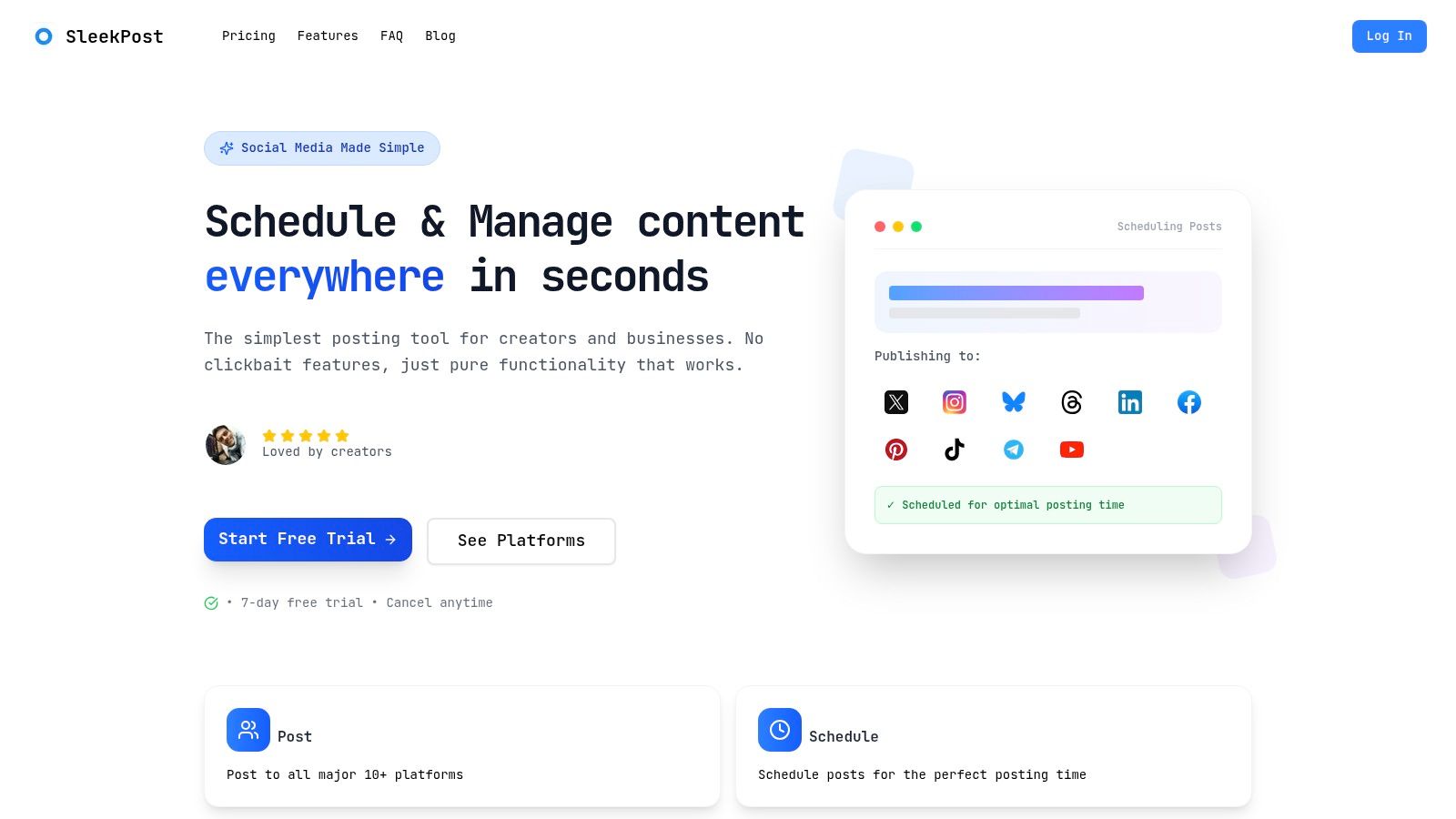
SleekPost is the strongest fit when publishing across several social networks is the bottleneck. It gives creators, marketers, and small teams one clean dashboard for scheduling and publishing to 10+ platforms, including X, Instagram, LinkedIn, Facebook, YouTube, TikTok, Threads, Pinterest, and Bluesky. Instead of copying a finished post into separate native composers, you can prepare a content batch in one place and adjust the copy or media for each channel.
The useful detail is the balance between centralization and control. You can queue posts, create recurring content, set auto-reposts, and handle carousels, videos, reels, and text updates without forcing every platform into identical formatting. That matters because a LinkedIn post, an Instagram caption, and an X update rarely need the same wording. SleekPost reduces repetitive publishing while leaving room for platform-specific edits.
Where it fits best
The built-in AI Content Generator turns a link or short prompt into draft posts adapted for different platforms. It works best as a first-pass batching assistant, not as an unattended brand voice. Generated copy can vary by topic and audience, so a quick human edit should remain part of the process.
SleekPost's paid plans include unlimited posts, a media library, and large file uploads. The listed tiers start with Starter at $5.40 per month or $64.80 per year, Pro at $11.40 per month or $136.80 per year, and Premium at $23.40 per month or $280.80 per year. The SleekPost pricing page also lists a 7-day free trial and a refund within seven days of a charge. Confirm current terms before subscribing because product pricing can change.
Practical rule: Use SleekPost to remove repetitive distribution work, but keep approval, editing, and final platform checks with a person.
Advanced reporting and some AI analytics are still listed as coming soon, so data-heavy teams may need a separate measurement platform. For a focused publishing workflow, however, its simplicity is the advantage. The content creation workflow guide shows how to connect batching, editing, and distribution without building a crowded stack. For broader email administration, compare it with these Mail Tracker for Gmail suggestions.
2. Zapier
Zapier is the practical choice when your team already has the right apps but keeps moving information between them manually. Its no-code workflows connect thousands of applications and can trigger actions from forms, spreadsheets, CRMs, email, project tools, and publishing platforms. A simple example is sending an approved content record to a task board, notifying a channel, and creating a reporting row after publication.
The visual builder supports multi-step Zaps, filters, paths, and webhooks. That gives a non-technical marketer enough control to handle common exceptions without waiting for engineering support. Zapier also offers products for forms, tables, chatbots, agents, and workflow design, so it can extend beyond basic trigger-and-action recipes.
The cost of convenience
Zapier's broad app ecosystem and templates shorten setup time, but complexity can arrive quickly. AI steps, code steps, and SDK-based workflows consume tasks in ways that can be difficult to forecast before the automation runs at scale. Faster polling, single sign-on, and stronger governance may also require higher plans.
Start with one workflow that has a clear owner and a visible failure point. For example, automate the handoff from an approved campaign brief to a publishing queue, then log the result. Don't automate every notification around it until the basic flow is reliable.
Use Zapier when the problem is a broken handoff between tools, not when a single platform already handles the job well. A lightweight publishing tool can often replace several Zaps for routine social scheduling. Review this guide to third-party tools before adding another connector to your stack.
3. Make
Make suits teams that need more control than a straightforward automation recipe provides. Its visual scenario builder uses modules, routers, iterators, and error handlers, which makes branching workflows easier to inspect. A content agency might route approved assets differently depending on the client, channel, campaign type, or approval status, then process several related records in parallel.
That control comes with a steeper learning curve. Make's interface exposes more of the workflow logic, which is valuable when you need detailed conditions but slower when you only want to connect a form to a spreadsheet. The platform supports a broad app library, custom apps, REST API endpoints, real-time monitoring, and detailed execution logs.
When granular control pays off
Make's credit-based pricing can align better with workflows that have a complicated shape, but you need to understand how operations are counted. A scenario that looks small on the canvas can perform many actions when it loops through records, branches into multiple paths, or retries failed steps. Monitor execution history and set sensible error handling before relying on it for client-facing processes.
“The cheapest automation is the one your team can still understand six months later.”
Use Make for structured, high-volume handoffs where routers, parallel processing, or detailed logs matter. Don't choose it just because it has more modules than a simpler alternative. Start with a diagram of the current process, identify the repeated steps, and build only the path that removes a measurable source of manual work.
Visit Make to assess whether its scenario model matches your workflow. If your needs are limited to publishing and basic approvals, a dedicated social tool may keep the process easier to maintain.
4. Calendly
Calendly removes a small but persistent source of delay: finding a meeting time that works for everyone. Connect the calendars you already use, define availability, and send a booking link instead of exchanging several rounds of email. For a solo consultant, that may be enough. For a lean team, round-robin routing and group scheduling help direct the right lead to the right person.
The platform also supports qualification questions, CRM and marketing integrations, and payment collection through Stripe and PayPal. Those features matter when scheduling is part of a sales or service workflow rather than a separate administrative task. A qualified prospect can book with the appropriate owner, while a paid session can require payment before the appointment is confirmed.
Protect the calendar, not just the booking page
Calendly's AI features include Notetaker for transcripts and recaps, plus Callie in beta for assisting with email scheduling. Availability and pricing for those features depend on the plan or add-on, and deeper CRM functions may require Teams or Enterprise tiers. Check the exact plan before assuming a feature is included.
The setup work is mostly operational. Define meeting types, buffers, working hours, intake questions, and cancellation rules. Without those decisions, a booking link can make your calendar busier rather than more useful.
Use Calendly when scheduling friction is the bottleneck. It won't fix meetings that lack an agenda, owner, or decision process. Pair it with automatic notes only when someone reviews the recap and turns genuine action items into assigned tasks.
5. Buffer
Buffer remains a good option for teams that want a clear social publishing interface with channel-by-channel control. It supports planning, drafts, approvals, tags, scheduled posts, analytics, an AI Assistant, hashtag management, first-comment scheduling, and a community inbox. The interface is approachable, which reduces onboarding time for clients or collaborators who don't work in social tools every day.
Its per-channel pricing model can work well for a creator with a focused set of networks or an agency managing several brands with different requirements. The trade-off is that the total subscription can grow as your channel list grows. Read the feature matrix carefully, especially if you need advanced analytics, listening, engagement, or governance features.
Choose it for clarity
Buffer is strongest when you want predictable scheduling and a clean approval path, not an all-purpose marketing operating system. A practical workflow might look like this: draft and tag content, send it for approval, schedule the approved version, and review channel performance later. Keep the creative source files and campaign documentation elsewhere if Buffer isn't the right home for them.
Check the billing model before migrating: Per-channel pricing can be efficient for a narrow workflow, but it needs a deliberate account and brand inventory.
Use Buffer if its channel-level structure matches how you buy software. Compare its limits with SleekPost's approach to limited versus unlimited publishing, especially if your team publishes frequently or manages recurring content.
6. Canva
Canva shortens the distance between an idea and usable creative. Its templates, stock assets, background removal, resizing, Brand Kits, approval features, and social scheduling give small teams a practical way to produce graphics, carousels, short videos, ads, and other campaign assets without handing every request to a specialist designer.
The time savings come from repeatable structure. Create a Brand Kit, define common formats, save reusable layouts, and build templates that preserve the elements people shouldn't change. This lets a marketer adapt one campaign concept across several placements while keeping fonts, colors, and visual hierarchy consistent.
Fast production has boundaries
Canva's AI features, including Magic Studio and Magic Layers, can speed up ideation, resizing, translation, and editing. AI usage allowances depend on the plan, and heavy use may require an AI Pass or additional top-ups. Treat generated layouts and copy as production material that needs review, especially for claims, accessibility, and brand details.
Canva is also not a replacement for every professional video workflow. It works well for fast social assets and lightweight edits, but complex timelines, detailed color grading, and advanced audio work may still belong in a professional editor.
Use Canva when your bottleneck is producing consistent visual variations quickly. Establish approval ownership before opening collaboration access to everyone. Otherwise, the team may spend the saved design time reviewing too many near-duplicate versions.
7. Descript
Descript is built around a useful idea for content teams: edit the transcript, and the recording changes with it. After transcription, you can remove filler words, repair audio with Studio Sound, generate captions and summaries, and create short clips from a longer podcast, interview, or webinar. That makes it particularly useful for teams repurposing one recording across multiple formats.
A producer who isn't comfortable inside a traditional non-linear editor can work directly with text. The workflow is straightforward: record or import the file, correct the transcript, remove unwanted sections, identify useful excerpts, and export the resulting clips. Remote recording Rooms and stock media support can keep more of that process in one workspace.
Use AI for volume, judgment for selection
Descript's AI tools can accelerate narration, overdubs, clip generation, and cleanup. Voice cloning and avatars introduce additional review responsibilities, so teams should establish consent and brand rules before using them in client or public work. Media-hour and AI-credit limits can also become relevant when a team processes a high volume of recordings.
Precise color grading and advanced audio mastering remain better suited to professional video and audio tools. Descript earns its place when speed of repurposing matters more than complete post-production control.
Try Descript for a workflow that turns one source recording into captions, summaries, clips, and social drafts. Send the approved clips to your publishing system only after someone checks names, claims, cuts, and context.
8. Notion
Notion works best as the operating layer for a lean content team. Its databases, relations, views, subtasks, dependencies, forms, permissions, and custom sites can hold briefs, campaign calendars, status fields, approval notes, and asset links in one connected workspace. That consolidation can reduce the need to search through separate documents, task boards, and meeting notes.
A useful content database doesn't need to be elaborate. Give each item an owner, channel, format, status, due date, source link, approval field, and publishing destination. Create views for planning, production, review, and completed work. The structure should make the next action obvious without requiring a meeting to explain it.
Avoid building a database museum
Notion's flexibility is both its strength and its main risk. A complex schema can become difficult to maintain, especially when permissions, linked databases, and multiple team conventions grow without an owner. AI Meeting Notes, Notion Agent, Enterprise Search, and custom Agents can reduce manual work, but AI and security features vary by plan, and custom Agents use Notion credits.
One workspace doesn't mean one giant database. Keep the system understandable enough that a new contributor can use it without a training project.
Choose Notion when scattered briefs and unclear ownership are slowing production. The content planning tool guide can help connect a planning database to a separate publishing workflow. Keep the publishing system focused if Notion starts becoming a substitute for every specialist tool.
9. Grammarly
A content workflow often breaks at the final pass: a caption needs tightening, an outreach email sounds too blunt, or a landing page contains avoidable errors. Grammarly checks grammar and spelling, proposes rewrites, adjusts tone, and works across desktop, browser, mobile, and editor integrations. It fits captions, scripts, client messages, and other copy that needs a quick review before publishing.
For a lean marketing team, shared style guides, brand tones, snippets, and analytics extend the tool beyond personal proofreading. A snippet can save repeated typing for service descriptions, calls to action, or standard replies. Set these rules up once, then apply them during drafting and review.
Keep creative judgment in the loop
Grammarly may flatten intentional phrasing, conversational copy, or a brand's preferred rhythm. Its plagiarism and AI-text detection features also require human interpretation. Feature availability and pricing vary by seat and region, so check the current plan details before rolling it out across a team.
Use Grammarly after drafting, not instead of a clear brief. Give it guidance on audience, vocabulary, punctuation, and prohibited words. Then let a person approve each meaningful rewrite. A polished sentence can still be wrong for the brand, the channel, or the customer.
10. Motion
A founder finishes a client call and finds the rest of the day out of sequence. Motion combines calendar management, tasks, and project planning to rebuild the agenda around changing priorities. Its AI planner assigns tasks to available time, then adjusts the schedule when meetings move or deadlines change. Project workflows, capacity planning, dashboards, and time tracking extend the same approach to small teams.
The main benefit is less manual rescheduling. Define each task's duration, priority, deadline, and availability, then review the proposed day. That setup suits founders and lean marketing leads who alternate between strategic work, production, and operational requests.
Expect a tuning period
Motion only becomes useful after you provide accurate inputs. Set realistic durations, protect focus blocks, and correct the planner when its choices conflict with your judgment. Vague estimates produce a tidy-looking schedule that may still be impossible to follow.
AI Meeting Notetaker and AI Chat can support follow-ups, while native apps keep tasks and plans available across devices. Heavy AI use may require additional credits, so check how your team will use those features before choosing a plan.
Use Motion when daily prioritization and schedule changes consume more time than content distribution. It may replace separate calendar and task workflows, provided the team follows shared rules for priorities, durations, and availability. Compare that setup with other options in this team productivity tools guide before centralizing the workflow.
Top 10 Time‑Saving Tools, Quick Comparison
| Tool | Core features | Quality (★) | Price / Value (💰) | Target (👥) | Unique selling points (✨) |
|---|---|---|---|---|---|
| SleekPost 🏆 | Schedule & publish to 10+ platforms; per-platform customization; AI Content Generator; unlimited posts (paid) | ★★★★☆ | 💰 Starter $5.40/mo · Pro $11.40 · Premium $23.40 · 7‑day trial | 👥 Creators, marketers, small teams | ✨ Ultra-simple UI, cross‑platform reach, unlimited scheduling, AI batching · 🏆 |
| Zapier | No-code multi-step automations across 9,000+ apps; Copilot/agents | ★★★★☆ | 💰 Task-based tiers; enterprise pricing | 👥 Marketers, ops, IT, automation builders | ✨ Massive app ecosystem; AI orchestration & templates |
| Make (Integromat) | Visual module/scenario builder with branching, parallel runs, detailed logs | ★★★★ | 💰 Credit-based model (cost-efficient at scale) | 👥 Engineers, ops, data-heavy workflows | ✨ Granular control, parallel processing, on‑prem connectors |
| Calendly | Multi-calendar booking, round-robin, payments, AI Notetaker/Callie | ★★★★ | 💰 Freemium → paid team/AI tiers | 👥 Sales, recruiters, consultants, teams | ✨ Team routing, payments at booking, AI call recaps |
| Buffer | Plan, schedule, AI assistant, analytics, approvals, per-channel options | ★★★★ | 💰 Per-channel pricing; predictable scaling | 👥 Creators, agencies, SMBs | ✨ Clear UX, per-channel billing, simple analytics |
| Canva | Templates, stock assets, Magic Studio AI, social scheduling | ★★★★★ | 💰 Freemium; Pro + AI Pass/top-ups | 👥 Designers, marketers, social creators | ✨ Huge template library, Magic Studio AI for rapid creatives |
| Descript | Edit audio/video by text, transcription, Studio Sound, overdub | ★★★★ | 💰 Tiered plans; media‑hour & AI limits | 👥 Podcasters, video creators, editors | ✨ Edit-by-text, automatic clips/captions, voice cloning |
| Notion | Docs & databases, views/relations, Notion Agent, AI notes | ★★★★ | 💰 Freemium; Team/Enterprise credits | 👥 Teams, PMs, content planners | ✨ All-in-one workspace, custom databases, AI agents |
| Grammarly | Real-time grammar, tone, rewrites, plagiarism & AI-text checks | ★★★★ | 💰 Per-seat plans; team pricing | 👥 Writers, teams, professionals | ✨ Tone/style guides, brand snippets, wide integrations |
| Motion | AI calendar & task planner, auto-schedule, capacity & timelines | ★★★★ | 💰 Subscription + AI credits | 👥 Founders, lean teams, busy professionals | ✨ Auto-built daily agendas, dynamic rescheduling, Gantt timelines |
Build a Stack That Gives Time Back
The best stack probably won't include all ten tools. It should reflect the point where work currently stalls. If publishing takes the most effort, start with SleekPost or Buffer. If approved work gets lost between systems, look at Zapier or Make. If planning and ownership are unclear, Notion or Motion may deliver more value than another content generator.
A sensible sequence starts with one source of truth for briefs, status, owners, and deadlines. Notion can fill that role for teams that need flexible documentation, while Motion fits teams that need automatic calendar-based prioritization. Don't introduce both at once unless you can explain exactly which decisions each system owns.
Production comes next. Canva handles repeatable visual assets, while Descript helps turn recordings into written and short-form content. Grammarly provides a final language pass across the text that moves through those workflows. Each tool solves a different production constraint, so the handoff should be explicit. A brief becomes an asset, an asset becomes approved content, and approved content moves to distribution.
Match tools to bottlenecks
Publishing should stay separate from planning when the publishing tool does that job better. SleekPost can centralize multi-platform scheduling, per-network customization, recurring posts, and AI-assisted drafting. Buffer may be a better fit when channel-level billing, approvals, and its established interface align with your team.
Automation belongs after the process is stable. Zapier is easier to approach for common app connections and multi-step recipes. Make is more suitable when you need routers, iterators, parallel work, detailed logs, or custom API behavior. Neither tool can repair an unclear approval process. Automating an unclear process only moves the confusion faster.
Meetings need a similar distinction. Calendly reduces coordination before a call, while Motion can protect the work around the call and reschedule tasks when the day changes. Meeting notes are useful only when someone reviews them, confirms decisions, and assigns follow-ups.
A time-saving stack should also reduce context switching. One workplace software analysis estimates that knowledge workers toggle apps about 1,200 times a day, roughly once every 24 seconds, and places the broader economic cost of context switching at around $450 billion annually. The same productivity statistics analysis estimates that an organization with 5,000 employees could save more than $3.1 million per year by reducing app switching. These figures don't mean every small team needs an all-in-one platform. They show why every added workspace needs a clear reason to exist.
Audit the stack before expanding it
Use this short review before adding another subscription:
- Integration ownership: Name the person responsible for connecting, testing, and maintaining each integration.
- Approval points: Define where a human checks claims, brand voice, visuals, permissions, and final publication.
- Usage limits: Check task counts, media hours, AI credits, storage, seats, polling, and reporting limits against real usage.
- Workflow boundaries: Write down which tool owns the brief, the asset, the approval, the scheduled post, and the performance record.
- Weekly time audit: Track the repeated tasks your team performs, then remove or redesign tools that don't produce observable time savings.
The planning principle behind time-saving systems is simple. A small planning investment can save about two hours of execution time when people spend 10 to 12 minutes planning the day, according to the historical productivity guidance collected in this 2026 efficiency overview. The exact result will vary, but the operating lesson holds. Decide what matters before opening another app.
Automation adoption is already mainstream in social workflows. 75% of marketers used at least one social media management tool in 2023, and a 2026 market report recorded more than 220,000 enterprise deployments in North America and more than 150,000 in Asia-Pacific during 2025, as reported in this social media marketing statistics roundup. That makes basic scheduling less of a differentiator than simplicity, speed, and the ability to avoid unnecessary switching.
AI deserves the same discipline. A 2026 social media marketing survey found that 98% of respondents use AI tools, with 53% using them daily, while 93% optimize content for social search at least sometimes. The survey also reported that 81% said social search optimization produced moderate or significant improvement in the previous six months, as summarized in this social media productivity comparison. Those figures support selective use, not blanket automation. Use AI for drafts, summaries, variations, and repetitive preparation, then reserve human attention for judgment and relationships.
A focused stack should make the next action easier to see and the next handoff easier to complete. If an app adds another login, dashboard, approval queue, or integration to maintain, it should earn that cost through visible time savings. Review your workflow every week, keep the tools that remove friction, and retire the ones that merely give you more places to organize the same work. A dedicated subscription tracker app can also help you review recurring software costs as the stack changes.
SleekPost gives creators and lean marketing teams one simple dashboard for scheduling, customizing, and publishing content across 10+ social platforms, with recurring posts and AI-assisted drafting for faster batching. If repetitive distribution is taking time away from strategy and creative work, visit SleekPost and test whether a focused publishing workflow gives your week back.