You've got a strong idea, a half-written caption, three versions of the same graphic, and a client asking whether the post is going live today. The copy sits in a document, the final image is buried in a chat thread, approvals are spread across email, and each platform has its own scheduler. By the time everything is ready, the creative energy has gone and publishing feels like damage control.
That's why a useful content creation workflow must do more than generate ideas or draft captions. It has to move work cleanly from strategy to production, review, approval, and distribution. AI can help with ideation and drafting, but coordination, ownership, and measurement determine whether the system holds up on a busy publishing day.
Marketing teams are already shifting toward AI-assisted production. By 2026, 94% of marketers planned to use AI in content creation processes, while 89% already used generative AI for content tools. The most common uses were brainstorming topics, summarizing content, and writing drafts, according to Averi's 2026 AI content marketing benchmarks. The next operational advantage won't come from producing more raw drafts. It will come from reducing the friction between every person, file, decision, and platform involved in shipping them.
Table of Contents
- Why Most Content Creation Workflows Break Down
- Planning Your Content Foundation and Calendar
- Batching Ideas and Assets Without Burning Out
- Organizing Assets and Streamlining Team Handoffs
- Customizing Scheduling and Automating Publishing With SleekPost
- Measuring What Works and Refining Your Workflow Over Time
Why Most Content Creation Workflows Break Down
A typical publishing day starts innocently. A social manager finds a useful article, asks an AI tool for platform variations, sends the draft to a designer, pastes the copy into a shared document, and drops a preview into Slack. A stakeholder requests a softer opening. The designer exports a revised image. Someone schedules the old version by mistake. Another person notices the error after the post is live.
Nobody lacked ideas. The workflow failed because the work moved through disconnected systems without clear handoffs.
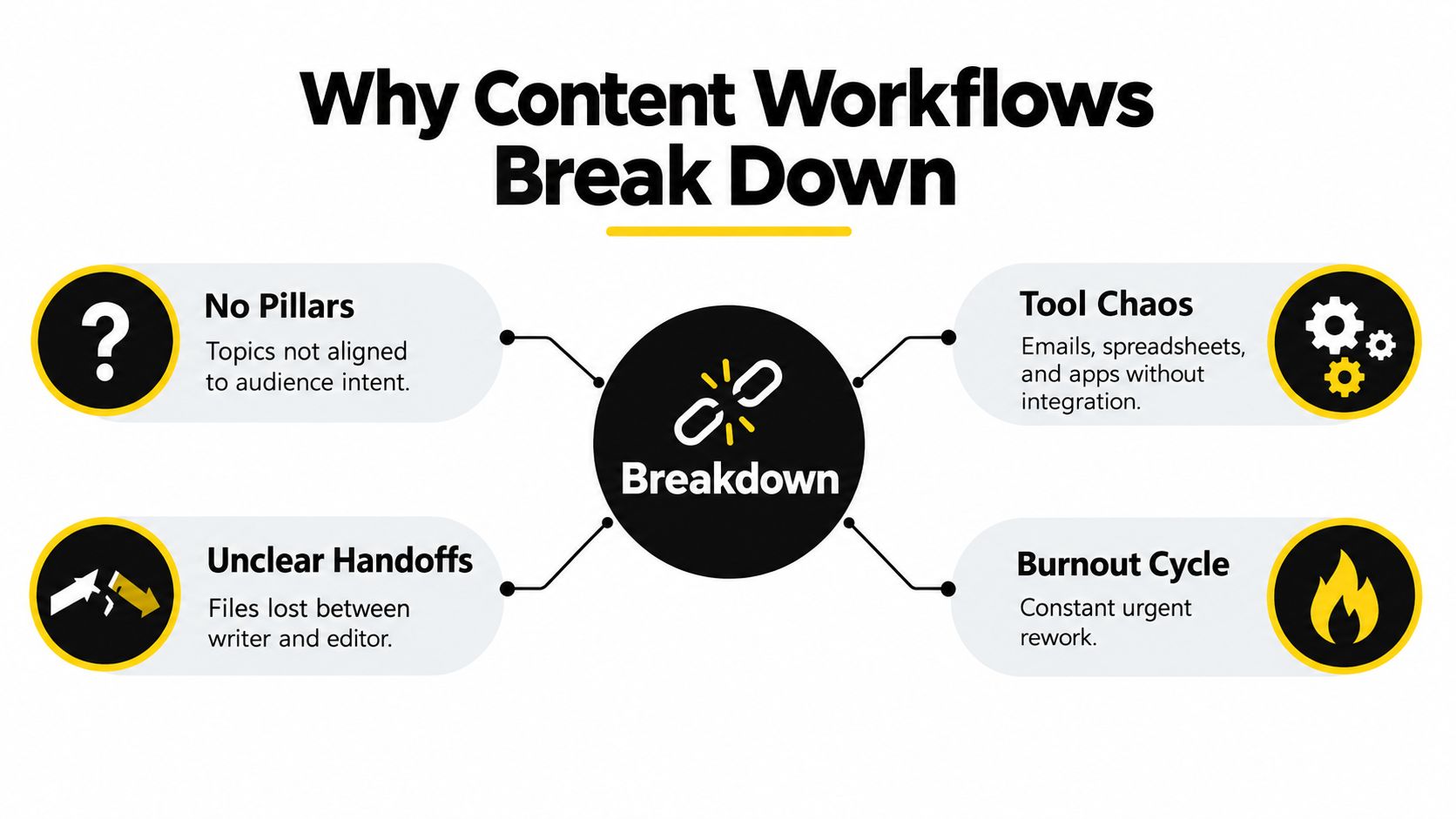
The four friction points
Tool fragmentation creates constant context switching. A team may use a document editor for copy, a drive for media, a project board for assignments, email for approvals, and native platform schedulers for distribution. Each tool can work well alone, but the connections between them remain manual.
Unclear ownership creates silent delays. If nobody knows whether the writer, editor, account manager, or client owns the next action, a finished draft can sit untouched. A content calendar shows what should publish, but it doesn't automatically show who must approve the asset or which version is final.
Weak handoffs make small changes expensive. When a reviewer edits a downloaded file instead of the shared draft, the team now has two possible finals. When feedback arrives in separate messages, the creator has to reconstruct the decision before making the revision.
Last-minute publishing turns routine work into urgent work. The social manager is no longer adapting a prepared idea for each platform. They're searching for assets, checking dimensions, rewriting copy, confirming links, and asking for approval at the same time.
Research from Adobe's 2026 workplace study supports this diagnosis. 57% of respondents reported too many fragmented tools for AI-enabled content tasks, while 32% struggled to connect workflows across teams and 31% had difficulty collaborating in a shared workspace (Adobe's Forrester thought leadership paper). The practical lesson is simple: generation is only one stage. A reliable system gives every asset a home, every review a status, and every handoff a named owner.
A lightweight hub such as SleekPost can sit close to the execution layer, keeping scheduling, platform adaptation, and media access together instead of adding another disconnected workspace. The broader mindset matters more than the software choice, though. Stop asking how to create more posts. Start asking where work gets stuck between one decision and the next.
Planning Your Content Foundation and Calendar
A calendar can't rescue an unfocused strategy. Before opening a writing tool, decide what your content should accomplish, who it serves, and where each idea belongs.
Start with the business outcome. A product launch, an educational campaign, a founder-led brand, and a customer-retention program need different content signals. Define the intended action in plain language, such as understanding a problem, evaluating a solution, joining a conversation, or returning to an existing resource.
Build pillars around audience intent
Choose a small set of durable content pillars that your team can revisit without forcing repetition. Useful pillars might include practical education, product use cases, customer objections, behind-the-scenes expertise, and industry commentary. Each pillar should answer a real audience need rather than describe an internal department.
Then map each pillar to platform behavior:
| Content pillar | Audience intent | Strong format | Platform adaptation |
|---|---|---|---|
| Practical education | Learn a task or solve a problem | Short tutorial, carousel, thread | Concise steps on X, visual explanation on Instagram, detailed context on LinkedIn |
| Product use cases | Understand how a solution fits | Demonstration, workflow, comparison | Screen recording for YouTube, use-case post for LinkedIn, short demo for TikTok |
| Expert commentary | Form an opinion | Point of view, response, analysis | Discussion prompt on Threads, perspective-led post on LinkedIn, compact take on X |
The mapping prevents one caption from being copied everywhere. The core idea can stay consistent, but the opening, length, media, and call to action should reflect the platform.
Turn ideas into an owned backlog
Capture ideas in a single backlog with five fields: topic, pillar, intended audience action, owner, and target publication window. Add a status such as idea, briefed, drafting, review, approved, scheduled, or published. Keep the fields useful enough to guide action, but avoid building a project-management maze that nobody updates.
Your calendar should also show dependencies. Mark whether a post needs a product screenshot, a client approval, a link check, or a coordinated launch. Assign the person responsible for the next action, not just the person who originally suggested the idea.
A realistic cadence beats an ambitious calendar that collapses after a busy week. Use the calendar to protect consistency, not to fill every available slot. The social media calendar guide can help you structure those planning decisions without turning the calendar into a second full-time job.

Planning rule: Every calendar entry should tell someone what to make, why it matters, where it will appear, and who moves it forward next.
Batching Ideas and Assets Without Burning Out
Batching works because it separates mental modes. Ideation asks you to explore. Drafting asks you to make decisions. Asset preparation asks you to find and organize files. Publishing asks you to check details. Switching between those modes every few minutes creates the feeling of being busy without producing a clean queue.
A practical batch begins with an idea sprint. Set a focused block for collecting customer questions, sales objections, product updates, audience comments, competitor references, and source links. Use an AI assistant to expand a strong prompt or turn a relevant link into possible angles, but keep the selection human. AI can generate options quickly. It can't decide which point fits your positioning, audience maturity, or current business priority without direction.
Use a repeatable production rhythm
Once the ideas are selected, write briefs before captions. Each brief needs a central point, the audience problem, the evidence or example supporting it, the desired action, and the platforms that need a version. This prevents the common mistake of asking AI to “write a post” without supplying the context that makes the post sound like your brand.
Draft in a sequence rather than alternating between unrelated formats. For example:
- Create the source idea. Write the clearest version in your own voice, with the full reasoning intact.
- Generate platform variants. Ask for different openings, lengths, structures, and calls to action for each network.
- Edit for judgment. Remove generic phrasing, unsupported claims, awkward transitions, and promises the source material can't support.
- Prepare the asset set. Pair the approved copy with the correct image, carousel, video, reel, or link preview.
- Move approved work into the queue. Keep publishing separate from creative development.
A reusable asset kit makes this rhythm easier. Store brand fonts, approved logos, recurring visual layouts, product screenshots, background footage, customer-approved language, and thumbnail templates in one media library. Name files for retrieval, not for the person who created them. “Spring campaign final final 2” is a warning sign. “Product-demo-dashboard-linkedin-approved” tells the next person what they're looking at.
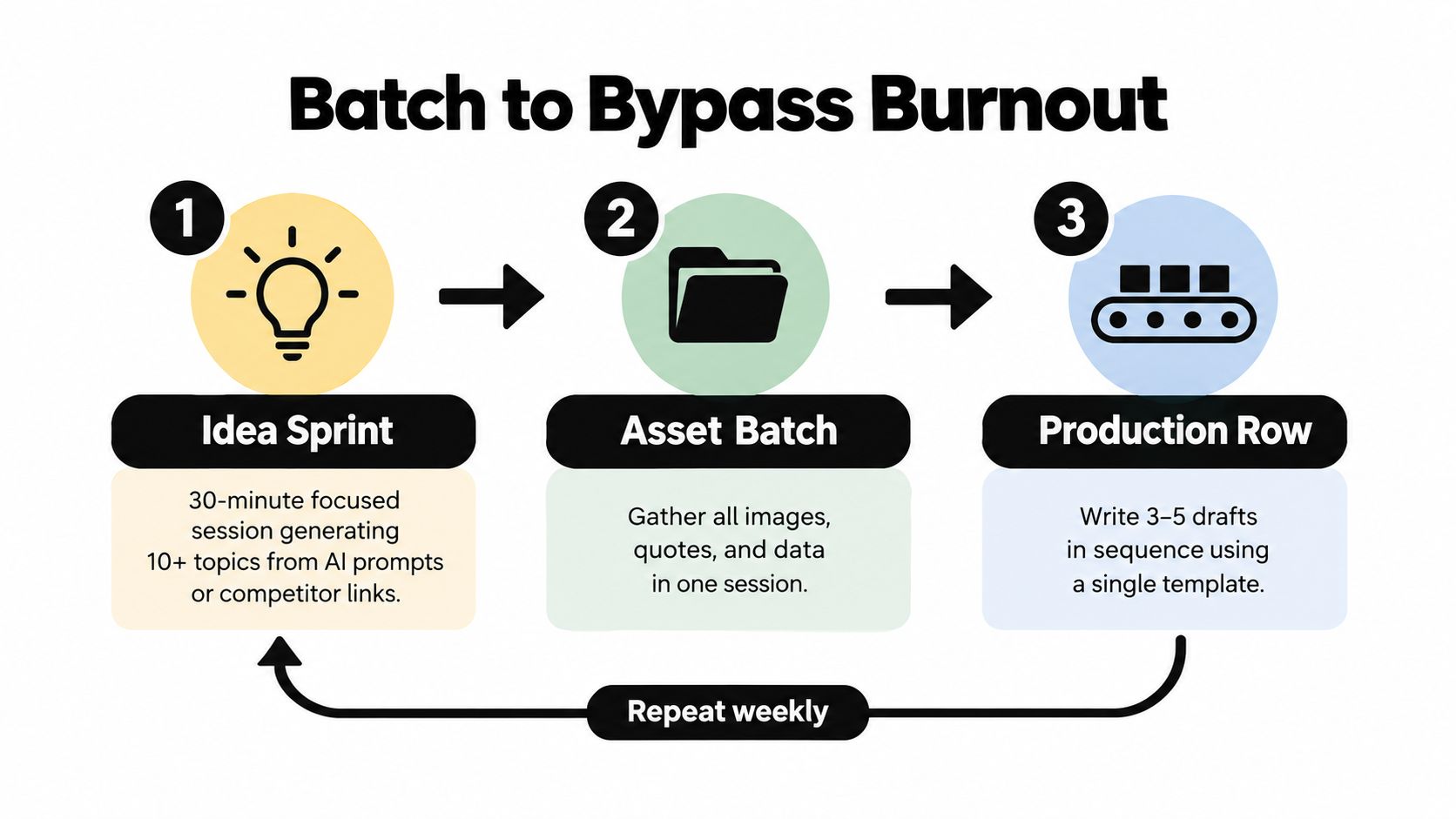
The content batching framework is useful when you need to make batching a recurring operating habit rather than a rescue tactic. The key is to reserve separate time for production and distribution. If you create and publish in the same session, urgent notifications and platform details will pull you away from the creative work.
AI-assisted creation is now common enough that cost and speed alone can't define quality. A 2026 research summary estimated that 38% of business web content involved AI assistance at some stage, compared with 14% in 2024 and 26% in 2025. It also reported that 72% of publishers use AI tools in editorial workflows, with some using AI for first drafts and others limiting it to research or outline support (Presence's AI content creation research summary). Those patterns support a useful division of labor: let AI handle repetitive transformation, while people control the angle, factual review, voice, and final decision.
A batch is successful when the next publishing session feels administrative, not creative. You should be choosing from prepared work, not inventing the week under pressure.
Organizing Assets and Streamlining Team Handoffs
Batching reduces production switching. It doesn't solve a team that loses files, reviews the wrong version, or waits for approval in an untracked conversation. That problem needs an explicit handoff system.
Create one shared workspace for each campaign, client, or recurring content stream. Store the brief, working copy, approved copy, source links, media, usage notes, and approval record together. If your team has to search multiple drives to understand one post, the workspace isn't functioning as a source of truth.
Make the next action visible
A good handoff answers four questions immediately:
- What is this asset? Use a consistent naming pattern that includes the topic, platform, format, and status.
- Which version is current? Keep revision history available and identify the approved file clearly.
- Who acts next? Assign one owner for writing, design, review, approval, and scheduling.
- When is the next decision due? A date without an owner is a reminder, not a workflow.
The simplest approval stages are often enough: draft, internal review, client or stakeholder review, approved, scheduled, and published. Don't create separate statuses for every minor activity. Status should help a busy manager answer “what's blocking this?” in seconds.
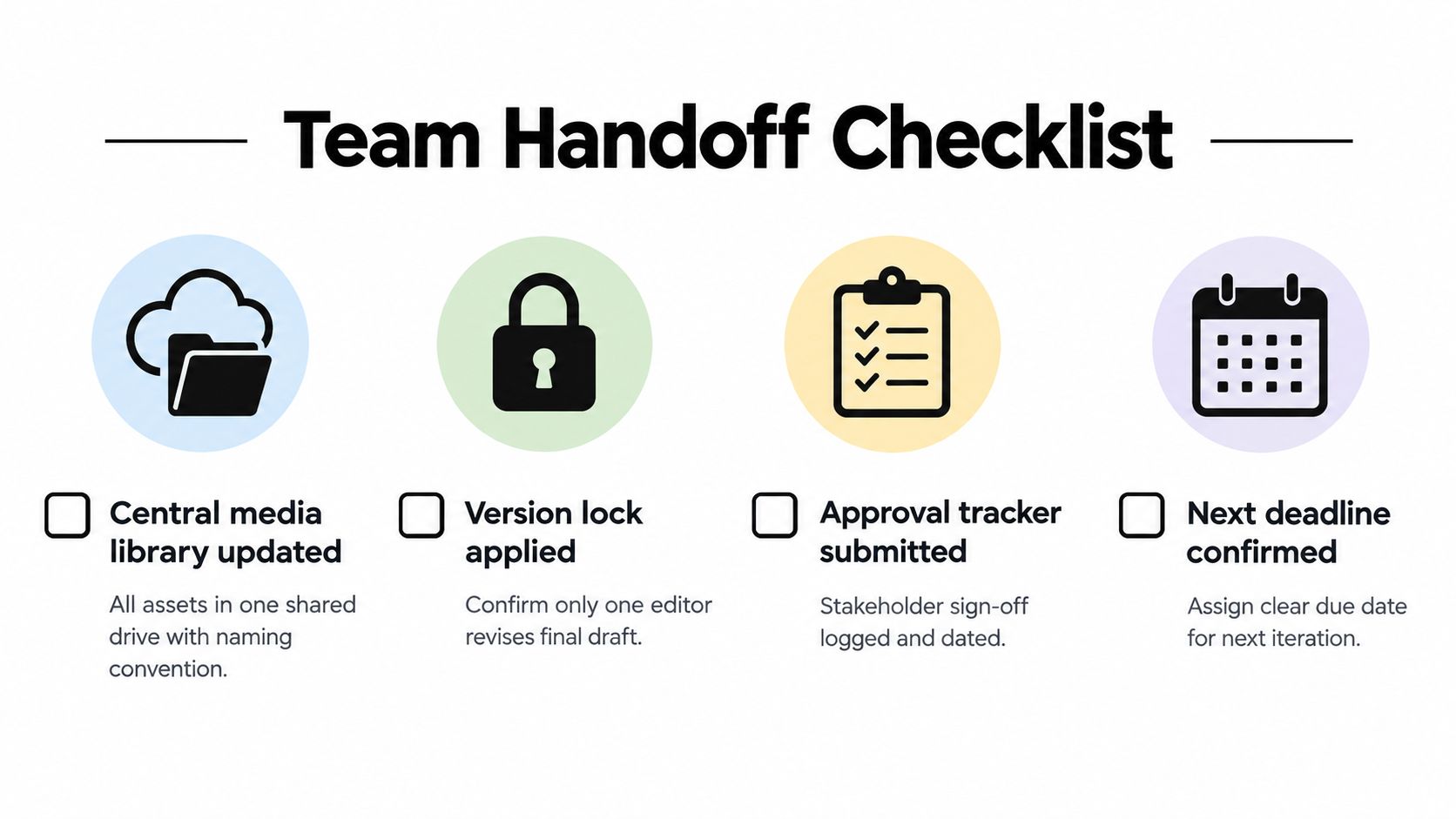
Use a handoff checklist
Before moving an asset to scheduling, verify:
- Media confirmed: The image, video, carousel, or reel is attached to the correct draft.
- Copy locked: The final text has one clear approved version.
- Links checked: The destination matches the call to action and works on the intended platform.
- Permissions recorded: Any customer quote, image, music, or third-party material has the required usage approval.
- Platform requirements reviewed: The format, crop, tags, mentions, and media treatment fit the destination.
- Approval logged: The reviewer and approval decision are visible to the people publishing the asset.
SleekPost's dashboard and media library can support this execution model by keeping social publishing and media access in one place. That doesn't replace a full project-management system for complex campaigns, but it can remove a handoff between the final approved asset and the publishing queue. For teams that need more structure around reviewer roles and sign-off, the content approval process guide provides a practical reference.
The goal isn't to eliminate every tool. It's to give each tool a clear job and reduce the number of places where a decision can disappear.
Customizing Scheduling and Automating Publishing With SleekPost
Publishing automation fails when teams treat every network as a copy-and-paste destination. A strong content creation workflow keeps the strategic idea consistent while adapting the execution to each platform.
Start with one approved source message. Then create platform-specific versions. X may need a sharper opening and a direct discussion prompt. LinkedIn may benefit from more context and a professional takeaway. Instagram may need a caption that supports the visual. TikTok and YouTube may depend more heavily on the first spoken line, title, thumbnail, and video structure than on a long caption.
Build the post inside one publishing view
A practical scheduling sequence looks like this:
- Select the source item. Pull the approved brief, copy, and media from the workspace.
- Choose the destinations. Select the networks that serve the audience for that idea.
- Customize each version. Adjust copy, hashtags, mentions, links, media, and calls to action per platform.
- Preview before queueing. Check line breaks, crops, video behavior, link placement, and account selection.
- Assign a publication slot. Use a queue for regular content and a fixed time for launches, announcements, or coordinated campaigns.
- Record the status. Mark the post scheduled, then keep the approval and source asset attached.
SleekPost supports scheduling and publishing from a single dashboard across 10+ platforms, including X, Instagram, LinkedIn, Facebook, YouTube, TikTok, Threads, Pinterest, and Bluesky, as described in its social media scheduler app guide. Its AI Content Generator can turn a prompt or link into draft social posts, while per-platform customization lets the manager revise the output before it enters the queue.
Automate repetition, not judgment
Recurring posts work well for durable reminders, evergreen education, frequently asked questions, and regular promotional slots. They work poorly for news, time-sensitive claims, fast-moving conversations, or content that depends on a current product state. Auto-reposts can extend the life of a useful idea, but each repost still deserves a quick relevance check.
Use automation for the mechanical parts:
- Queue maintenance: Keep approved posts moving into open publication slots.
- Recurring content: Repeat stable messages according to a documented schedule.
- Auto-reposts: Reuse durable content after checking that the wording and destination remain accurate.
- Media retrieval: Pull approved videos, carousels, and images from the media library instead of downloading them again.
- Draft transformation: Turn one source link into platform variations, then edit for voice and accuracy.
Don't automate final approval for sensitive topics. Product claims, customer stories, regulated subjects, executive statements, and posts that mention other people require human review. The more consequential the post, the less acceptable a generic AI draft or unattended recurrence becomes.
Paid SleekPost users can schedule unlimited posts, and the product offers a 7-day free trial with cancel-anytime flexibility, according to the publisher information provided for this article. Treat those commercial details as plan considerations, not as a reason to publish more than your audience can absorb. The best queue is the one your team can inspect, maintain, and trust.
Measuring What Works and Refining Your Workflow Over Time
A workflow that saves time but lowers quality isn't healthy. A workflow that produces polished posts nobody engages with isn't effective either. Track operational speed, editorial quality, audience response, and governance together.
Many social teams still measure automation mainly through time saved. Metricool's 2026 study reported that 95% of social media professionals use AI, but 54% measure its impact only by time saved, while 6% track content quality and 4% track post performance. The same study found that 14% said AI-generated content performs worse than non-AI content, and only 12% had a clearly defined AI policy (Metricool's State of AI in Social Media study). Those findings point to a practical gap: efficiency is an input, not the outcome.
Use a small measurement set
Track workflow health with signals your team can review:
- Production flow: Where do drafts wait, and which approval stage creates repeated delays?
- Quality: Does the final post sound like the brand, make a clear point, and support its claims?
- Performance: Which formats, topics, openings, and calls to action earn meaningful audience response?
- Rework: How often does an asset return from approval because the brief, copy, or media was incomplete?
- Governance: Can you identify who approved the post and locate the source asset quickly?
AI policy doesn't need to be a long legal document. Define which tasks AI may handle, which claims require source checking, who performs final review, how sensitive information is treated, and when the team must disclose or document AI assistance.
Run a monthly workflow retro
Choose a small sample of published content and review it with the people who planned, created, approved, and scheduled it. Ask where the work paused, which handoff caused confusion, whether the platform adaptation improved the message, and what audience response should change future briefs.
Then make one operational adjustment. Rename a confusing status. Remove a redundant approval. Add a required field to the brief. Move a recurring post into a review queue. Replace an unreliable template. Small changes compound because they improve every future asset that passes through the system.
Use the reporting best practices guide to keep performance review connected to publishing decisions rather than isolated in a monthly spreadsheet. A durable loop is straightforward: plan, batch, review, publish, measure, refine. When every stage has an owner and a visible handoff, automation supports judgment instead of hiding its absence.
SleekPost gives creators and marketing teams one dashboard for adapting, organizing, and scheduling social content across 10+ platforms, with an AI Content Generator, media library, recurring posts, auto-reposts, and unlimited posts for paying users. Visit SleekPost to start the 7-day free trial and turn your content queue into a workflow you can maintain.