You've queued a product launch, approved the captions, and handed the calendar to your scheduler. At 8:03 on Monday morning, the dashboard tells you the queue is full, the remaining posts are locked, and the campaign you planned last week never finished saving. The problem isn't your content strategy. It's the billing model sitting underneath your workflow.
That's the limited vs unlimited decision. A scheduler's post allowance matters, but batch ceilings, queue depth, recurring slots, media storage, account access, and overage behavior matter more. I've worked with quota-based systems and unlimited tools, and the practical lesson is simple: the right plan is the one that lets your team publish normally during its busiest week, not the one that looks cheapest during an average week.
| Workflow factor | Limited scheduler | Unlimited scheduler |
|---|---|---|
| Monthly publishing | Posts consume a recurring quota | No per-month post meter |
| Batch publishing | Large campaigns can hit a ceiling | Easier to load a full campaign |
| Queue depth | Often capped separately | May be more generous, but still needs checking |
| Recurring content | Frequently restricted by slots or account tier | Usually more suitable for evergreen workflows |
| Cost behavior | Lower entry price, possible overages | Higher fixed commitment, more predictable usage cost |
| Main risk | The queue stops when the quota runs out | “Unlimited” still may exclude accounts, media, speed, or features |
Table of Contents
- The Monday Morning Post Cap Problem
- What Limited and Unlimited Schedulers Actually Mean
- Comparing the Two Plan Models Side by Side
- The Real Cost Trade-Offs Most Reviews Skip
- Which Plan Fits Your Posting Reality
- Migrating Between Plan Models Without Losing Content
- Choosing the Right Scheduler With Confidence
The Monday Morning Post Cap Problem
At 8:03 a.m., a solo creator opens the scheduler to check launch-day posts. The product launch starts at noon, but the dashboard shows that only four of the planned eighteen posts can remain scheduled. The other fourteen are behind the monthly cap, which reset on the first of the month and disappeared faster than expected during launch preparation.
By 8:17, the creator is deleting older queue items to make room. At 8:31, they're copying captions into a spreadsheet because the scheduler won't save new drafts once the quota is exhausted. A link in a draft expires while the team tries to move the post manually. At 9:05, the launch queue is being rebuilt platform by platform, and the original publishing sequence is already compromised.
The damage isn't limited to inconvenience:
- Launch timing slips: A post intended for the first announcement window goes live late or not at all.
- Manual work expands: The creator has to copy media, captions, tags, and platform variations into separate native apps.
- Content visibility breaks: Three posts never publish, so their performance data never enters the campaign report.
- Approvals become unreliable: A client or collaborator may approve a draft that the scheduler can't retain.
A queue management system only works when the queue can hold the work your calendar requires. A low quota can turn ordinary scheduling into emergency operations, especially during launches, seasonal campaigns, or reactive news cycles.
Unlimited plans promise to remove this exact failure. They eliminate the per-month post counter, so publishing volume no longer locks the next item in line. But they don't automatically remove every constraint. You can still run into account limits, media-library ceilings, recurring-post restrictions, approval permissions, or performance rules.
That's why “unlimited” should be treated as a workflow commitment, not a magic word. The useful question isn't whether you'll publish an infinite number of posts. It's whether the plan protects your busiest queue from the failure that stopped your Monday morning campaign.
What Limited and Unlimited Schedulers Actually Mean
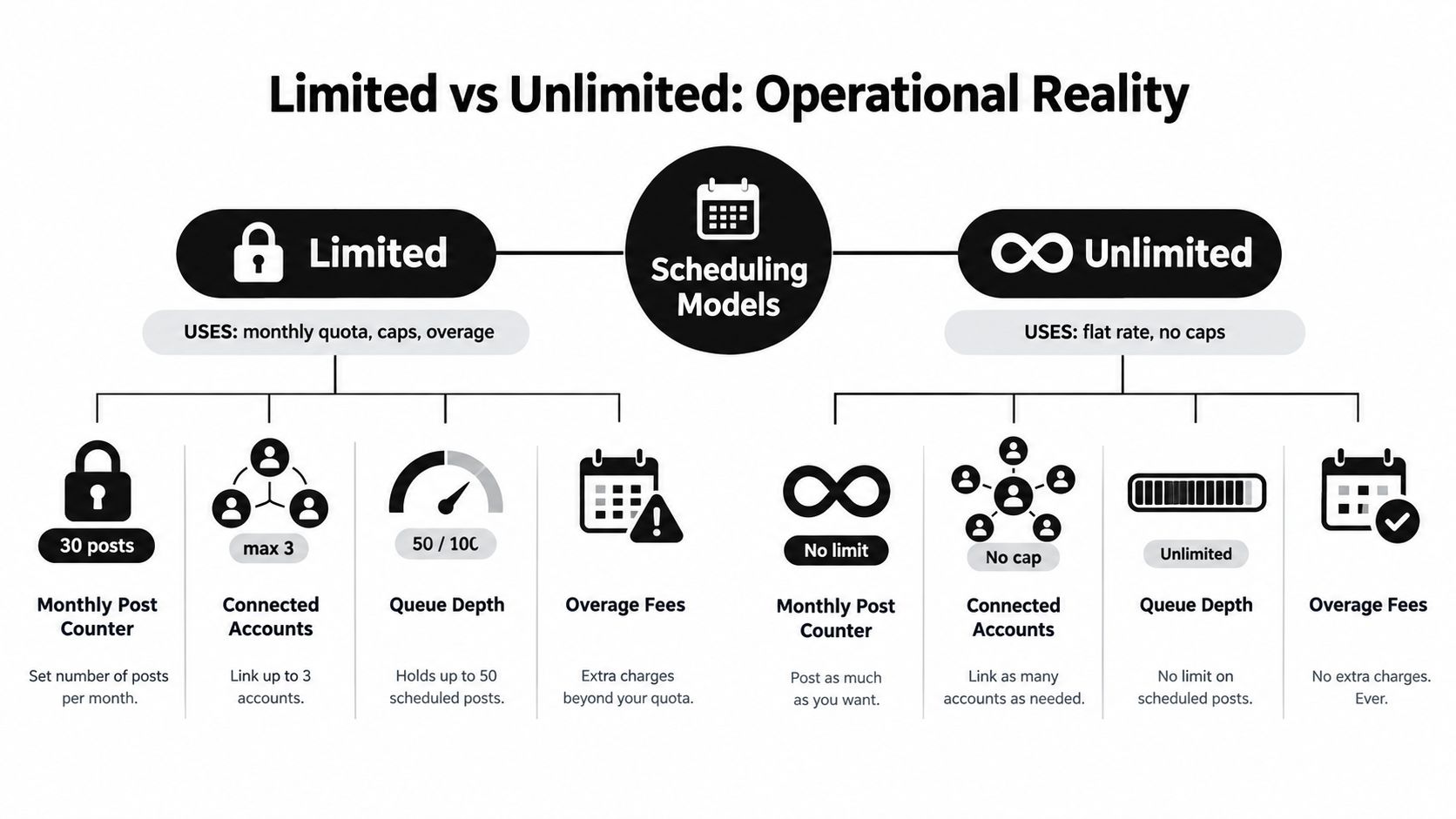
A limited scheduler charges or gates access around a defined monthly post quota. Every published or scheduled item may count against that allowance, depending on the platform's rules. The plan may also restrict connected accounts, queue depth, recurring slots, media storage, seats, or platform-specific features.
An unlimited scheduler removes the monthly post ceiling. That distinction gives you freedom to batch content, build longer campaigns, and keep reactive posts in the queue without watching a counter. It doesn't mean every part of the product is unlimited.
The four limits hiding behind the headline
Most pricing pages organize the operating model around four building blocks:
- Post quota: The number of items you can schedule or publish within the billing period. This is the obvious limit on a capped plan and the variable an unlimited plan removes.
- Queue size: The number of future posts the system will hold. A plan can advertise unlimited posts while still limiting how far ahead the queue can extend.
- Recurring slots: The number of evergreen or repeating schedules you can create. This matters if you recycle educational content, reminders, testimonials, or promotional sequences.
- Media library capacity: The amount of video, image, carousel, or other uploaded material the account can retain. A large campaign can hit storage limits before it hits a post limit.
The distinction resembles other subscription decisions where “unlimited” describes one metered activity, not the entire service. For example, when you compare Vocuno Suno pricing, you still need to inspect what the plan includes beyond the headline allowance.
Read the pricing page operationally
Before choosing a plan, translate every feature into a workflow question:
- Can the team load an entire campaign in one session?
- Can recurring posts run without consuming scarce slots?
- Can each account store enough media for the planned publishing cycle?
- Does adding another channel require a separate upgrade?
- Does the platform slow, pause, or review unusually heavy usage?
A social media scheduler app should be judged by how it handles your actual publishing system, not by the largest number in the pricing card. Unlimited posts solve quota anxiety. They don't solve a short queue, weak media handling, or missing platform permissions.
Comparing the Two Plan Models Side by Side
The cleanest comparison starts with the workflow, not the price badge. A limited plan can be perfectly sensible when the calendar stays light and predictable. An unlimited plan becomes more valuable when publishing comes in bursts, multiple people contribute, or recurring queues form the backbone of the operation.
| Criterion | Limited Plans | Unlimited Plans |
|---|---|---|
| Cost predictability | Low fixed entry cost, with possible upgrades or overages | Higher fixed commitment, with less post-based variation |
| Posting flexibility | Requires quota planning and rationing | Supports heavier batches and reactive publishing |
| Workflow friction | Counters, resets, and locked drafts create interruptions | Removes the monthly post counter, but other gates remain |
| Overage behavior | May block saves, publishing, or trigger extra charges | Usually shifts restrictions toward accounts, storage, queue depth, or fair use |
| Team fit | Strong for small, stable calendars | Strong for launches, agencies, and multi-account operations |
Cost predictability
Limited plans make the quiet month look attractive. The trouble starts when your calendar changes. A product launch, a client approval delay, or a run of timely posts can push the account into an upgrade decision at exactly the moment the team needs speed.
Unlimited plans turn post volume into a fixed planning assumption. That helps finance teams forecast, but only if the plan's other restrictions are clear. A fixed fee isn't predictable if a new client requires another account tier or a video-heavy campaign fills the media library.
Posting flexibility
Quota-based scheduling encourages rationing. Teams hold back low-priority posts, shorten campaigns, or publish directly in native apps to preserve the remaining allowance. That behavior weakens consistency and makes the calendar reflect the billing cycle rather than the audience strategy.
Unlimited posts support batch creation and evergreen recycling. They're especially useful when one idea needs platform-specific versions across several channels. The limit still moves elsewhere, so check queue depth, recurring slots, and account access before treating the plan as unrestricted.
Workflow friction
The most expensive interruption isn't always an overage invoice. It's the time spent checking counters, deleting planned posts, rebuilding queues, and explaining why an approved item never went live. That work fragments the operating rhythm for creators and adds coordination overhead for teams.
Unlimited scheduling removes the need to count each post. It doesn't remove review friction, broken media formats, weak approval tools, or poor platform customization. You're trading one kind of friction for a simpler operating model, not buying a frictionless system.
For a broader evaluation, use a guide that helps you choose a platform that matches your workflow, then compare the actual limits against your busiest publishing pattern. A focused cheapest social media scheduler search can help with price discovery, but the cheapest subscription isn't automatically the cheapest workflow.
The Real Cost Trade-Offs Most Reviews Skip
The list price is only the first line in a scheduler budget. The cost comes from the restrictions that shape how your team works after the subscription starts.
| Cost driver | Limited plan behavior | Unlimited plan behavior |
|---|---|---|
| Fair-use thresholds | Heavy usage may trigger review, blocking, or an upgrade | Post count is removed, but fair-use rules may still apply |
| Queue depth | Future posts may stop at a defined capacity | Often more flexible, but queue limits can remain |
| Media storage | Large campaigns consume a finite library allowance | Storage may still be capped or tiered |
| Recurring slots | Evergreen schedules may be restricted | Better suited to recycling, subject to plan rules |
| Seats | Additional contributors can cost extra | Unlimited posts don't necessarily mean unlimited users |
| Channels | New accounts or platforms may require a higher tier | Account access can remain the main upgrade gate |
A limited plan can look inexpensive until a campaign creates excess demand. If a plan costs $15 with a 50-post ceiling and a $12 overage tier, those exact terms can make a busy campaign materially more expensive than the headline price. The calculation isn't abstract. It's base fee plus the additional publishing capacity required to finish the work.
Unlimited posts change the budget from a variable publishing expense to a more fixed subscription decision. That matters during seasonal campaigns, launches, and last-minute reactions because the team can add content without treating every new post as a cost event. The trade-off is that you may pay for capacity you don't use during quiet periods.
Use a finance review, not a feature checklist
Calculate the expected monthly cost with four lines:
- Base fee: The subscription required for the workflow.
- Predicted overage: The extra amount created when the calendar exceeds the included quota.
- Seats: Contributors, reviewers, clients, or teammates who need access.
- Paid channels: Accounts or platforms that sit behind a higher tier.
Then add the operational cost of failure. A locked queue can force manual publishing, create reporting gaps, and pull a strategist away from higher-value work. A no-commitment pricing approach can reduce commitment risk, but you still need to test the scheduler with a real batch, real media, and real collaborators.
Finance rule: Price the plan against your busiest normal month, then inspect the restrictions that appear when usage spikes.
Unlimited isn't automatically cheaper. It's often more controllable for teams whose publishing volume changes sharply. Limited is often more efficient for a stable calendar that never approaches its allowance.
Which Plan Fits Your Posting Reality
The right answer changes with cadence, account count, and how your team behaves under pressure. I'd make the decision by persona, because the same quota can feel comfortable to one operator and unusable to another.
The solo creator with a steady calendar
A creator publishing 3–5 times a week across two channels can usually start with a limited plan. The calendar has enough room for routine content, and the queue isn't likely to become a production warehouse.
This creator should still check whether drafts count, whether failed posts consume allowance, and whether video or carousel publishing follows different rules. If the queue stays comfortably below the limit and launch weeks are rare, paying for unused unlimited capacity doesn't make sense.
Recommendation: Choose limited, then review the plan when the creator begins batching campaigns or adding channels.
The small business owner with campaign bursts
A small business publishing daily may operate comfortably on a capped plan until a launch doubles the normal cadence for a couple of weeks. That's when the quota starts influencing editorial decisions. The team delays low-priority posts, removes useful reminders, and spends time calculating what can fit.
Unlimited becomes the better operational choice when the business treats campaigns as a normal part of growth. The value isn't only the number of posts. It's the ability to load the launch sequence, keep evergreen content active, and respond to customer questions without sacrificing the planned calendar.
Recommendation: Choose unlimited when campaign spikes are recurring or when hitting the cap would disrupt revenue-sensitive publishing.
The agency manager with overlapping clients
An agency manager has a different problem. Each client brings its own queue, approval cycle, account mix, and publishing rhythm. Per-client quotas compound the administrative work, even when each individual client seems modest.
Unlimited is usually the correct model for this setup because the agency can manage one operating system instead of tracking several counters. The manager still needs to verify connected-account limits, seats, permissions, media storage, and client separation. Unlimited posts won't fix a plan that restricts the accounts the agency needs.
Recommendation: Choose unlimited when multiple clients, recurring queues, or overlapping launches make quota tracking part of the daily job.
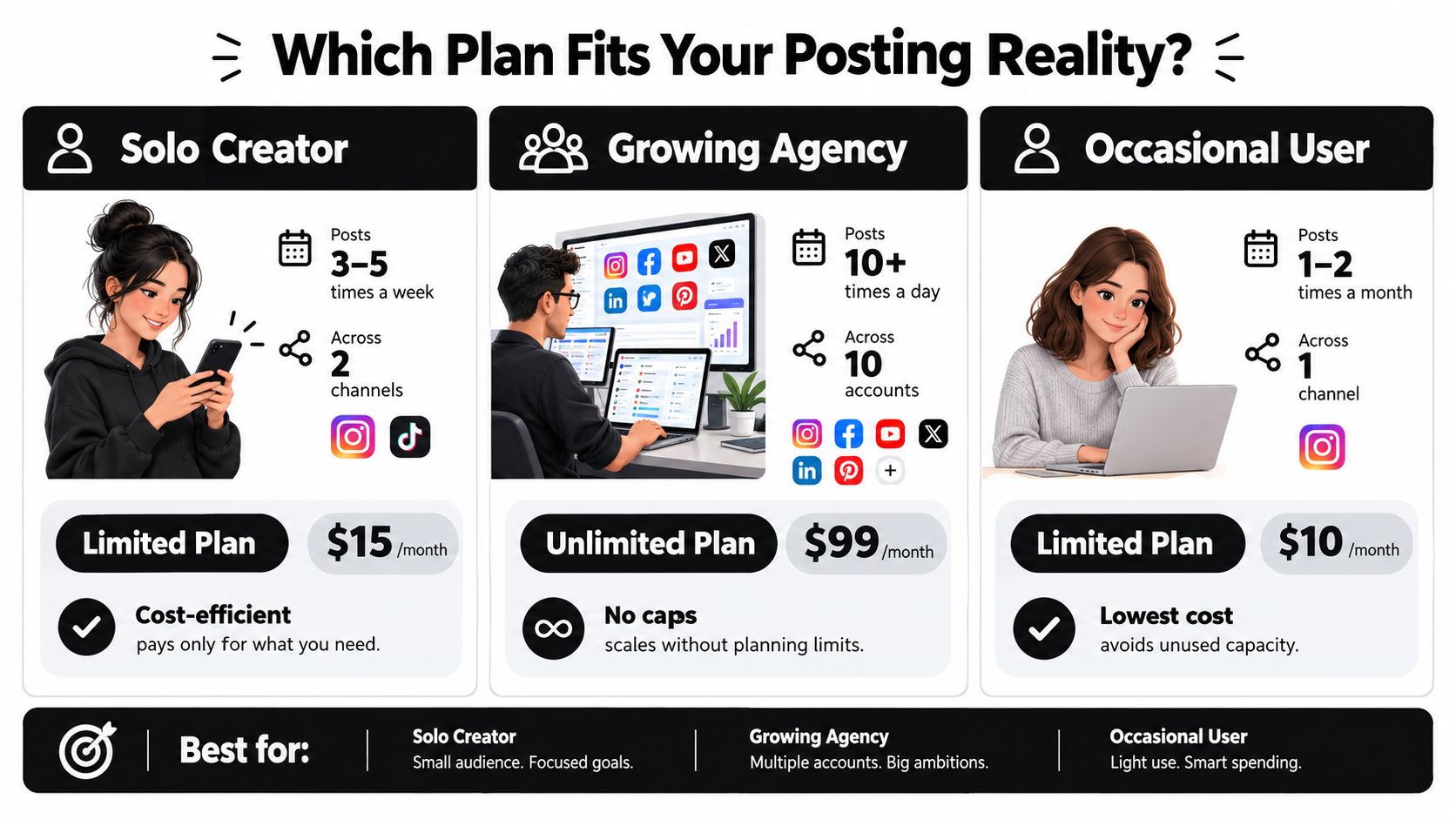
A useful tiebreaker is your team's reaction to a wall. If someone calmly reduces the queue and publishes the rest natively, limited may be fine. If a cap triggers panic, missed approvals, or a launch scramble, unlimited is paying to remove a recurring operational failure.
Migrating Between Plan Models Without Losing Content
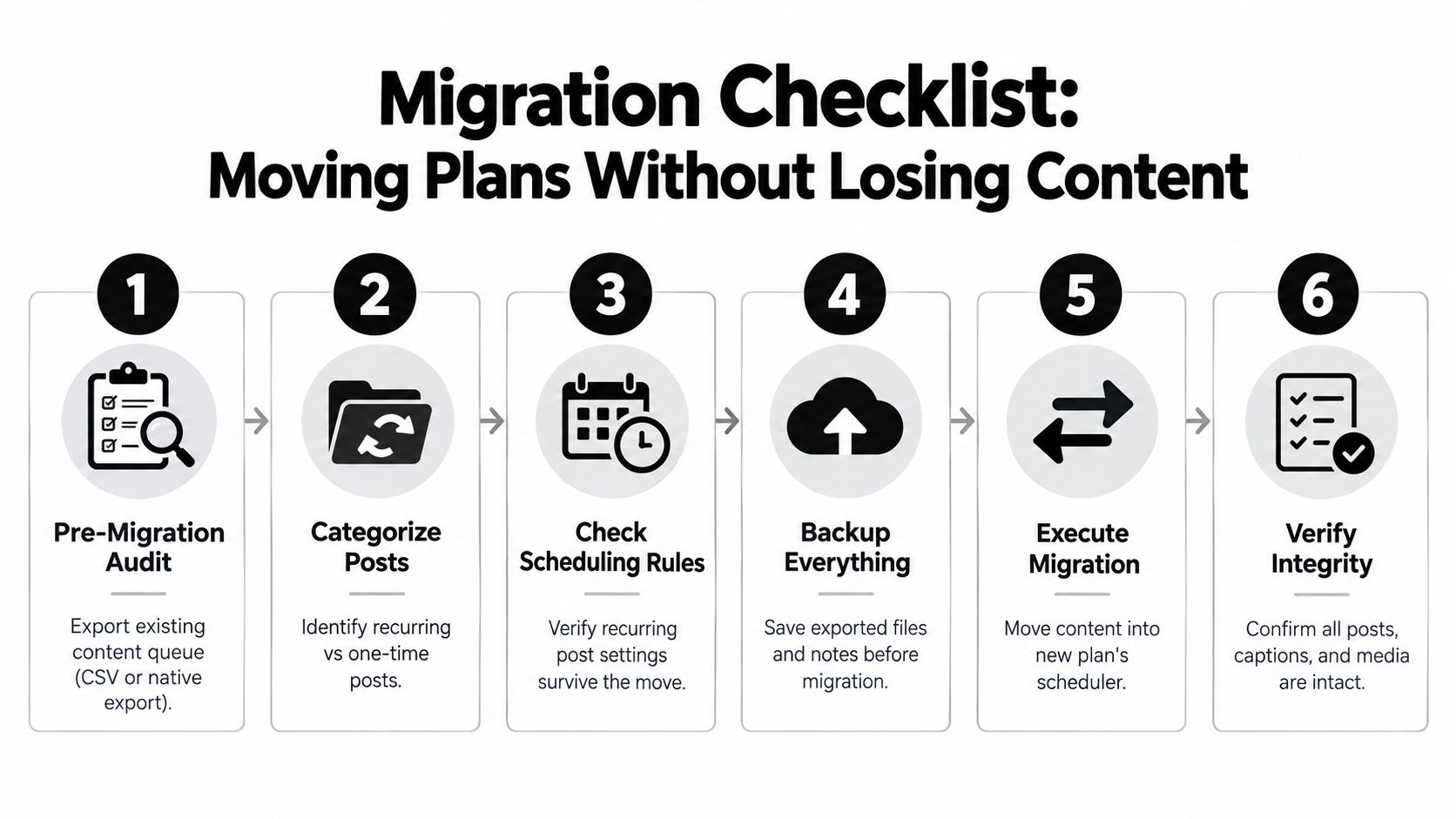
Treat a plan change as a controlled data move. An upgrade can be easy to click and hard to reverse if the old queue, recurring rules, media files, and permissions don't transfer cleanly.
Build the backup before changing billing
Start with a pre-migration audit. Export the queue through CSV or the platform's native export, record post dates and channels, and separate recurring content from one-off posts. Screenshot the calendar view as a visual reference, because a successful export may not preserve the old interface's layout or status indicators.
Next, create a short migration register:
- Recurring content: List each repeating post, interval, start date, and end condition.
- One-time content: Mark launch posts, announcements, and posts with fixed dates.
- Media references: Note which captions depend on specific files, crops, or video versions.
- Permissions: Record who can create, approve, publish, and view analytics.
- Drafts: Back up unfinished copy separately, especially before a downgrade.
Re-import recurring posts first. They form the schedule's backbone, and rebuilding them later creates avoidable gaps. Move one-time campaign content after the recurring structure is stable, then re-add media through the new library instead of assuming old file links will remain valid. For heavy creative files, check the platform's large file uploads requirements before the move.
Protect the trial and verify the first day
A 7-day trial that requires a credit card can convert automatically when the trial ends. Set a calendar reminder two days before conversion, confirm the billing status, and cancel if the test doesn't survive a real workflow. Downgrades deserve equal care because older drafts may reset or become inaccessible when the lower tier applies.
For the first 24 hours after migration, verify:
- Scheduled dates and time zones.
- Captions and platform-specific variations.
- Media attachments and thumbnails.
- Recurring rules and next-run dates.
- User permissions and approval status.
- Publishing notifications and failure alerts.
Don't delete the old account or cancel the old plan until the first scheduled cycle completes successfully. A clean migration is one where the audience never notices that the scheduler changed.
Choosing the Right Scheduler With Confidence
Make the decision with three questions: How many posts do you publish in a normal month? How many accounts and people need access? Do recurring queues matter more than platform-specific analytics depth?
A limited model fits a stable operation that stays under 80 posts per month, especially when the team values per-platform analytics tiers more than high-volume queue management. That recommendation assumes the quota applies to the work you publish and that campaign spikes aren't frequent enough to create emergency upgrades.
An unlimited plan fits batch publishing, evergreen recycling, and multi-account management when a quota starts shaping editorial choices. SleekPost offers paid plans with unlimited posts and unlimited scheduled posts, alongside capabilities such as recurring posts, a media library, large file uploads, and publishing across multiple social platforms. Treat those features as items to test against your own queue, account, approval, and media requirements rather than as substitutes for due diligence.
| User profile | Monthly posts | Priority feature | Recommended model |
|---|---|---|---|
| Occasional publisher | Low and stable | Lowest predictable spend | Limited |
| Consistent solo creator | Below 80 | Analytics and adequate queue room | Limited |
| Campaign-focused business | Variable, with launch bursts | Batch publishing and recurring content | Unlimited |
| Agency or multi-account team | High or distributed across clients | Account management and queue depth | Unlimited |
The practical buying filter
Choose limited when the calendar is stable, the team is small, and a quota won't interrupt publishing. Choose unlimited when volume arrives in batches, evergreen content matters, or several accounts share one operating process.
Before you subscribe, load a representative batch. Test recurring posts, attach your heaviest normal media, invite the people who approve content, and inspect the account limits. If the system performs well during that test, the pricing model is probably aligned with your workflow.
The single takeaway: Unlimited is a workflow design choice, not just a higher post count.
SleekPost gives paying users unlimited posts and unlimited scheduled posts, with tools for recurring content, media management, and publishing across multiple social platforms. Visit SleekPost and test your real campaign queue during the free trial before a plan cap becomes your next Monday morning problem.