TikTok's longest possible video and the length you can publish are two different numbers, and neither one tells you how long your video should be. The platform's own history explains why: its predecessor launched with a 15-second limit in 2016, grew to 60 seconds at global expansion in 2018, then to 3 minutes in 2021 and 10 minutes in 2022, a 40-fold increase in six years, according to TikTok's newsroom. A ceiling that has moved that many times isn't a fixed product specification. It's a moving target that differs by publishing route, by account, and by region.
That has a practical consequence most guides skip. The number you should plan around isn't the biggest one you've read about. It's the limit on the exact route you'll hit publish through, plus a separate editorial judgment about how much runtime your idea earns.
Table of Contents
- TikTok Video Length Limits by Upload Route
- How Account, Region and Access Change Your Limit
- Verify Web Upload and TikTok Ads Limits
- Creator Rewards Minimum Duration
- Whether Longer Videos Get More Reach
- Choose Your Length and Confirm the Route Before You Post
- How to Check Video Length Before You Publish
- Length Errors and How to Fix Them
TikTok Video Length Limits by Upload Route
Start with the comparison, because a single universal number misleads every reader who doesn't publish the way the author does.
| Publishing route | Maximum length | What limits it |
|---|---|---|
| Recording inside the TikTok app | 10 minutes | Recording tool availability can vary by account and region |
| Mobile app upload of a finished file | Up to 60 minutes | Completed file from the device; app version and region can affect it |
| TikTok Studio upload | 30 minutes | MP4 or WebM, minimum 720x1280 resolution, file under 10 GB |
| Content Posting API | 3 minutes for all creators | 5 or 10 minutes only for eligible creators; the endpoint rejects files over 10 minutes |
| Web upload | No published figure available | Confirm against TikTok's current web upload specification |
| TikTok Ads | No published figure available here | Check the current ad specification for the exact ad format |
The gap between those rows is the whole story. Current documentation summarized by Speedrun Social's breakdown of TikTok post limits puts in-app recording at up to 10 minutes and direct mobile uploads of completed files at up to 60 minutes, while the Content Posting API lets all creators post videos up to 3 minutes, with 5-minute or 10-minute publishing opened to some creators, and an upload endpoint that won't accept anything over 10 minutes.
Work through the rows from the route most creators use to the least documented. In-app recording is the default for anyone shooting inside TikTok, and it's the most restricted of the mainstream options, because the tool itself caps what you can capture. Uploading a finished file from your camera roll roughly sextuples that ceiling, which is why creators who edit externally get more headroom than creators who shoot natively.
TikTok Studio sits between them. Third-party publishing through the API is the tightest route of all, and it's the one most scheduling tools and cross-platform integrations use.
The rule the table leaves behind: the limit that matters is the limit on the route you publish through, not the longest number you've seen quoted anywhere.
Two rows carry no verified figure, and that's deliberate. Web upload and TikTok Ads both exist as publishing surfaces, but neither has a documented maximum in current sources, so they're marked as unevaluated rather than filled with a guess. Readers who schedule video to other networks alongside TikTok run into the same route confusion elsewhere; this guide to Twitter video length limits shows how much a single platform's ceiling can differ between the app and the publishing API.
Why the mobile app and the API disagree
The consumer app is built for people holding a phone. The API is built for software making authenticated requests at scale, and it enforces stricter validation because the platform can't inspect each submission interactively. A video that uploads cleanly by hand may be rejected by an integration running on your behalf.
That asymmetry catches businesses, not hobbyists. A social media manager who tests a 12-minute upload manually will assume the file is fine, then watch a scheduled post fail at the worst possible moment.
How Account, Region and Access Change Your Limit
TikTok's available duration can vary by account, region, app version, and publishing access. A figure that applies to one creator does not automatically apply to another.
Account availability. TikTok has introduced longer recording and upload options gradually. The options shown to you depend on what is enabled for your account.
Regional rollout. Features may reach markets at different times. As a result, creators in different countries may see different duration options, even when using the same app version.
App version. An older build may not show options available in a newer one. Updating the app can help distinguish an outdated interface from an account or regional restriction.
API access. Programmatic publishing can have different eligibility rules from recording or uploading in the TikTok app. Check the limit for the specific publishing route and account before scheduling a video.
Reported tests are not published limits
Longer uploads have occasionally appeared in limited testing. Those tests do not establish a published limit for all accounts, regions, or routes. Someone else's access is not proof that the same option is available to you.
Treat a duration as confirmed only for the account and publishing route where it is available.
Three checks to run on your own account
- Confirm the app build: update TikTok, reopen the recorder, and check the duration options shown.
- Check account access: look for longer recording or upload options. If they are absent, your account may not have access.
- Compare the scheduler with the route's specification: check the publishing tool's stated maximum against TikTok's documentation for that route. If they differ, use the lower figure until you confirm which limit applies.
Agencies managing client profiles may encounter different options across accounts. A shared workflow for managing multiple TikTok accounts from one dashboard can make those differences easier to track before scheduling.
A limit applies only to the account and route where it has been confirmed.
Verify Web Upload and TikTok Ads Limits
Web uploads and ads need separate checks. TikTok's web-upload specification applies to that publishing route; ad limits depend on the specific ad format. Record the maximum duration, file format, resolution, file size, and date checked for each.
1. Find the current specification for the exact route. Use TikTok's web-upload documentation for browser uploads and the specification for the ad format you plan to run.
2. Record the conditions. Account, region, and app or browser version can affect what a route accepts. Include them so the result can be reproduced.
3. Test at your intended maximum length. A short sample does not establish whether a much longer file will pass. Rejection may occur during encoding or transfer.
4. Save the result and check again periodically. A specification can change, so a previously confirmed limit may no longer apply.
5. If the route fails or has no published specification, use a route with a documented ceiling. TikTok's app and TikTok Studio offer documented limits. Avoid relying on a guessed web or ad maximum.
Practical rule: A successful organic upload does not confirm that the same length is allowed in an ad. Check the specification for the ad format itself.
Treat figures from third-party articles as unverified until they match TikTok's official page. For posts sent to multiple destinations, schedule a post and customize it for each platform, so you can adjust the format or route if one destination rejects the video.
Creator Rewards Minimum Duration
Every limit discussed so far is a maximum. TikTok's Creator Rewards program runs the opposite rule. The Creator Rewards documentation states that eligible videos must be at least one minute long, which makes the 60-second threshold a monetization eligibility requirement, not the general upload limit.
That distinction gets flattened constantly. A creator reads "60 seconds" in a rewards context and concludes TikTok won't accept shorter videos, then pads a 20-second idea to a minute to satisfy a rule that doesn't apply to it.
Three separate values belong in any content plan, and they should never collapse into one setting.
The platform's maximum accepted duration. Set by the route, as the table shows. This is a hard technical wall.
The creator's intended duration. Set by the content. A one-step tip needs eight seconds. A product teardown needs three minutes.
Any program-specific minimum. Set by the monetization program the video is entered into. For Creator Rewards, that's 60 seconds.
Once the three live separately, editorial decisions get easier. A quick hook can stay short for ordinary posts, while reward-oriented explainers, tutorials, and reviews need enough runtime to clear the threshold without padding. A tutorial built for rewards knows before scripting that it needs a full minute of substance, which usually means a second example or a longer demonstration rather than slower delivery.
Keep the minimum as a configurable rule rather than a global one. Hard-coding 60 seconds as a platform limit pushes every ordinary post longer than it should be and quietly costs completion rate.
The same three-value logic applies when you're deciding where monetization effort is worth spending at all, which is a broader question than TikTok alone: compare what each platform pays before building a content calendar around a rewards threshold. Program rules also change independently of upload limits, so re-read TikTok's own program page rather than trusting a secondary summary, including this one.
Whether Longer Videos Get More Reach
The assumption that short TikToks always win is wrong on the aggregate data, and right on the mechanism. Both parts matter.
Analysis of more than 1.1 million videos found that videos longer than 60 seconds generated 43.2% more reach and 63.8% more watch time than videos lasting 30 to 60 seconds, per Buffer's analysis of longer TikToks. Against shorter baselines the gap widens further: longer videos produced 175.6% more watch time than 10-to-30-second videos and 264.5% more than 5-to-10-second videos.
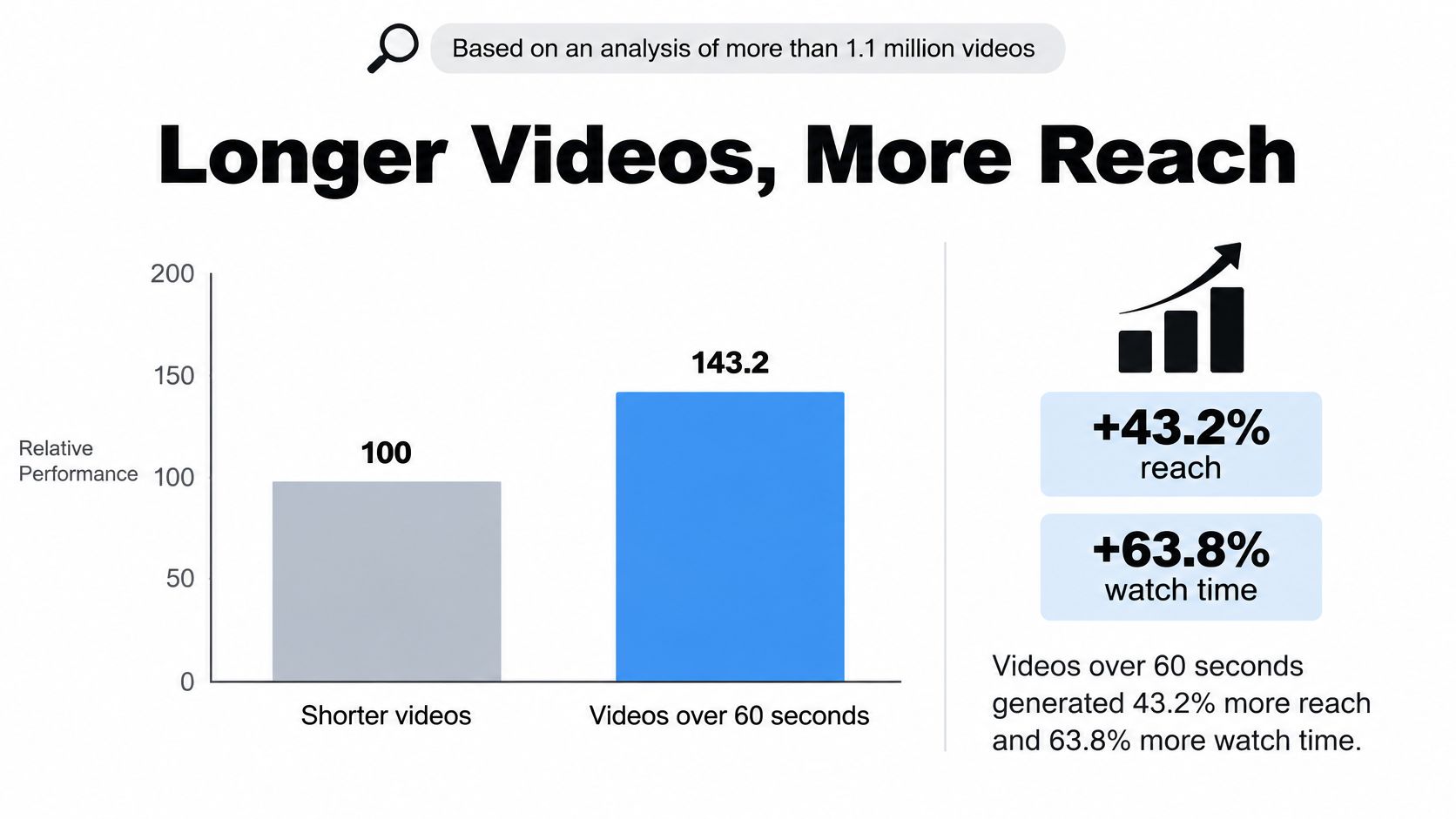
Read that as a license to post 20-minute rambles and you'll lose. The same analysis found that only about 12% of the videos examined exceeded one minute, and those longer videos had a median watch time of 11.3 seconds against 6.9 seconds for 30-to-60-second videos. So the average viewer leaves a long video sooner in relative terms. Long videos win on total watch time while losing ground on early retention.
The ceiling and the effective length are different questions
"tiktok video length limit" answers what the platform will accept. It says nothing about what holds attention. A video can sit comfortably under every technical maximum and still be four times longer than the idea inside it.
The useful question is narrower: when does added runtime create enough value to offset the extra drop-off it invites? That depends entirely on the content's shape.
- One-step ideas: a single demonstration, a reaction, a quick tip. Short clips finish, and a finished clip is a strong signal.
- Tutorials: a process with sequential steps needs the steps shown, and cutting them produces a video nobody can follow.
- Reviews and comparisons: the verdict only earns trust if the reasoning is visible. A 25-second verdict reads as an advert.
- Storytelling and search-driven explanations: context takes time. Viewers who searched for the answer will stay for it.
If your videos are underperforming despite decent length, duration isn't the first variable to inspect. Diagnosing why views stall on TikTok usually points at the hook or the retention curve before it points at runtime.
The practical method is measurement, not a rule. Track retention, completion rate, watch time, and reach on your own account, then compare a 40-second cut against a 3-minute cut of comparable ideas. Those four metrics will tell you where your audience's patience sits. A universal duration recommendation can't, because it was never measured on your viewers.
Choose Your Length and Confirm the Route Before You Post
Three decisions, in order. Each one narrows the next.
First, choose the length from the content. What does the idea need? A one-step tip suits a short clip. A tutorial, review, or explainer needs the runtime to show its reasoning. If the video is headed for Creator Rewards, it needs at least 60 seconds to clear the eligibility floor. Decide this before you export, because length chosen after editing is usually length imposed by the edit timeline rather than by the idea.
Second, confirm the route's ceiling. Take your intended length and check it against the row in the table that matches how you'll publish. Recording in-app caps at 10 minutes. A finished file uploaded through the mobile app reaches up to 60 minutes. TikTok Studio accepts up to 30 minutes. API publishing through a scheduler or integration tops out at 3 minutes unless the account has extended eligibility, and the endpoint refuses anything past 10 minutes regardless. If the route can't take the length, either change the route or change the length. Don't discover the mismatch at publish time.
Third, run the technical check before the video enters the queue. Duration, container, resolution, and file size all get validated together, not one at a time after a failure.

A scheduler earns its place when it lets you set length per platform rather than forcing one export everywhere. SleekPost supports posting to 10 platforms including Facebook, Instagram, Twitter, YouTube, TikTok, LinkedIn, Bluesky, Threads, Pinterest, and Telegram, and each post can be customized for each platform, so a full-length TikTok cut can sit in the same campaign as a trimmed version for networks with tighter ceilings.
The single action that prevents a failed post: before you publish, confirm the length against the route you're actually publishing through. Not the route you tested on last month.
How to Check Video Length Before You Publish
Six steps, each with a reason. Working through them in order takes a couple of minutes and eliminates nearly every publish-time failure.
1. Identify the route you'll publish through. In-app recording, app upload, TikTok Studio, the API, or a third-party scheduler. Each has its own ceiling, so naming the route first stops you comparing your file against the wrong number.
2. Read the duration from the encoded file, not a typed field. Variable-frame-rate footage and container metadata can disagree with the actual stream, so a manually entered duration is a claim rather than a measurement.
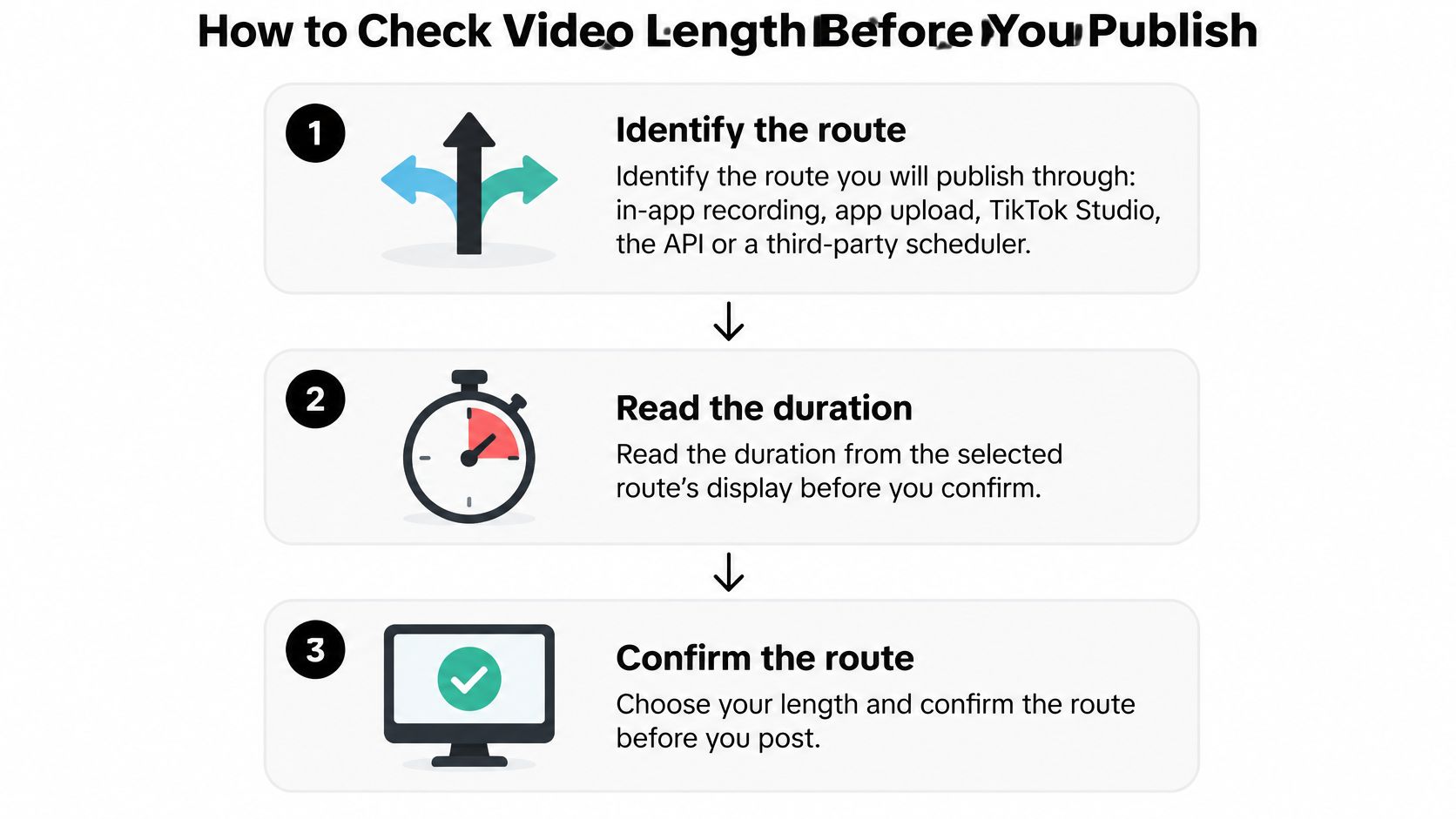
3. Compare that measured duration with the route's maximum. TikTok's current creator-upload specification lists a maximum of 30 minutes for videos uploaded through TikTok Studio, per TikTok's creator tools documentation, which is 1,800 seconds. Anything longer needs a different route or a trim.
4. Confirm the container, resolution, and size. The same specification requires MP4 or WebM, a minimum resolution of 720x1280, and a file size below 10 GB. A file within the duration limit still fails if it misses any of these.
5. Trim or re-encode if it fails, keeping the original. Preserve the source file, then generate a platform-specific rendition under 10 GB using H.264 video with AAC audio and 9:16 vertical framing. Re-encoding from the original once beats re-encoding an already-compressed copy.
6. Run the check before queueing. Validation at queue time gives you room to fix the file. Validation at publish time gives you a missed slot.
The 30-minute TikTok Studio figure is a ceiling, not a target. Long uploads increase processing time, storage consumption, and transfer failure risk, the same documentation notes, and they raise the odds a viewer leaves before the main value arrives.
A passing check looks like a log entry: measured duration, container, resolution, and file size recorded for each video before the post is queued. If you're capturing at that stage anyway, get the aspect ratio right in the same pass rather than re-exporting twice. Creators assembling a capture setup that produces clean source files the first time will find these budget vlogging kit picks a useful starting point.
Length Errors and How to Fix Them
The most common failure isn't a video that's too long. It's a video that plays perfectly in the TikTok app and gets rejected by a scheduler or API integration. The file was never the problem. The route was.
Diagnose in this order, because it's ordered by how fast each fix is.
Check the route first. A third-party tool may publish through an API with a lower ceiling than the consumer app. That accounts for most "it worked when I tried it manually" failures, and switching routes takes seconds.
Then check creator eligibility. If the file is under the app's ceiling but the tool caps at 3 minutes, the account likely lacks extended API publishing access. Eligibility takes longer to resolve than a re-encode, so knowing early matters.
Then check container, resolution, and size. A file that's the right length can still fail on format. This is the third check because it's the least common cause of a length-shaped error.
Only then trim the video. Cutting content is the most expensive fix and the one people reach for first. Most length errors are route or eligibility problems that trimming doesn't solve.
| Symptom | Likely cause | Fix |
|---|---|---|
| Upload rejected for a video over 10 minutes through the API | Endpoint limit of 10 minutes | Trim the file or publish from the TikTok app |
| Video over 3 minutes fails in an automated tool | Standard API ceiling for creators without extended access | Check creator eligibility or shorten to 3 minutes |
| File plays in the app but fails in a scheduler | Different publishing route with a lower cap | Validate against the route the scheduler uses |
| Large file stalls or fails to upload | Container, resolution, or size outside the TikTok Studio specification | Re-encode to MP4 at 720x1280 minimum and under 10 GB |
One failure mode deserves its own line. A file can pass a preview duration check and still fail at publish, because the metadata the preview read doesn't match the encoded stream. That's why step two in the validation sequence reads the actual media rather than a duration field.
Most of these fixes take minutes. Eligibility changes can take considerably longer, which is why changing the route often beats re-editing the file. A creator who needs a 12-minute tutorial live today should publish it from the app rather than wait on API access to widen.
The pattern across every section holds here too. The error message rarely says which limit you hit, only that you hit one. Naming the route before you troubleshoot turns a vague rejection into a specific, fixable constraint.
SleekPost handles the part of this that's pure bookkeeping: one dashboard where each post carries its own length and format per platform, so a long TikTok cut and a short version for tighter networks can be scheduled together without re-uploading twice. The Starter plan includes 5 connected social accounts with multiple accounts per platform, unlimited posts, and 500MB file uploads, which covers a creator running several TikTok accounts alongside everything else. Start with the 7-day free trial at SleekPost and confirm your route's real ceiling before the next post goes into the queue.