You've got a post ready, but the image is still in a downloads folder, the client hasn't approved the caption, and yesterday's comments are unanswered. Meanwhile, a scheduled promotion is about to publish even though the offer has changed.
To manage social media posts reliably, you need more than a full calendar. You need a routine that connects creation, accessibility, approvals, publishing, replies, and results, with a clear way to stop everything when circumstances change.
Table of Contents
- The Workflow From Plan to Results
- Plan the Calendar and Batch Creation
- Adapt Each Post for Every Platform
- Approvals, Accessibility and Safety Checks
- Schedule, Repeat and Automate Without Losing Control
- Measure, Respond and Iterate Your Posts
- Start Your First Week of Scheduled Posts
The Workflow From Plan to Results
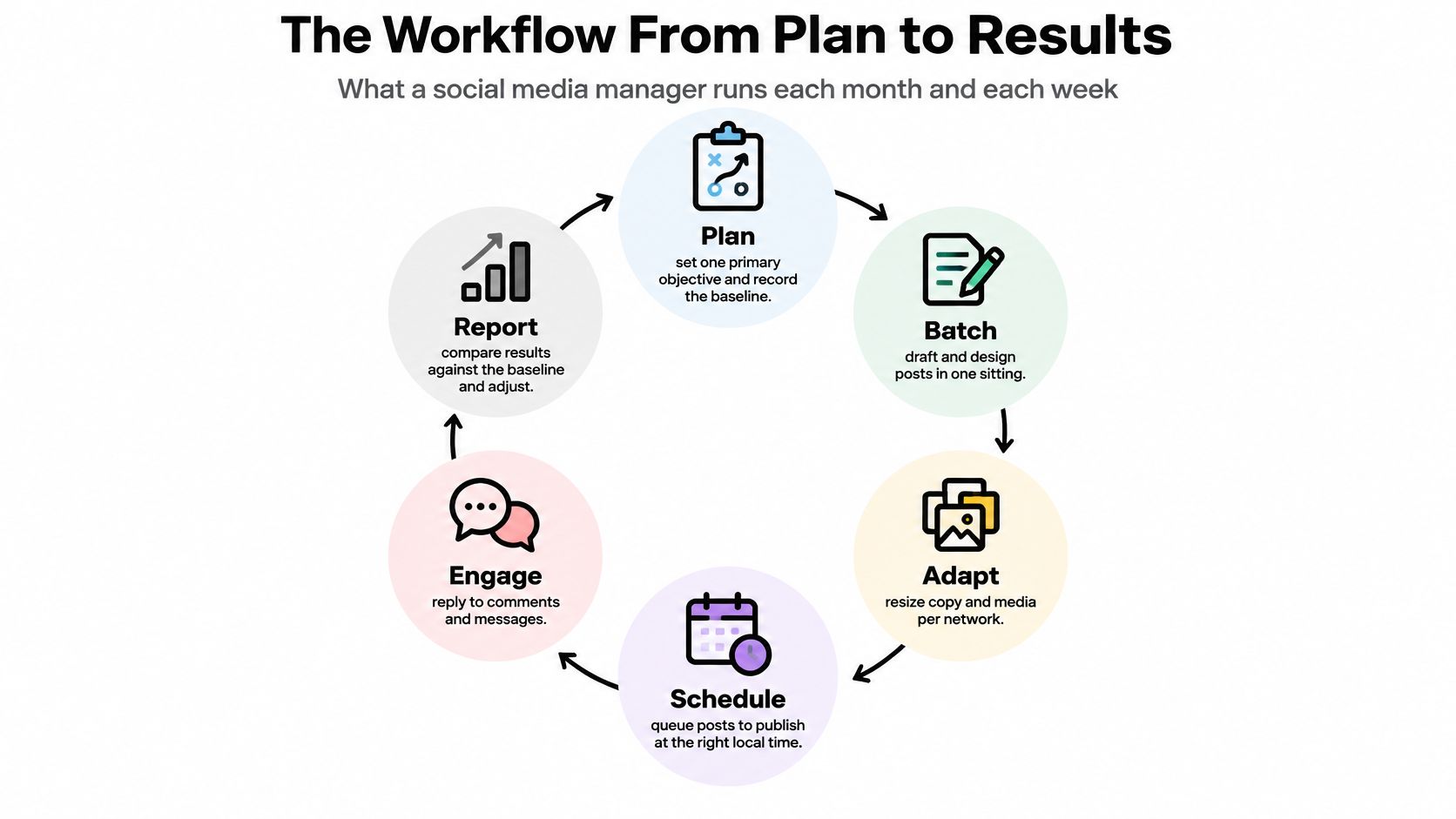
A missed post often starts well before its publishing slot. Someone drafted it without assigning an approver, or nobody checked whether the media was ready. Treat publishing as a loop with named outputs, not a collection of reminders.
Review the plan monthly, then run the operating cycle weekly. Check individual posts before publication and monitor replies while campaigns are active. The monthly decision is where to invest effort; the weekly decision is what to change based on audience response and operational problems.
The six stages of a social media posting workflow
| Stage | What you produce | Decision you make | Review rhythm |
|---|---|---|---|
| Plan | Monthly objective and a calendar of post slots | Which objective and which platforms | Monthly, checked weekly |
| Batch | Drafted core messages, images and video clips | Which ideas are grouped into one session | Weekly |
| Adapt | Platform-specific version of each draft | What changes for each network | Every batch |
| Schedule | Queued posts with publish times and recurring rules | Which posts recur and which need a fixed time | Weekly |
| Review | Approved posts and a reply log | Who signs off and which posts are held | Before each publish |
| Measure | Like-for-like results and a list of formats to keep | Which formats and cadence to repeat | Weekly |
The circular view keeps engagement and reporting connected to the next planning decision.
This routine works for a solo creator, a small business, or an agency handling client accounts. The number of approvers changes, but every post still needs an owner and a final decision.
Test your current process against last week's posts. Can you identify the objective, original draft, adapted version, publishing decision, approval, and result for each? A blank beside review or measurement is a more useful finding than another list of content ideas.
The workflow usually breaks at the stage you skip, not the one you do most.
Plan the Calendar and Batch Creation
Start with the outcome, not an empty calendar. If you can't explain what a post should accomplish, don't assign it a publishing slot yet.
Set a cadence you can evaluate
The Rival IQ Social Media Benchmark Report found that engagement didn't correlate reliably with posts per day. More publishing isn't automatically better publishing. Choose a sustainable starting cadence, keep creative quality reasonably consistent, and look for repeatable changes rather than reacting to an isolated weak post.
Choose a primary objective. Pick reach, engagement, traffic, or conversions, then record the relevant platform baseline. The common slip is assigning every objective to every post, which leaves you without a clear success criterion.
Give every calendar slot a purpose. Record the audience segment, format, call to action, channel, campaign, owner, and status. A slot labelled only by weekday tells the team when something is due, not why it exists.
Set the test before publishing. Write down the initial cadence and what evidence would justify increasing or reducing it. Don't change frequency and creative direction together, because you won't know which change mattered.
Use a content calendar creation process that separates planned, drafted, approved, and held content. For a time-sensitive campaign, Express Text on event social promotion is a useful companion for organising event-related messages rather than treating every announcement as interchangeable.
Batch ideas, not repetitive copy
Keep the calendar and baseline visible while creating, so production follows an actual publishing decision.
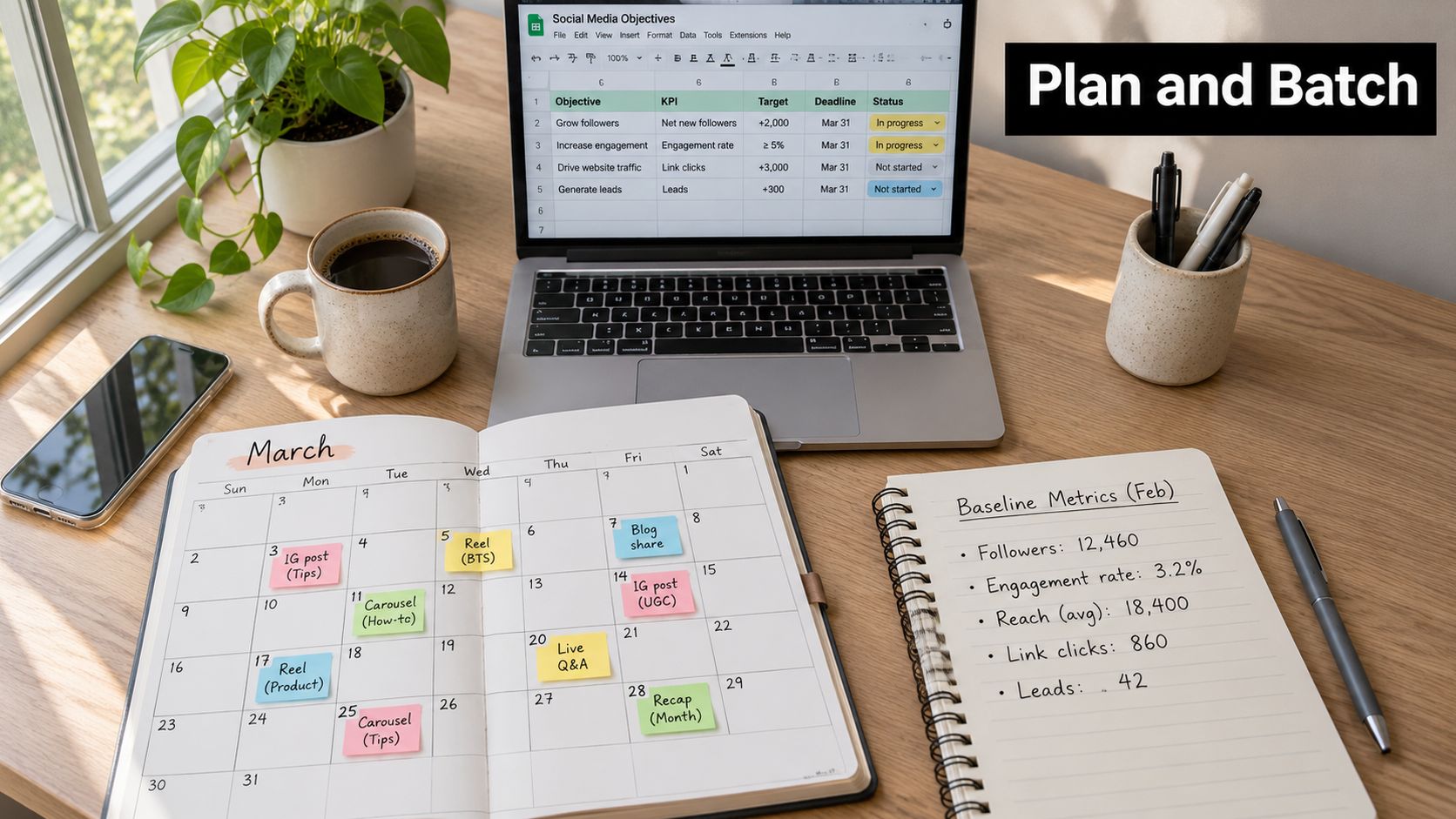
Group related production work. Draft the week's core messages together, then record supporting material beside each draft. Batching by theme saves context switching, but near-identical posts make the feed repetitive.
Use AI for the first draft, not final judgement. Give an AI content generator an article link, a described topic, or a YouTube video, then check its claims and replace wording that doesn't sound like the brand. A fluent draft can still contain an unsupported promise or miss the point of the original material.
Attach approved assets. Put photos, clips, and carousel slides in a shared media library with permission notes and recognisable filenames. Don't make the publisher guess which downloaded file is cleared for use.
Leave a hold lane for timely material that needs a fresh decision. Batching should fill purposeful slots, not remove room for judgement.
Adapt Each Post for Every Platform
A product walkthrough does not travel as one file. The same demonstration can become a vertical TikTok clip with readable on-screen instructions, an Instagram carousel of the key steps, and a LinkedIn text post about the problem the product solves.
A viewer watching a demonstration needs visible action. A professional reading a text post needs a useful lesson before any product pitch. Those are editorial choices, and a resize will not do that work.
Pew Research Center's US platform research reports that 83% of adults had ever used YouTube, 68% Facebook, and 47% Instagram. Those figures describe platform use, not the reach your account can expect. The split is why one master caption fails a weekly plan.
How to adapt one post for each platform
| Platform | Format to test | Adaptation to make |
|---|---|---|
| YouTube | Tutorial or Short | Name the topic plainly in the title and description; add captions |
| Native video or image with a link | Give the opening a community-relevant angle; keep the destination clear | |
| Carousel or Reel | Put the main benefit first; add image descriptions | |
| TikTok | Vertical demonstration | Show the action promptly; pair spoken explanation with captions |
| Lesson-led text post | Lead with a practical insight and put supporting context before the link | |
| X, formerly Twitter | Concise text with an image | Make the hook understandable without opening another page |
| Vertical image pin | Use a descriptive title and link to the matching landing page |
Bluesky, Threads, and Telegram sit on the same publishing list. Give each its own copy and media rather than dropping a LinkedIn paragraph into a short composer.
Use the table as an editorial comparison before you commit a campaign to a channel, and check current composer options for links, previews, and media. While you adapt, write the emergency stop for that variant: a wrong destination, a claim comments cannot support, or a thread you cannot moderate in time. Put that condition next to the draft so a weekly review can see what you pulled and why.
Make the topic understandable
For discovery beyond followers, use explicit subject wording in titles, captions, on-screen text, and spoken explanations. HubSpot's social media marketing report highlights recommendation-led distribution. Clear wording gives people and platform systems useful context without keyword stuffing.
Before a variant is ready to schedule, check its hook, length, aspect ratio, caption, hashtags, alt text, link treatment, and call to action. Note who answers comments on that format. A Reel and a LinkedIn lesson draw different replies, and the person on duty needs the variant's claim in front of them. The distinction between repurposing and duplication is central to what cross-posting means; Premierely's guide to cross posting for music curators offers a specialist example of adapting a shared idea across channels.
In the weekly review, compare the adapted versions against the original idea. Keep the container that made the topic understandable. Retire the one you had to stop.
Keep the same idea. Change the container.
Approvals, Accessibility and Safety Checks
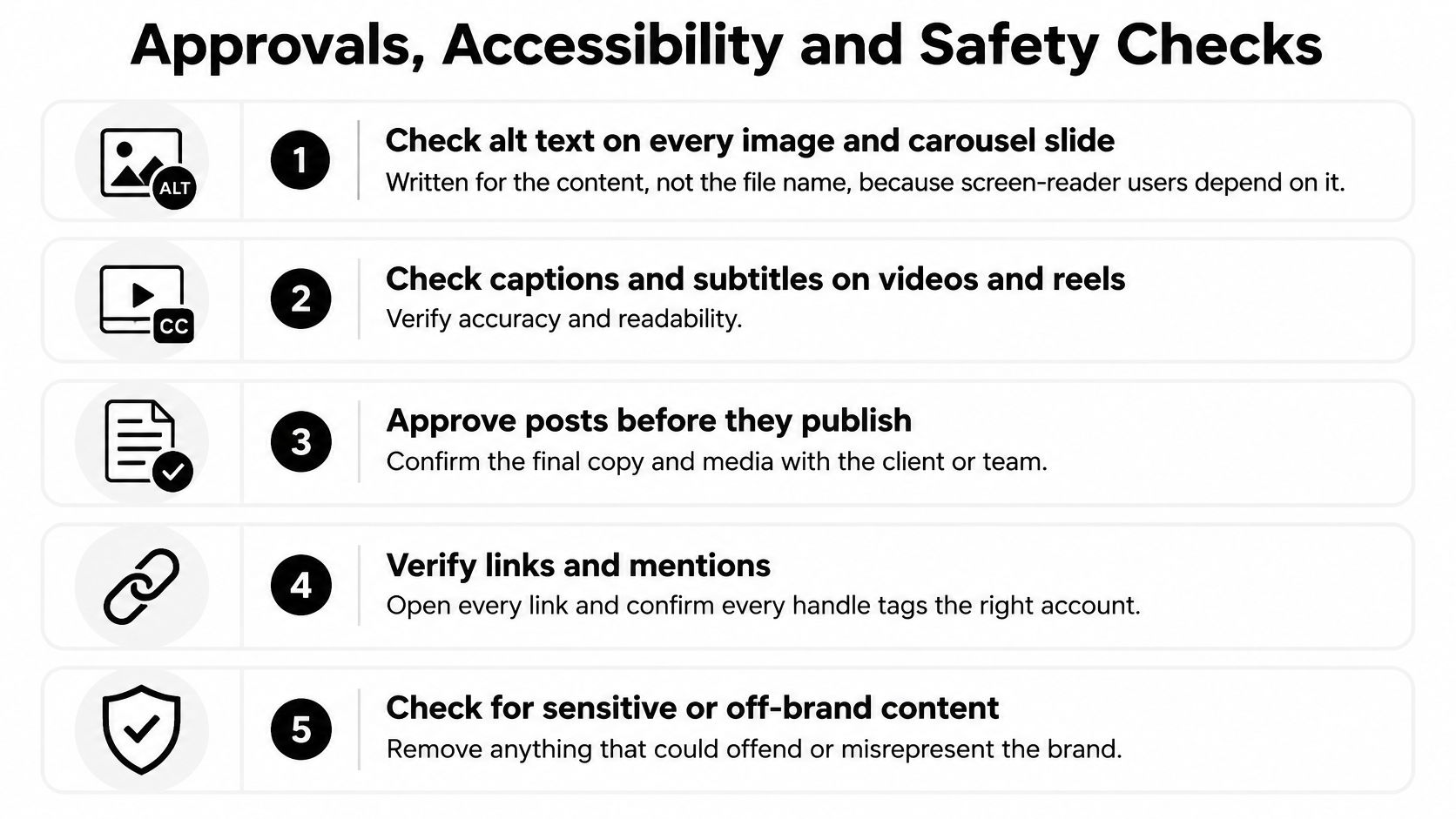
Approval is the final editorial check before a post goes live. Confirm that people can understand and use the content, the team can support its claims, and someone is ready to handle responses. Make this review part of the weekly publishing rhythm, not a task reserved for high-profile campaigns.
A 2025 study of moderation accessibility involving 15 people with vision impairments found learning, compliance, and psychological costs when using moderation tools on Facebook and X. A platform control that seems straightforward during planning may be difficult to find or operate during a stressful incident. Check that the person on duty knows how to respond before publication.
Make the release checklist explicit
Describe meaningful images. Write alt text that explains the image's relevant content, including important text or information not already in the caption. A filename is not a description.
Check video accessibility. Correct automatic captions, review subtitle contrast, and confirm that interface overlays do not hide instructions or other important details.
Verify asset permissions. Confirm that photos, footage, music, and customer contributions are cleared for use before approval. Record the permission so the team can check it later.
Check claims and disclosures. Match claims to supporting evidence and review applicable advertising requirements, particularly for paid partnerships and sensitive health or finance topics.
Assign release authority. Name who drafts, who approves, and who can stop publication. A solo operator can still pause between drafting and final review.
Set moderation rules. Answer genuine questions, preserve legitimate criticism, and hide or report policy-breaking abuse. Document threats and identify who should receive an escalation.
Apply the checklist to the final preview, after platform-specific edits. A change to the caption, image, or video can introduce a fresh accessibility or approval issue.
A written content approval process should state which edits require renewed approval. For hospitality posts, confirm guest-facing details with the appropriate operational checklist, such as this short term rental checklist for hosts.
Keep an emergency stop
A scheduled post reflects an earlier decision. Before release, check it against current news, business conditions, and customer concerns. If the context has changed, pause and review rather than letting the calendar decide.
Write down who can stop publication, which accounts may be affected, and what approval is needed before restarting. SleekPost lets users disconnect a social account, delete media from their library, or delete individual posts at any time. Deleting a library file alone does not cancel a scheduled post.
If a post needs to be held, stop publication, remove affected scheduled posts, and check each network for content already live. Resume only after someone has approved the revised context.
Schedule, Repeat and Automate Without Losing Control
Timing matters because reactions can arrive quickly. A social scheduling study published by ACM, analysing more than 144 million posts and over 1.1 billion reactions, found that most networks received the majority of reactions within the first two hours after publication.
That's a reason to schedule around your audience and staffing, not a promise that a particular time will rescue weak content. The study describes historical platform behaviour; your account's current activity should guide the actual slots.
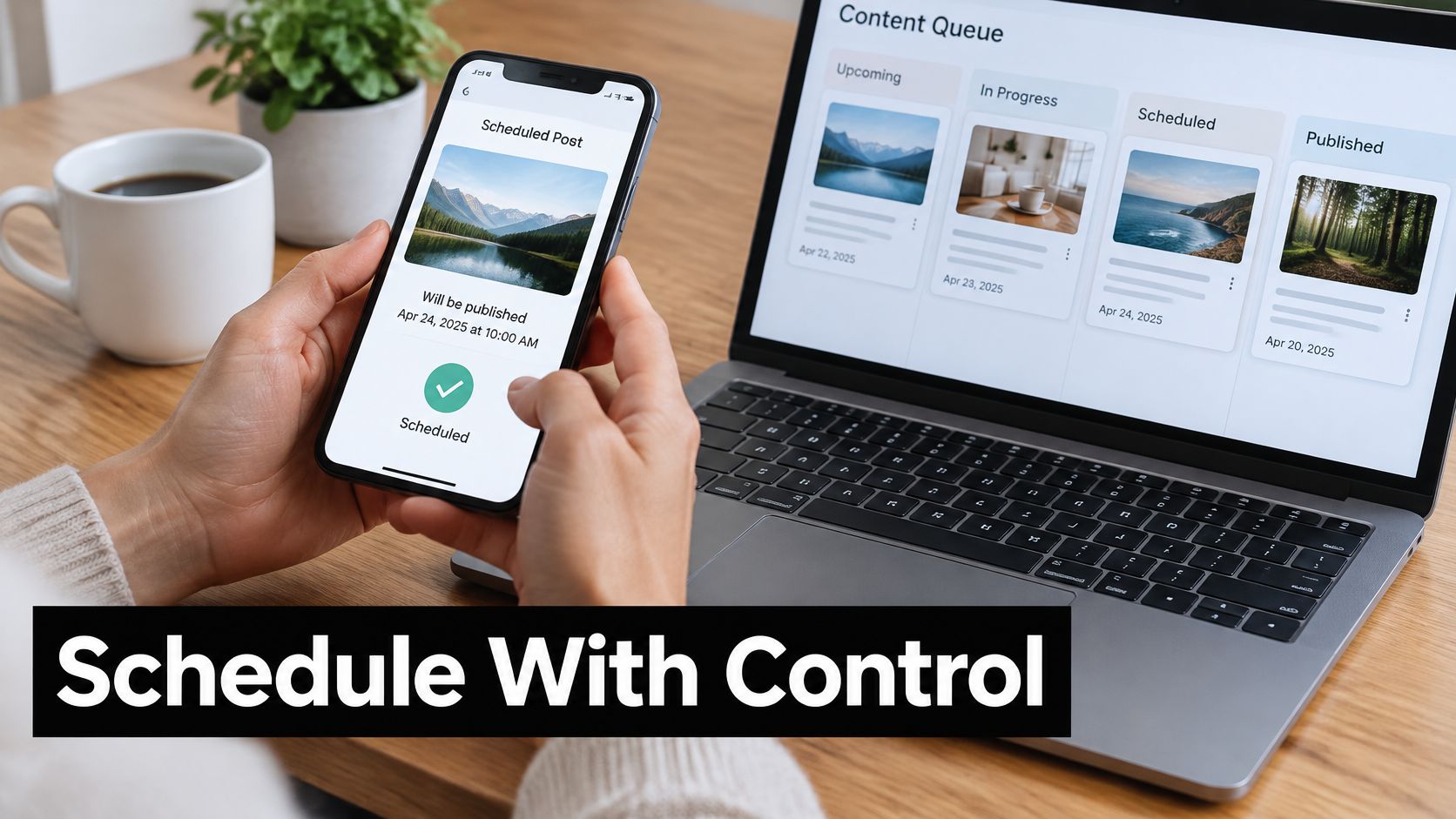
Keep the calendar visible while setting publication times.
Separate delivery from editorial decisions
We send posts and media to the chosen networks through their official APIs, publishing on the user's behalf without requiring a manual login for each post. We publish at the correct local time based on the time zone of the user's device.
Posts scheduled through us have the same reach as manually published posts. That doesn't mean every post receives identical results; scheduling is a delivery method, while content, timing, and audience response still matter.
Run the queue with explicit rules:
- Fill planned slots. Don't add a post merely because a day looks empty.
- Use account-level timing signals. Choose platform-specific slots and make sure someone can monitor important releases.
- Repeat only durable material. An accurate how-to may recur; a dated announcement shouldn't.
- Limit auto-reposts. Check whether the audience still needs the message and whether the destination remains useful.
- Audit the queue weekly. Look for expired offers, changed details, duplicate ideas, and content that no longer fits the campaign.
Use recurring social media posts for information with a clear review owner. Record what would make each recurring post obsolete, such as a product change or revised policy.
The publishing controls are easier to assess when you can see the workflow in action.
Handle failures without creating duplicates
If a queued post fails, check the account connection, media compatibility, and network error first. Then inspect the destination account before retrying, because a delayed confirmation can look like a failed publication.
Reschedule the existing item where possible rather than creating another copy. Edit scheduled content in place and preserve its campaign identifier in your tracking sheet.
Automation rule: Every recurring post needs an owner, an expiry condition, and a way to stop its next publication.
Measure, Respond and Iterate Your Posts
A published post creates response work, not just a reporting entry. HubSpot's social media strategy guidance recommends responding within two hours or less; treat that as a planning target, not a universal service promise.
Set coverage that matches the campaign. A product launch needs someone ready for questions, while an evergreen tutorial may need scheduled inbox checks. Acknowledge an issue promptly when resolving it requires another team member.
Which metric answers which question
| Metric | Question it answers | Compare only with |
|---|---|---|
| Impressions | How many times the post was shown | Same platform and format |
| Unique reach | How many different people saw it | Same platform and time window |
| Engagement rate | How strongly people interacted | Same denominator, followers or impressions |
| Clicks and UTM sessions | Who went on to the link | Posts with the same call to action |
| Saves and completed views | Whether the content is worth repeating | Account baseline for the same format |
| Comments and replies | Response workload and sentiment | Same topic and platform |
Keep a reporting sheet you can use
Pull native platform results into a common sheet with the post identifier, campaign, format, publication time, objective, and outcome. Follow a consistent performance-tracking process, but retain each platform's metric definitions.
Engagement rate needs a named denominator. Interactions divided by impressions answers a different question from interactions divided by followers. Don't combine the resulting rates into a single cross-platform ranking.
Add UTM parameters to campaign links and connect relevant conversion events in your website analytics. Use a post-level experiment identifier to distinguish variants without relying on captions that may change.
Separate content problems from execution problems
Log broken links, wrong crops, weak opening frames, delayed replies, and policy rejections separately. Otherwise, you might discard a useful topic because its destination didn't load or its main instruction was cropped out.
Engagement also isn't proof of business impact. When you can't connect a post to a purchase or enquiry, label sentiment, word-of-mouth share, and engagement as proxy measures, not revenue.
At the weekly review, make a short keep, change, and stop list. Repeat formats that outperform the account baseline on meaningful outcomes such as saves, qualified clicks, or completed views, rather than choosing winners on likes alone.
Close the review by assigning each change an owner. A report without a publishing decision is just a record of what happened.
Start Your First Week of Scheduled Posts
Make the first week small enough to finish. You're testing whether the operating routine works, not proving that you can maintain every possible channel.
Run a manageable pilot
Monday, choose the outcome. Select a primary objective and a small platform mix, then record the starting metrics. Choose channels you can create for and monitor without abandoning customer work.
Tuesday, build the calendar. Give each proposed post an audience, format, action, channel, and owner. Leave unready ideas in draft rather than assigning them optimistic release dates.
Wednesday, prepare the variants. Batch the core material, adapt it, and complete the release checks. Hand over a finished publishing package, not a folder of assets someone else must interpret.
Thursday, inspect the live operation. Confirm that intended posts appeared correctly, check replies, and investigate failures. Update the queue if business details have changed.
Friday, record the decisions. Compare like-for-like results, note operational defects, and choose what deserves another test. If the audience response is still developing, keep the experiment open rather than declaring a winner.
Use the dashboard without skipping the process
SleekPost lets you publish to multiple social media platforms at the same time from one dashboard, removing repeated copy-and-paste. Free users can create and schedule five posts per month, while paying users have unlimited posts. Keep the pilot within the available allowance and account for the platform variants you intend to publish.
The practical test is whether every scheduled item has a clear owner, an approved version, and a measurable purpose. Write your first calendar this week, then place the six workflow stages beside it and fill the missing decisions before you queue anything.
SleekPost offers scheduling, per-platform customisation, and recurring-post controls for managing a consistent publishing routine from one dashboard. Visit SleekPost to prepare your first calendar, queue approved posts, and leave time for the replies and review that make publishing useful.