
You posted every day this week. Impressions climbed, a few posts picked up comments, and the weekly recap looked healthy. Then you opened the newsletter tool and the subscriber count hadn't moved. The posts did their job as content. They didn't do the job you needed.
That's the gap in how to track performance. A like proves someone paused. It doesn't prove a signup, a lead, or a sale. The workable approach is triangulation: tagged links, platform numbers, what customers say when you ask, and an occasional controlled test. Every result gets a confidence level. You don't credit one post with one sale just because the timestamps sit close together.
Table of Contents
- Pick the Goal Your Numbers Must Prove
- How to Set Up Tracking on Every Platform
- Consolidate Metrics Into One Monthly Dashboard
- Attribution Confidence Levels Explained
- How to Run a Test Without Fooling Yourself
- Read Patterns That Engagement Alone Hides
- Start Your First Weekly Tracking Review
Pick the Goal Your Numbers Must Prove
A creator can publish daily, watch impressions rise, and still find zero new subscribers. The posts attracted attention. They never pointed at a goal a number could prove. Before you export anything, write the business result in one sentence and pick one primary KPI that would settle an argument.
The mismatch is common. Recent global research finds that 68% of social teams measure engagement and 65% measure conversion rates, while more advanced teams are more likely to use revenue and efficiency metrics. Nielsen's 2025 global ROI research reports that 38% of marketers rank sales or ROI among their top two success metrics, and 60% focus on both reach/frequency and ROI in cross-media measurement. A high-engagement post and a quiet post that books better conversations aren't the same win.
| Goal | Primary KPI | Diagnostic metrics | Efficiency check |
|---|---|---|---|
| Sell a product or course | Purchases or revenue | Link CTR, landing-page sessions, conversion rate | Cost per sale, hours per post |
| Grow an email list | New subscribers | Link clicks, landing-page conversion, saves | Subscribers per hour of content work |
| Generate B2B leads | Qualified leads | Profile visits, saves, link clicks, form starts | Cost per qualified lead |
| Drive app or SaaS trials | Trial starts | Clicks, signup page conversion, video completion | Trial starts per post |
| Build a personal audience | Returning followers or newsletter subscribers | Watch time, completion rate, shares, saves | New followers per hour |
A newsletter writer watches new subscribers, then link clicks and landing-page conversion to see where people drop. A B2B consultant watches qualified leads, with profile visits and saves as early signs of interest. A SaaS founder watches trial starts, not follower count. The efficiency column is what separates a busy account from a valuable one. Hours per post and cost per outcome sit next to the KPI so a format that burns an afternoon for two clicks loses to a shorter post that converts.
The campaign performance measurement playbook from FindClout is a useful companion when you need to tie a campaign back to a commercial result rather than a vanity chart. If you want the math in one place, a social media ROI calculator keeps hours, spend, and outcomes on the same page.
Write the goal in one sentence. Name one KPI. Record a baseline from the last eight weeks. Set a target for the next quarter. Four lines. That's the sheet you review against, not the platform's default chart.
How to Set Up Tracking on Every Platform
Tags fail more often from sloppy names than from missing pixels. Agree on the scheme before you build a single link, or GA4 will split one platform into three rows.
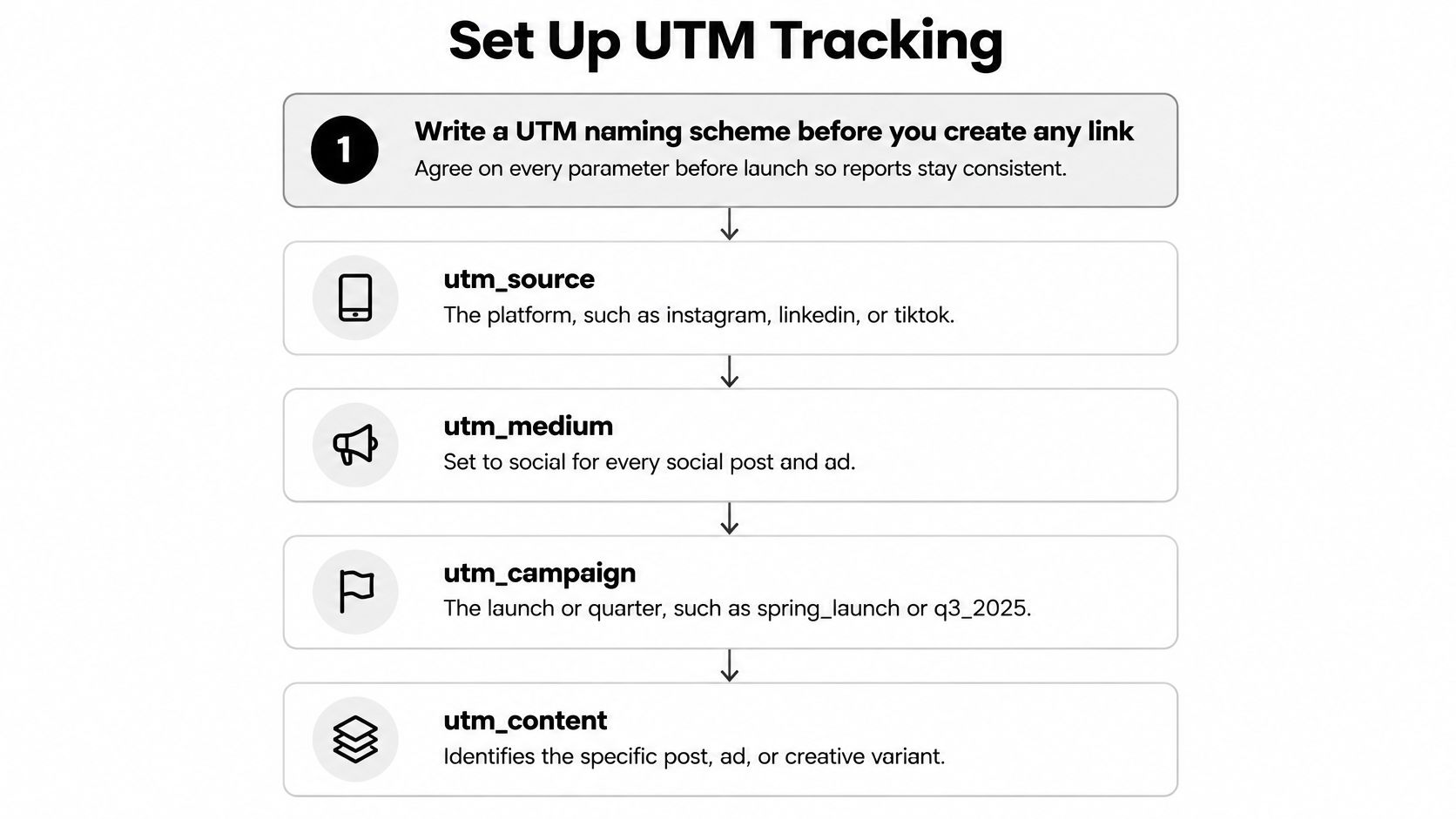
- Write the naming scheme first. Use
utm_sourcefor the platform (instagram,linkedin,tiktok),utm_mediumset tosocial,utm_campaignfor the launch or quarter, andutm_contentfor the post format or ID. Keep every value lowercase with hyphens. Mixed case is the usual slip, andInstagramplusinstagrambecome two sources. - Build every link in Google's Campaign URL Builder. Paste that full URL into the bio, caption, or description. A shortener with no UTMs behind it throws the click into direct traffic, and you've lost the post.
- Install one tag per conversion platform on the site. That means the Meta Pixel, TikTok Pixel, LinkedIn Insight Tag, and Pinterest tag. Skip a platform you don't advertise on. Extra tags just add noise and consent prompts.
- Confirm each tag fires before you trust a report. Use the platform's test tool and a browser helper extension. A pixel that "looks installed" in the dashboard can still fail on the thank-you page.
- Define two conversion events. One primary event (purchase, signup, or lead) and one micro event (email capture or add-to-cart). A slow month still gives you a signal if the micro event is moving.
- Turn on native analytics and export weekly. Use the professional dashboards on Instagram and TikTok, LinkedIn page analytics, and YouTube Studio. Pull each to CSV on the same weekday. If you're still learning the Instagram side, this walkthrough of how to get insights on Instagram covers the native view those exports come from.
- Filter GA4 traffic acquisition to source and medium social. Publish one test link per platform and check realtime. If the hit doesn't appear within a few minutes, the link in the caption isn't the tagged one.
Do this once per campaign, not once per post from scratch. Reuse the campaign value and only change utm_content.
Consolidate Metrics Into One Monthly Dashboard
Publishing 100 posts is an implementation result. It isn't evidence the posts created attention or business value. NIST's performance-measurement guidance treats measurement as a systematic approach that should be thorough, and it splits metrics into implementation (was the work carried out), effectiveness or efficiency (did it produce the intended result with reasonable resource use), and impact (broader business consequences). A dashboard that only shows output will congratulate a busy month that sold nothing.
Define each metric once
Platforms don't share formulas. Engagement rate may divide by followers on one network and by reach on another. Click-through rate only compares if the denominator is the same everywhere, impressions or reach, pick one and write it down. Put those definitions in a shared glossary before anyone builds a chart. Two people arguing over a rate are usually arguing over a formula.
| Layer | Metrics to include | Data source | Review cadence |
|---|---|---|---|
| Implementation | Posts planned vs published, platform coverage, format mix | Scheduling tool, native exports | Weekly |
| Effectiveness | Engagement rate, link CTR, saves, video completion rate | Native analytics, GA4 | Weekly |
| Impact | Leads, signups, purchases, revenue, cost per outcome | CRM, store, GA4 conversions | Monthly |
| Efficiency | Hours per post, cost per qualified lead, outcome per hour | Time log, ad spend, CRM | Monthly |
Build it so the review stays short
Use one Google Sheet. One tab per platform, pasted from the native CSV. One tab for GA4 social traffic. One tab for conversions from the CRM or store. A Looker Studio page on top of that sheet keeps the monthly review under 30 minutes, which is the point. If the review takes an afternoon, you'll skip it.
Set the baseline as the median of the last eight weeks, not your best week. A spike from one viral post will make every normal week look like a failure. Show each metric against that median, and report each format on its own row. A strong Reel can hide a carousel that never earns a click. For the paid side of the same sheet, ad metrics from AdCrunch are a clear reference when you need cost and efficiency definitions that organic dashboards leave out. The habits in reporting best practices keep that monthly page readable for a five-person team instead of a dump of every available column.
Attribution Confidence Levels Explained
Say a listener shares your podcast clip on TikTok. A colleague sees it, sends a DM, and three days later someone buys through direct traffic. No single report owns that path. Last-click will call it direct. The platform will call it a view. Both are incomplete.

Recent B2B research names ROI attribution as a top challenge for 56% of marketers and cross-journey customer tracking as a challenge for 57%, and it flags dark social, where social-originated visits show up as direct traffic. The 2025 B2B social media report is blunt about that gap. Treat the sources as a set, and grade each one.
| Evidence source | What it proves | Blind spot | Confidence |
|---|---|---|---|
| Tagged clicks matched to conversions in GA4 | Visitor arrived from a specific post and converted in the same session | Misses later return visits and other devices | High |
| Platform-reported pixel conversions | Platform users who converted after seeing or clicking | Counts overlap across platforms | Medium |
| Self-reported source on signup or checkout | Customer remembers the discovery channel | Recall bias, and the answer may be a friend | Medium |
| Branded search and direct traffic trend | Demand is rising after a campaign | Could come from PR, seasonality or other channels | Low, directional |
Three buckets, never added together
Report revenue in three buckets: directly attributed, influenced, and brand-lift directional. Don't sum them. Adding a tagged sale to a "maybe TikTok" sale double-counts the same customer and invents a ROI nobody can defend.
On the signup or checkout form, add a dropdown: your platform names, plus "a friend or podcast." That one field catches dark social that pixels miss. People misremember, so treat the answer as medium confidence, not a receipt.
Practical rule: A single week of branded-search growth on a small audience is noise. Wait for several weeks against the same baseline before you call it demand.
A short walkthrough of reading those overlapping reports helps when the numbers disagree:
How to Run a Test Without Fooling Yourself
Attribution tells you where to look. A controlled comparison tells you whether the change caused the result. Google's experimentation guidance recommends reading the point estimate, the margin of error, and the p-value together. A common decision threshold is p < 0.05, and only when the confidence interval excludes zero.
- Write the hypothesis in one sentence. Example: carousels with a product demo on slide two will raise link CTR from Instagram over the next four weeks.
- Name one primary KPI and the lift worth acting on. A 20% relative increase in CTR is a decision. A 2% wiggle isn't, even if the chart slopes up.
- Lock the duration before you start. At least two full content cycles. Longer if you post fewer than three times a week. Stopping when the chart first looks good is how you publish a lucky week.
- Split comparable audiences where the platform allows it. A holdout or a geo split works for paid. For organic, alternate formats across matched weeks and say so. That design is weaker, and you shouldn't pretend it's a randomized test.
- Compare conversion rates by absolute lift and a confidence interval. If the interval includes zero, you don't have a result yet. Map the KPI with consistent names, IDs, timestamps, and UTM parameters so platform events and analytics events are the same action. Posting time can confound a format test, so check the best time to post on social media and hold the window steady while the creative is what you're testing.
The usual ways a test lies
Changing creative or targeting mid-test rewrites the question. Stopping at the first positive day freezes a fluke. Counting both the pixel conversion and the GA4 conversion as two sales inflates the lift. A seven-day attribution window on a 30-day buying cycle drops the people who were going to buy next month.
Say an account with 6,000 followers runs a two-week format test and sees a 9% CTR gap. The interval still includes zero. The right call is to run it again, not to rebuild the content plan around a difference that could be noise.
Read Patterns That Engagement Alone Hides
The post with the most likes can still be the post with the least business value. Reading one number in isolation is how that happens. In January–February 1992, Robert S. Kaplan and David P. Norton published "The Balanced Scorecard: Measures that Drive Performance" in Harvard Business Review. The Harvard Business School faculty record of that article describes four perspectives: financial performance, customers, internal business processes, and learning and growth. Reach, impressions, clicks, and conversions aren't a complete scorecard on their own. Pair the outcome with a customer signal, an operational signal such as publishing consistency, and a capability signal such as how much content you can realistically produce.
Each metric only means something next to the one after it. What audience engagement measures is interaction, not purchase intent, which is why the chain below starts after the like.
| Pattern | Usual meaning | Next move |
|---|---|---|
| High engagement, low link CTR | The hook works but the link or call to action does not | Move the link into the first comment or pin it, and rewrite the CTA |
| Good CTR, flat signups | Landing page does not match the post's promise | Compare the post's first sentence with the page's headline |
| Signups up, revenue flat | Audience is curious, not ready to buy | Test the offer, price page or a follow-up email sequence |
| Output on plan, impact flat | Content is busy, not valuable | Cut the lowest outcome-per-hour format and test a replacement |
| Low reach, high saves | Content is useful and shareable within a niche | Repurpose the post into a newsletter or lead magnet |
Score formats by outcome per hour, not by comments. A consultant's carousel might draw fewer comments than a meme and still produce three qualified calls. That carousel earns more production time. The meme earned the scroll. Visible attention that doesn't support retention, revenue, or the goal on your sheet is a distraction with good design.
Start Your First Weekly Tracking Review
A weekly review that takes longer than half an hour won't survive a busy month. Split 30 minutes into four blocks and stop when the timer ends.
Ten minutes, paste. Drop each native CSV into its tab. Don't clean historical rows during the review. Fix the export once, then paste.
Ten minutes, compare. Check planned versus published, then engagement rate and link CTR against the eight-week median. Note one format that's ahead and one that's behind. Skip anything that isn't on the glossary.
Five minutes, log one change. One sentence: what you'll do differently on the next batch. Two changes means you won't know which one moved the number.
Five minutes, write next week's test. One hypothesis, one KPI, a stop date. If you don't have a hypothesis, don't invent a test to fill the slot.
SleekPost fits the publishing half of that routine. Schedule the batch there so planned-versus-published comes off the queue, paste the same UTM-tagged link on every post in a campaign, and use per-platform copy plus the AI Content Generator to make one variant at a time. Recurring or auto-repost keeps an evergreen test on a stable schedule. Outcome numbers still come from native analytics, GA4, and your CRM. The scheduler doesn't replace them.
For the next seven days, pick one goal, build one tagged link per platform, and record the baseline before you publish anything new.
SleekPost schedules and publishes to 10+ platforms from one dashboard, with per-platform copy, recurring posts, and an AI Content Generator so the content you measure goes out on a steady cadence. Pair that publishing rhythm with the tagged links, monthly sheet, and confidence levels above, and the weekly review has something real to read. Start a 7-day trial at SleekPost and put next week's batch on the calendar before you touch another vanity chart.