
A packed content calendar is the advice everyone repeats, and it is the habit that makes plans go stale. Filling every date feels like control. It is usually a stack of promises with no owner, no spare hour, and no rule for killing a post that no longer fits.
I would rather run a thinner grid I can defend than a month that looks finished and then slips. Dates are the cheap part of content calendar creation. The useful part is a row with one job, one person, one metric, and permission to leave slots open. What follows is that operating system: fields, a first-month cadence, a four-week build, weekly honesty checks, uncommitted capacity, and a decision to repeat, refresh, or retire.
Table of Contents
- The Fields Every Calendar Row Needs
- Starting Weekly Cadence by Platform
- Build and Fill the First Four Weeks
- Habits That Keep the Calendar Honest
- Spare Capacity When Plans Change
- Repeat Refresh or Retire Each Post
The Fields Every Calendar Row Needs
Start with the row, not the title brainstorm. A calendar is the execution grid: it maps topics, formats, publication dates, channels, owners, and deadlines. It does not, by itself, define the audience, the business objective, positioning, or the measurement plan. When Content Marketing Institute research published in 2018 asked B2B marketers about strategy, 37% said theirs was documented, while another 38% described a strategy that existed only in memory.
Write the editorial mission in one sentence before any date goes on the sheet. Then name five to seven coverage areas and pick topics inside them, which is the structure that same guidance recommends. A coverage area is a recurring job for the reader, like "weekend specials" or "behind the counter," and it should still make sense six months from now. A theme that expires after one campaign belongs in a brief, not on the grid. Mission and coverage areas first. Rows second.
The row you can copy
Every row needs the fields below. Status may only be idea, drafting, in review, scheduled, published, or killed. Killed matters more than it looks: a dead idea leaves the grid on purpose instead of decaying in a "someday" column, and the open slot becomes usable capacity. A field with no owner is a wish. Tie status changes to a real content approval process so "in review" means a person and a cutoff, never a parking lot.
| Field | What to write | Worked example |
|---|---|---|
| Publication date | Day and local publish time | Saturday, 8:30 a.m. local |
| Channel | One network per row | |
| Format | Feed, Reel, carousel, thread, Short, pin, or text | Reel |
| Pillar | One of five to seven coverage areas | Weekend specials |
| Audience | Who this version is for | Local Saturday shoppers |
| Hook | Opening line or visual, rewritten per network | The case is full by 9 |
| CTA | The single action you want | Save the menu |
| Asset location | Where the file or draft lives | Media library, pastry-reel-v2 |
| Owner | Person who can approve it | Maya |
| Status | Idea, drafting, in review, scheduled, published, or killed | Scheduled |
| Primary KPI | One metric tied to the objective | Saves |
| Flexibility | Fixed-date, flexible, evergreen, or experimental | Flexible |
The asset column works best when it names a file, not a folder somebody has to hunt through. SleekPost stores uploaded photos and videos in a media library, so the row can point at "pastry-reel-v2" and anyone covering for Maya can find the exact clip.
One idea, three rows
Say a neighborhood bakery runs a weekend-specials pillar. One week becomes three rows, each with its own hook and deadline, rather than one caption pasted three times. A 20-second Instagram Reel of the pastry case: hook "the case is full by 9," CTA "save the menu," owner Maya, KPI saves. A LinkedIn text post about Saturday staffing aimed at nearby office managers, different hook, CTA to plan a team coffee run. A Pinterest pin of the menu photo for people planning a weekend stop, KPI outbound clicks.
Same campaign idea. Three hooks. One deadline each. If Maya cannot approve the Reel, that row stays in "in review" and its date is a placeholder. The other two still ship.
Starting Weekly Cadence by Platform
Cadence is a capacity decision, not a leaderboard. Use the bands below as a first-month load. Change one platform at a time only after you have an internal baseline for reach, engagement rate, saves, click-through rate, and the percentage of posts published on time. I would not chase a viral "success multiplier" from a marketing site. Build your own baseline instead.
| Platform | Starting posts per week | Strongest job | Signal to watch |
|---|---|---|---|
| 3-5 | Proof, Reels, and saves | Saves and watch time | |
| TikTok | 3-5 | Discovery | Average watch time |
| YouTube | 1 long-form or 2-4 Shorts | Search and depth | Watch time |
| 2-4 | Expertise and pipeline | Comments and profile visits | |
| 3-5 | Community and local offers | Meaningful comments | |
| X | 4-8 | Timely points of view | Replies |
| Threads | 3-5 | Conversation | Replies |
| 5-7 | Evergreen search traffic | Outbound clicks | |
| Bluesky | 3-5 | Short updates | Replies |
These bands are starting points, not platform laws. A consultant who can film one afternoon a week can hold LinkedIn at three posts and skip daily short-form until a second batch of clips exists. Scaling creator posts on TikTok only pays off when the filming block already covers the edits. If it does not, the TikTok row is fiction. For Instagram specifically, match the band to hours you can defend, using a clear rule for how often to post on Instagram rather than someone else's streak.
Three planning layers
Separate strategy from the production schedule. The University of Surrey best-practice framework recommends researching what the audience consumes, identifying when it is most active, defining objectives, creating content pillars, choosing a sustainable weekly frequency, and tracking relevant metrics.
Run that as three layers:
- Quarterly: Name three to five themes tied to a business priority, such as booked intro calls or repeat local orders.
- Monthly: Tag every scheduled post with its theme and one job, awareness, consideration, conversion, or retention, so the grid does not overproduce low-intent formats that look busy and still miss sales.
- Weekly: Check whether production hours cover what is dated, then compare published work with the KPI already on the row.
A full calendar can still lack audience fit, differentiation, or a measurable outcome. Consistency is not effectiveness.
When the hours do not cover the dates
Before you lock a frequency, note what that audience already watches or reads, and the window when they are active. Start with one or two platforms and a cadence the team can sustain. If approval slips two weeks running, drop a row from the table. Do not add a third network to "make up" the gap.
Test one variable at a time. Change the hook, the format, the posting window, or the CTA, and hold the campaign objective still. Promote only the winning pattern into the next cycle.
Build and Fill the First Four Weeks
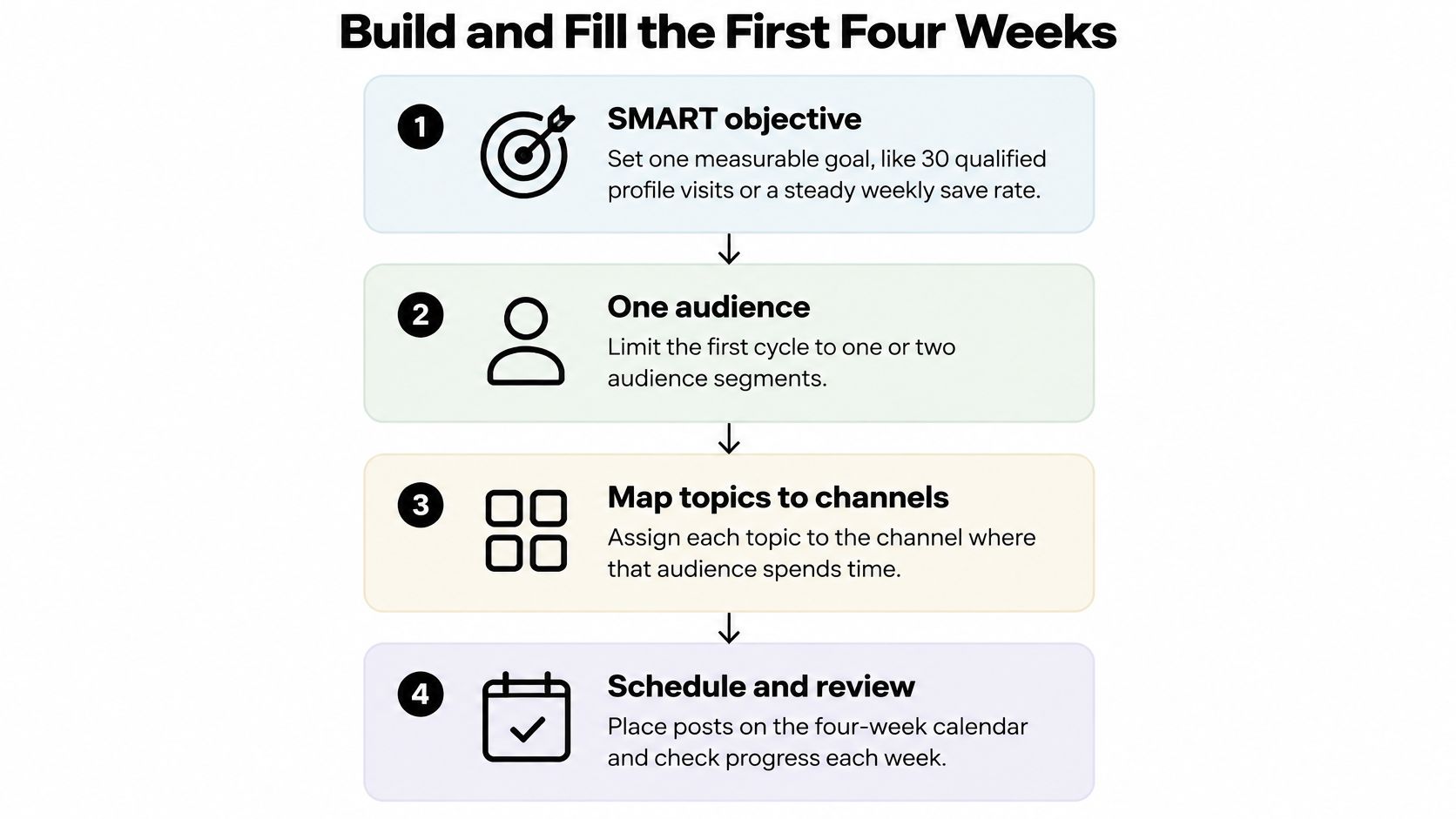
Build month one in order. Dates come after the objective, the audience, and the hours. Locking a quarter in advance is how small teams invent work they will not finish.
The University of Florida planning guidance treats goal-setting, platform selection, and message design as the three core planning components, and it recommends mapping content to the intended community and post types. The same guidance advises against posting identical copy verbatim across platforms. Keep the campaign idea. Rewrite the hook, length, creative size, call to action, and interaction style for each network.
Eight steps in order
Write one SMART objective. Pick a result you can count, such as qualified profile visits or a steady weekly save rate. Reach, community growth, or qualified leads all work if the metric is singular. A calendar with three goals and no priority will fill itself with the easiest format.
Name one audience and cap the first cycle. Limit the first four weeks to one or two platforms you can sustain, and to the community those posts are for. A bakery does not need a thought-leadership thread in week one.
Choose pillars tied to that objective. Stay inside the coverage areas you already named. If search is one of them, use AI SEO to see which questions people already type before you invent topics that nobody is looking for.
Pick a weekly frequency your hours can cover. Read the cadence table, then cut it to the block you really have. A solo founder with four hours a week should schedule about eight slots, not thirty. A two-person shop can add a review column and an approval cutoff, and still should not book every hour. Batching a week of posts in one sitting is what makes the smaller number workable. Film or write once, then split the output across the rows you can defend.
Draft a rolling four-week grid. Do not lock the quarter. Leave slots empty on purpose so a news day or a late asset has somewhere to land. An unbooked slot is capacity, and a packed grid that cannot absorb one surprise is a liability, not a plan. Work from a weekly or monthly view with flexible entries, and revise the next cycle instead of defending posts that were guessed months ago.
Put an owner, a status, an approval state, and an asset location on every row before the date is real. Publication date, channel, format, audience segment, pillar, CTA, and one KPI belong on that same row. If the file path is blank, the post is still an idea.
Adapt the asset per network. One caption everywhere is the step that breaks small-team calendars. A scheduler that keeps per-platform versions and a media library removes the retyping. SleekPost keeps a content calendar, drafts, per-platform post variants, and a media library in one place, and scheduling posts at a time you choose is what turns a row into a published slot. Active users save about 3.6 hours a week using SleekPost's per-platform versions and media library.
Review performance weekly and revise only the upcoming cycle. Compare the published result with the KPI already on the row, and mark each post as a candidate to run again or to drop when you plan the next grid. One quiet Reel is a data point, not a reason to rewrite the month.
What you can finish today
Open a blank four-week grid. Enter only rows you can defend. Schedule the coming week. Leave later rows flexible until the asset and the owner exist.
Add month two only after week one is scheduled and has been reviewed. If week one is still a list of titles, you do not have a calendar yet. You have a wish list with dates on it.
Habits That Keep the Calendar Honest
A longer template will not save a calendar that lies. A few weekly habits will.
- Set the approval cutoff at 48 hours before the slot. Anything that misses it moves to flexible or is killed. It does not get a same-day scramble.
- Batch production in one block and approvals in another. Creation and review should not collide on publish day. The person approving needs the file before the block, not during it.
- Scan pillar tags once a week. If one pillar owns more than half the grid, you are not covering the areas you chose. Move or cut rows until the mix is sane.
- Track two internal numbers first. Hours per asset, and the percentage of posts published on time. Those two beat a vanity total of impressions.
- Repurpose one core asset into the variants already on the row. Do not invent three unrelated ideas for the same day.
- Cut cadence before you cut the review block. A thinner calendar that ships beats a dense one that slips. When the week feels chaotic, that is the order.
If the review hour is not on the calendar, it is the first hour a solo creator gives away.
Agencies should apply the cutoff per client. One late approval must not shove every account into the next morning. Solo creators should block the review on the calendar itself, same as a filming block, or it will lose to whatever else is loud that day.
Spare Capacity When Plans Change
Most templates stop at topic, channel, owner, and deadline. They never say what to do when the plan is wrong. In a survey of 151 B2C marketing leaders, 89% said aligning planning, creation, and calendaring is necessary for success, yet only 1% described their planning and execution as fully in sync, a gap Skayle's content calendar notes put in plain numbers. A completely full month is a risk, not a badge.
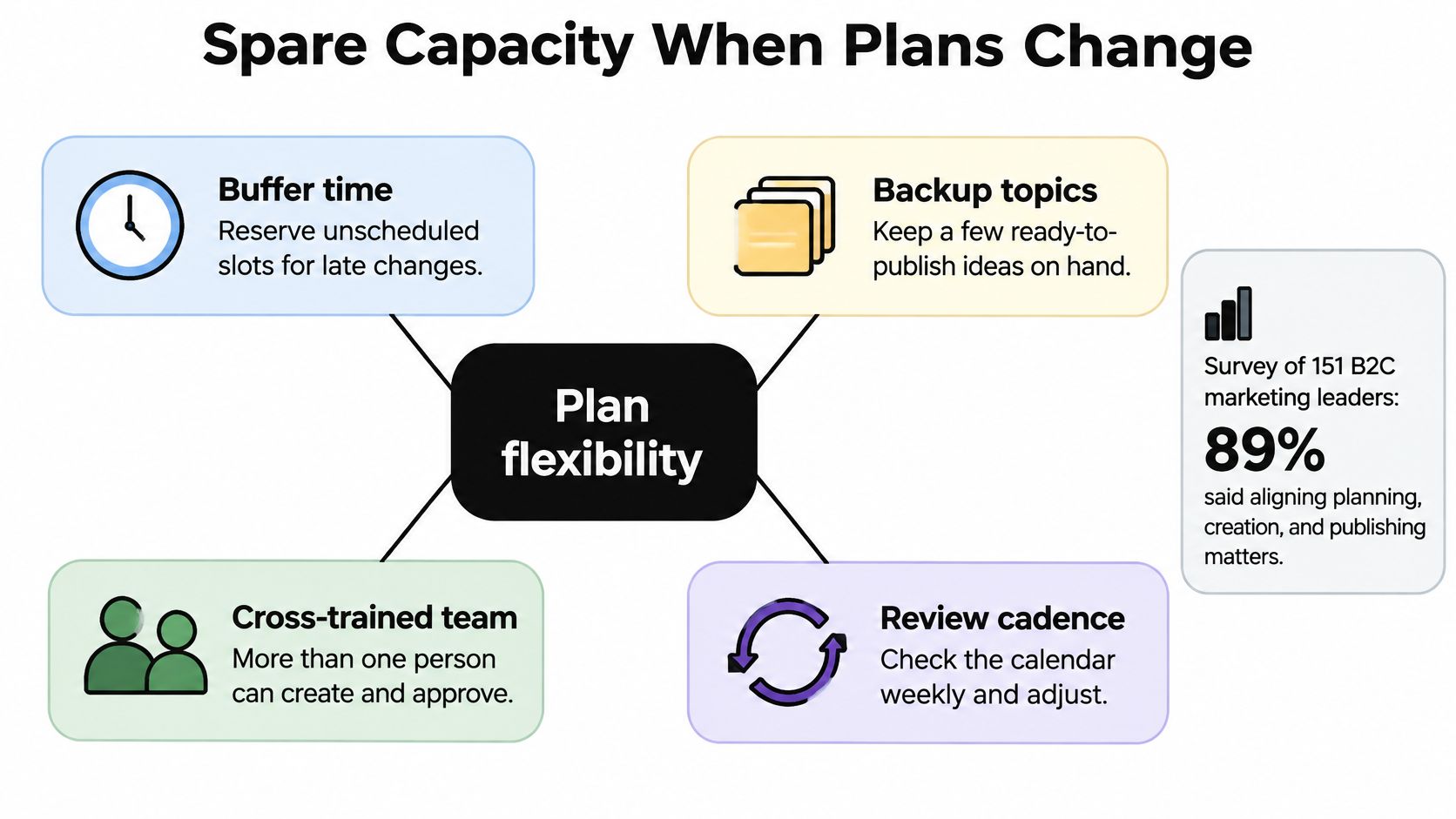
I hold back about 20 to 30 percent of slots as uncommitted capacity. Label every row fixed-date, flexible, evergreen, or experimental. Fixed-date covers launches, holidays, and promised partnerships. Flexible can move a week without damage. Evergreen can fill a hole. Experimental is allowed to fail and should stay small, about one in eight posts.
Stock three evergreen explainers before the month starts so a hole never forces a panic post. Teams that already know how ecommerce teams batch product visuals can use the same habit for those fallbacks: shoot the backups in the batch, label them evergreen, and leave them unpublished until a slot opens. A content repurposing strategy belongs here too. The fallback should be a second cut of a core asset, not a new idea invented at 9 p.m.
The short walkthrough below shows how a reserve slot absorbs a late change without a blank day.
Three reasons to kill or delay
Kill or delay a post when the news makes it inappropriate, the asset misses the approval deadline, or a post in the same pillar clearly missed its KPI that week. Write a decision log with four lines: the date, the change, the reason, and the next action.
Say a product launch slips on Tuesday. Swap in a ready FAQ, move the launch row to flexible, and do not fill the hole with off-message filler. The blank is not the failure. The scramble post is.
More than one person should be able to create or approve, even on a tiny team. A weekly review is where you defend the empty slots. If someone tries to book the reserve with leftover ideas, send those ideas back to the backlog.
Repeat Refresh or Retire Each Post
A post earns a second life only if it moves the objective on the row. Easy to schedule again is not evidence. Calendars rarely say whether an item should be repeated, refreshed, or retired, which is the gap UNICCM's content calendar guidance is right to flag. Attention is not the same thing as a business result, and a spike on one network does not transfer cleanly to another.
Give every item an objective, one primary metric, a review date, and a next action of repeat, adapt, refresh, or retire. Normalize rates by impressions or audience size so a small account is not judged against a viral outlier. Record qualitative signals too: customer questions, saves, and replies that repeat the same objection.
| Situation | Read it after | Evidence to collect | Next action |
|---|---|---|---|
| Awareness post above your baseline | 7 days | Reach or impressions, normalized | Repeat the pattern once |
| High attention, weak clicks | 14 days | Saves or watch time versus click-through | Adapt the hook or CTA |
| Conversion post with no signups | 14-30 days | Clicks and conversion rate | Refresh once, then retire |
| Customers repeat the same question | 30 days | Replies, saves, support questions | Move to recurring |
| One-day spike, then silence | 7 days | Spike versus saves and follows | Do not queue it |
| Steady evergreen clicks | 30 days | Clicks per impression over the month | Refresh and schedule again |
That table is the rule set. Do not add a second scoring system on top of it. If you want the mechanics of pulling those numbers, use a simple method for how to track performance and stop at the one KPI already written on the row.
Novelty is not a queue
Separate a one-day spike from something you can run again. A viral process Reel that brings no inquiries is a poor candidate for a recurring slot. A modest pricing explainer that still earns profile visits is a strong one. Awareness can be read in about seven days. Consideration signals such as saves, watch time, and meaningful replies often need two weeks. Clicks and signups may lag two to four weeks, so do not retire a conversion post on day three.
A freelance designer can retire the viral Reel, then refresh the quiet explainer and put it back on the grid. The explainer was never famous. It kept doing the job.
One change at a time
Run one controlled change, the hook or the posting window, and hold the objective still. Promote only the winning pattern into the next four-week cycle. If you change the hook, the CTA, and the day in the same refresh, you will not know which edit earned the next result.
Stop a post when the review window closes and the primary metric is still under your baseline after one refresh. Leaving it on the calendar because the file already exists is how stale work crowds out the slots you reserved.
SleekPost is a content calendar for creators and small teams who need per-platform versions, a media library, and a time they chose, without rebuilding every post by hand. Use it to keep the rows you can defend, leave capacity open, and schedule only what has an owner and a next action. Visit SleekPost and put the coming week on the grid before you fill the month.