A content calendar is a strategic scheduling framework that shows what content will be published, where it will appear, and when it will go live. Recent industry reporting says 92% of marketers use content calendars in 2026, up from 85% in 2025, making the calendar a baseline system for modern content planning. (Industry reporting on social media calendars)
You know the pattern. Monday starts with a good idea, Tuesday disappears into client work, and by Wednesday you're writing a social post from your phone while trying to remember which product announcement is supposed to go live first. The blog, email list, Instagram account, LinkedIn page, and video channel all need attention, but nobody has a shared view of what happens next.
A content calendar replaces that scramble with a visible operating system. It connects ideas, assets, owners, approvals, channels, and publication dates so your team can work ahead without becoming disconnected from what your audience needs today. The best calendars aren't rigid schedules that punish change. They're structured enough to protect consistency and flexible enough to absorb trends, urgent updates, and better ideas.
Table of Contents
- The Chaos of Content Without a Plan
- How Content Calendars Function as Workflow Systems
- Measurable Performance Gains from Structured Planning
- Common Formats and Tooling Options
- Building a Flexible Editorial Workflow
- Conclusion and the Strategic Necessity of Modern Calendars
The Chaos of Content Without a Plan
Monday begins with a strong idea. By Wednesday, the founder is asking why the company has not posted, a designer is waiting for a usable brief, and a writer is drafting copy without knowing who must approve it. The announcement goes live late, separated from the email, video, or follow-up content that could have supported it.
That workflow turns every post into a new coordination problem. The team chooses the topic, format, channel, message, asset, owner, review path, and timing under deadline pressure. Even a strong idea can underperform when nobody has time to adapt it to the channel, audience, or moment.
The definition that matters in practice
So, what is a content calendar in day-to-day marketing? It is a shared table or board where each planned item has a topic, channel, format, owner, asset link, approval status, and publication time. It can cover blog articles, newsletters, social posts, videos, product announcements, webinars, and campaign assets without forcing every format into the same workflow.
The format grew from newspaper and magazine editorial planning, where publishers coordinated issues well before publication. Digital publishing brought that discipline to WordPress, Blogger, Facebook, and Twitter, turning a publication schedule into a cross-channel planning method for marketing teams. Background on the evolution of content calendars
A useful calendar gives every item a clear home and exposes the decisions still missing. A small team can use it to batch its content creation, reuse a campaign idea across suitable channels, and spot gaps before production begins.
The calendar should guide repeatable work without freezing it. Keep planned slots for consistency, then leave room to adjust timing, format, or messaging when a trend, customer question, product change, or urgent update deserves attention. Treating the calendar as a living operating system prevents both extremes: chaotic last-minute publishing and rigid content that misses the moment.
How Content Calendars Function as Workflow Systems
A calendar becomes valuable when it stores the information people need to execute, not just a list of dates. Each entry should answer practical questions before production begins: What are we publishing? Which audience is it for? Where will it appear? Who owns the next step? What must be approved before scheduling?
At minimum, a social entry may contain:
- Post copy: The approved or working caption, headline, script, or thread.
- Media assets: Images, carousels, videos, thumbnails, or links to working files.
- Platform details: The channel, format, dimensions, and version required for that audience.
- Hashtags and supporting text: Metadata or platform-specific elements that belong with the post.
- Publish time: The intended release window, including the relevant time zone.
- Ownership and status: The person responsible and whether the item is an idea, draft, review item, scheduled post, or published asset.
From schedule to audit trail
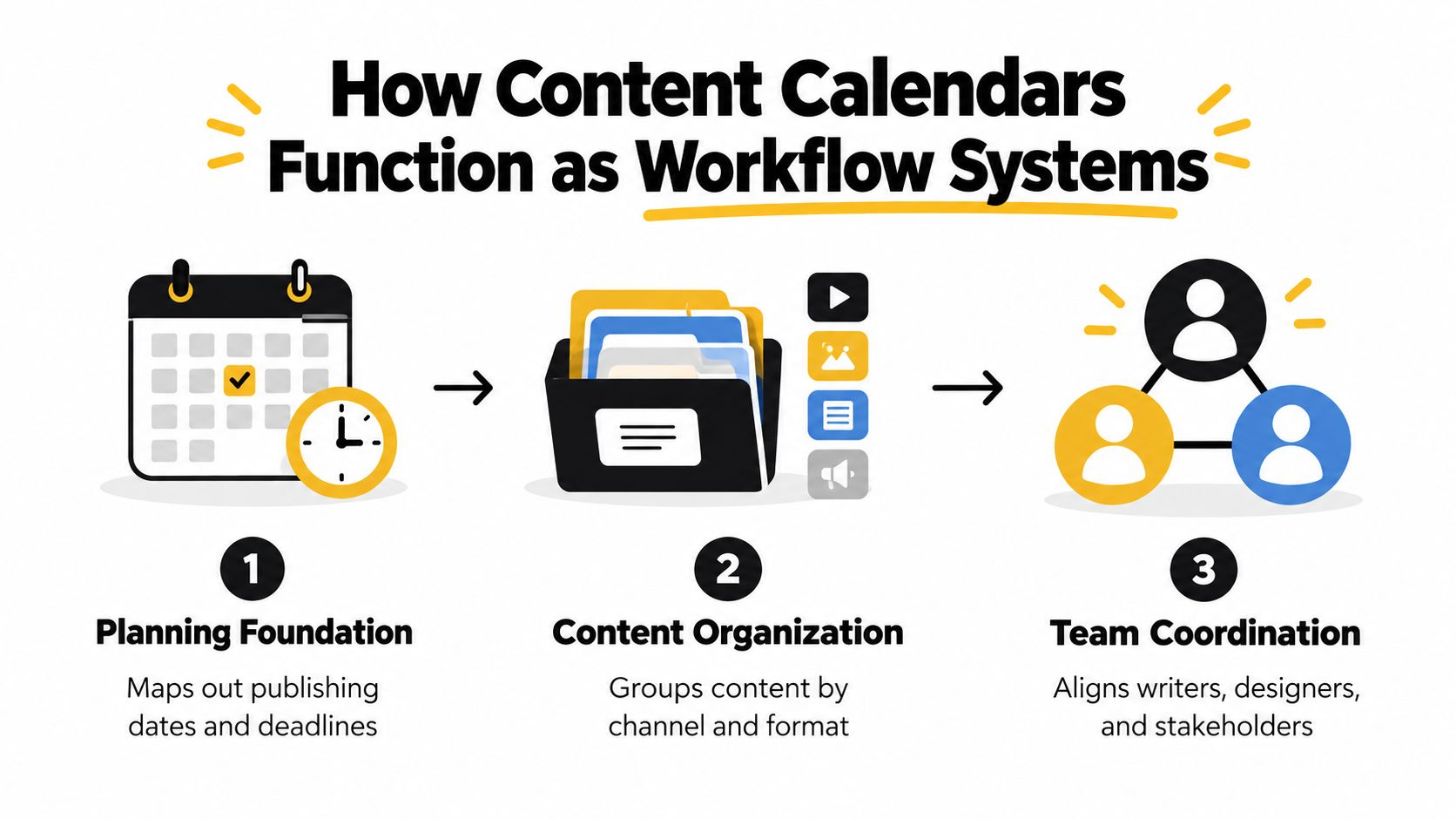
Putting those fields in one place turns publishing into an auditable workflow. A manager can see which posts are waiting for design, a writer can find the approved brief, and a client can review upcoming work without searching through separate chat threads. Teams can batch research, drafting, editing, and scheduling because the calendar makes dependencies visible.
This is the difference between a calendar and a list of ideas. A list tells you what you'd like to do. A workflow system shows who is doing it, what blocks progress, and what happens after approval. If messages are scattered across email, chat, documents, and task boards, guidance on how to fix chaotic team workflows can help you identify the coordination problem before adding another tool.
A practical status flow might look like this:
- Idea: The topic has a clear purpose but needs a brief.
- In production: Copy and creative work are underway.
- Review: A named stakeholder checks accuracy, tone, and compliance.
- Approved: The final version is ready for scheduling.
- Published: The live URL and performance notes are attached.
The same principle applies beyond social media. A blog post may need an SEO brief, an editor, a featured image, internal links, and a publication owner. An email may need segmentation and a matching landing page. A clear content creation workflow prevents those requirements from appearing as last-minute surprises.
Measurable Performance Gains from Structured Planning
A team can publish on schedule and still miss the audience, platform, or business goal. The useful measure is whether the calendar improves consistency while leaving room to respond to changing audience behavior. Structured social publishing has been associated with 67% higher engagement rates and 58% more consistent posting frequency than random publishing. (Reported performance differences for structured social publishing)
Those figures describe an operating advantage, not an automatic content upgrade. Planning creates time to sharpen the hook, adapt the asset for each platform, verify the link, and review the post before release. It also gives the team a controlled way to change direction when a relevant trend appears, instead of treating the calendar as a fixed document.
Timing should be tested rather than copied. Run a two-week comparison between two posting windows, such as 9 AM to 11 AM and 7 PM to 9 PM, then compare reach and meaningful actions by channel. Keep the stronger window where the data supports it, and change it when audience behavior changes. A single schedule rarely fits every platform or campaign.
Volume needs a production system
Publishing more often only helps when the team can maintain quality. Set a cadence that matches available writers, designers, reviewers, and source material. If the calendar requires constant last-minute work, the planned volume is already too high.
Build recurring themes, then reuse strong source material in formats suited to each channel. A single research finding might become a short post, a visual explanation, an email section, and a supporting article, provided each version gives the audience a reason to engage. Leave time for editing, approvals, publishing, and measurement rather than counting only finished posts.
Review performance by channel and format at the end of each cycle. A social media ROI calculator can help connect publishing effort with business outcomes. Record the resulting decisions in the calendar, including changes to topics, owners, timing, and output. The calendar should stay current enough to support planned consistency and fast adaptation, not merely document what the team intended to publish.
Common Formats and Tooling Options
The right calendar is the simplest system that your team will maintain. A spreadsheet can be enough for one person or a small group with a straightforward publishing rhythm. A dedicated platform becomes more useful when you manage several channels, need approvals, store large media files, or want scheduling connected to the planning view.
| Format | Flexibility | Collaboration | Automation |
|---|---|---|---|
| Spreadsheet | High. You can add fields and views quickly. | Basic. Sharing and comments work, but version control can become messy. | Low. Scheduling usually requires a separate tool. |
| Project management board | High. Tasks, owners, and dependencies are easy to organize. | Strong. Comments, assignments, and statuses are usually built in. | Moderate. Some tools connect to publishing platforms. |
| Dedicated social calendar | Moderate to high. Designed around channels, formats, and dates. | Strong for review and approval workflows. | Strong. Scheduling, queues, and recurring posts may be included. |
| Integrated marketing platform | Broad. Can connect content with campaigns and other channels. | Strong across departments and regions. | Varies. More capability often means more setup. |
Choose for the workflow, not the feature list
A spreadsheet wins when speed and control matter more than automation. You can create columns for the channel, owner, asset link, status, and publish date in minutes. It becomes frustrating when several people edit the same rows, approvals happen in other applications, or the team needs to publish frequently across different networks.
Project management tools handle ownership well, but they may require extra work to preview platform-specific copy and media. Dedicated social tools reduce the distance between planning and publishing, though they can introduce subscription costs or workflows your team doesn't need. Large marketing platforms offer deeper coordination, but configuration and training can become a project of their own.
Use a content planning tool when your current system hides more work than it reveals. SleekPost is one option for organizing posts in a visual calendar, tailoring content by platform, attaching media, and scheduling from one dashboard. The important decision isn't whether a tool has the longest feature list. It's whether a person can open the calendar, understand the next action, and complete it without hunting through several systems.
Start with the smallest viable setup. Add fields only when they answer a recurring question or remove a recurring delay. A calendar that nobody updates is less useful than a plain sheet that the whole team trusts.
Building a Flexible Editorial Workflow
A calendar fails when it treats the future as predictable. A product delay, breaking story, platform change, or useful trend can make a carefully scheduled post irrelevant. Current social guidance describes rapid-response publishing as a major shift, while Buffer recommends leaving space for timely or unexpected content rather than filling every available slot. (Current social media trend guidance)
The practical answer is a hybrid calendar. Plan enough evergreen content to protect your publishing rhythm, then deliberately leave capacity for reaction. That approach preserves consistency without forcing the team to ignore what matters today.
Build the system in four passes
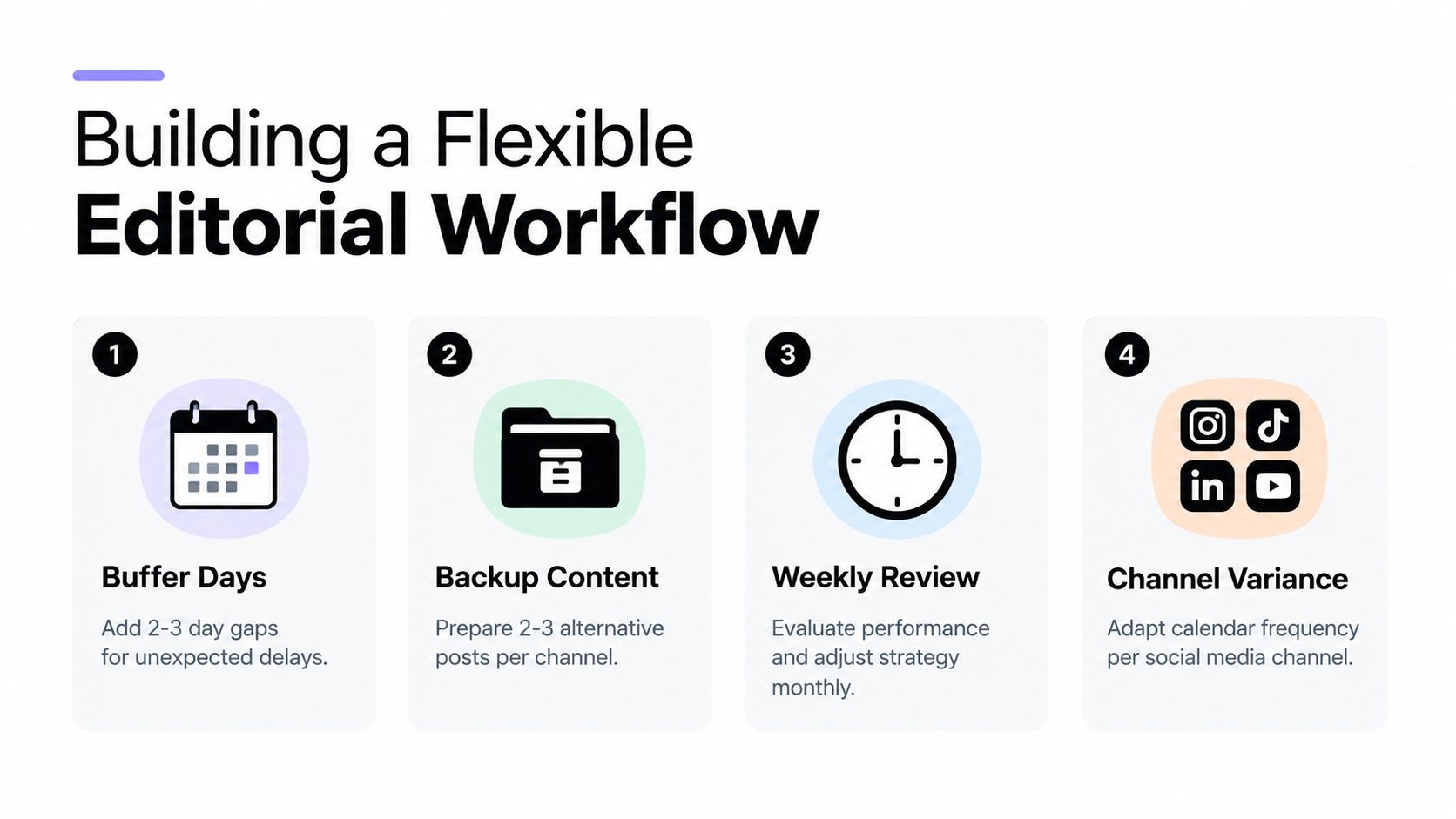
First, set the planning horizon. Establish broad themes and campaigns far enough ahead to coordinate resources, but keep individual posts closer to publication. The farther out you plan, the more detail you should remove. A quarterly theme can remain useful even when a specific caption becomes outdated.
Second, mark open capacity. Label open calendar positions as trend, community, response, or experiment slots. The label matters because it tells the team that the space is intentional, not a production failure. If an urgent opportunity doesn't appear, use the slot for a prepared evergreen post or move it forward.
Third, prepare fallback material. Keep adaptable posts, short videos, product education, and community prompts ready for days when planned content must move. Resources for actionable video ideas for teams can help you build a reusable bank instead of starting from a blank page during a busy week.
Fourth, review the calendar as an operating document. Check upcoming posts, delayed tasks, channel balance, and recent performance. Retire anything that no longer fits the context, and give the owner a clear decision rather than leaving an outdated item in limbo.
Protect the response process
Trend participation needs guardrails. Define who can approve a fast response, which subjects require extra review, and when the team should pause scheduled content. A timely post isn't useful if it creates an avoidable brand, legal, or customer-care problem.
Practical rule: Keep the calendar full enough to maintain rhythm, but never so full that one unexpected event breaks the entire week.
Use the content planning process to document those decisions. The calendar should show planned work and available capacity, while the workflow explains how someone moves an idea from observation to approved publication.
Conclusion and the Strategic Necessity of Modern Calendars
A content calendar started as an editorial schedule, but modern teams use it as a coordination layer. It connects organic posts with paid amplification, regional adaptations, creator activity, customer-care messages, email, blogs, and crisis communications. That broader role explains why a single channel view often stops being enough.
The distinction between a broad content calendar and a social media calendar is useful. The broad version maps the content system across blogs, email, video, and social. The social version tracks platform-level details such as the copy, media, owner, and publish time for each network. A marketing team may keep both views, with campaign themes at the top and execution details underneath.
What a durable calendar controls
A reliable system controls four things:
- Direction: Every item supports a campaign, audience need, or business objective.
- Execution: People know the asset, owner, status, approval path, and deadline.
- Adaptation: Open slots allow the team to respond to trends, news, and customer conversations.
- Learning: Performance observations change the next set of topics, formats, channels, and timing.
The trade-off is deliberate. Rigid planning gives you predictability but can produce stale content. Purely reactive publishing gives you immediacy but leaves the team exposed to missed deadlines, uneven quality, and repeated last-minute decisions. The hybrid model gives evergreen work a dependable place while reserving attention for what couldn't have been known in advance.
A useful calendar doesn't predict everything. It makes the next decision visible and gives the team room to make a better one.
Start with one shared view, a small set of required fields, and a review routine that people can sustain. Then connect the calendar to production, approvals, publishing, and measurement. When the system becomes part of daily work, consistency stops depending on memory or heroic effort.
SleekPost gives creators and marketing teams a visual calendar for organizing posts, adjusting timing, tailoring copy and media by platform, and scheduling from one dashboard. If you're ready to replace scattered publishing tasks with a practical cross-channel workflow, visit SleekPost and start planning your next content cycle.