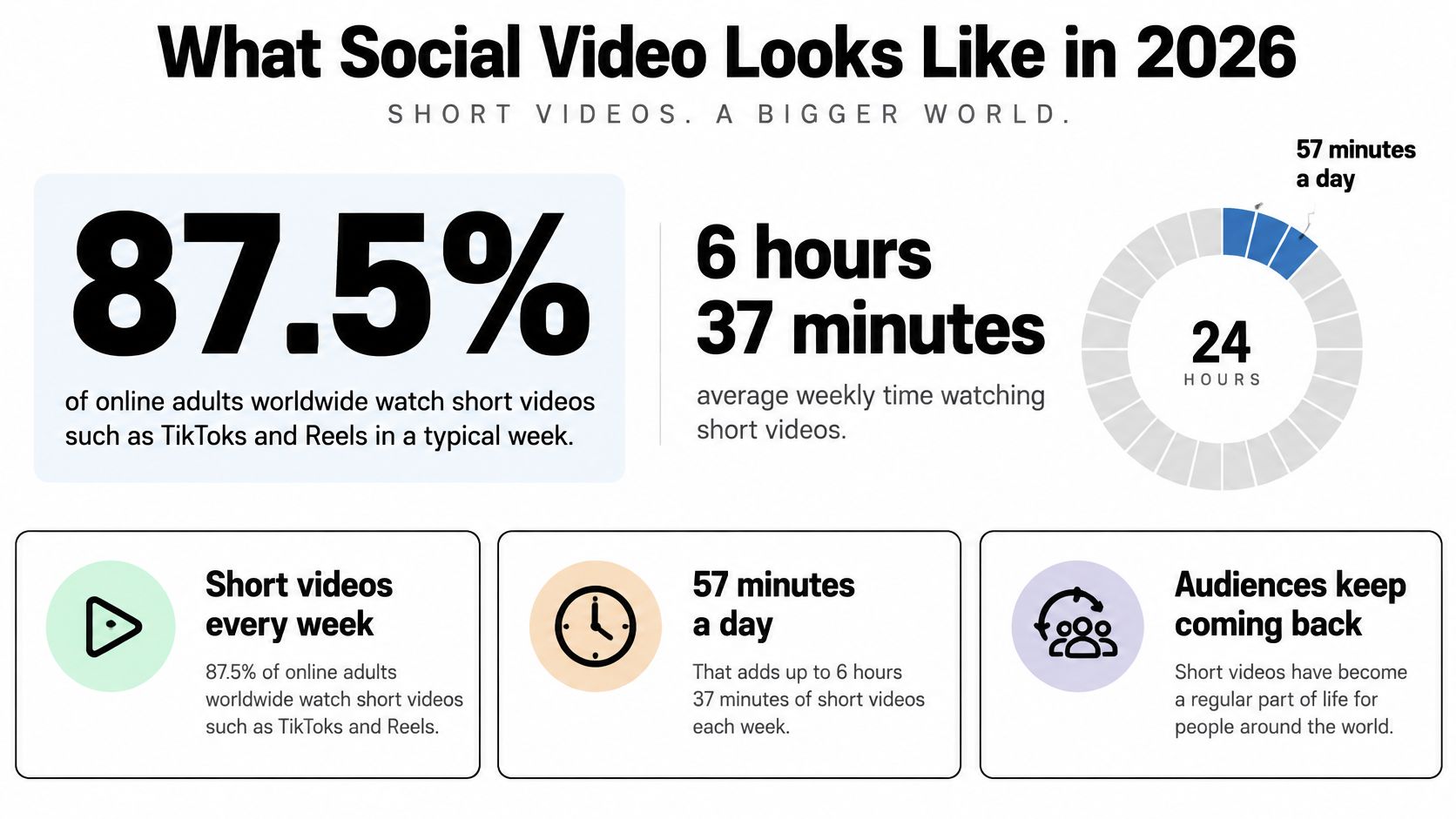
87.5% of online adults worldwide watched short videos such as TikToks and Instagram Reels in a typical week, according to DataReportal's April 2025 Global Statshot. Average weekly viewing time reached 6 hours and 37 minutes. For a working creator, that changes the assignment: you're not making a single grand introduction. You're creating useful reasons for people to encounter you again.
Table of Contents
- What Social Video Looks Like in 2026
- Video Types and Platform Specs at a Glance
- Matching Video Length to Your Goal
- Platform-by-Platform Best Practices
- A One-Idea Three-Edit Production Workflow
- Scheduling and Distribution That Compound Reach
- Templates and a Weekly Measurement Scorecard
- Your First Week of Social Video
What Social Video Looks Like in 2026
Say you run a bakery and want more celebration-cake inquiries. A polished montage might show your best work, but a useful video could answer a buying question: how to choose a cake that travels safely. That question gives you something to demonstrate, a recognizable customer problem, and a natural next step.
Video content for social media means video built to be discovered, watched, and acted on inside a social platform. It includes short-form clips, Stories, feed videos, long-form explainers, and live broadcasts. The format matters because someone browsing a feed needs different context from someone deliberately opening a tutorial.
The consumption pattern behind that distinction is easy to visualize.
Treat the feed like a busy street
Your opening is the storefront window. It needs to help the right person recognize something relevant, not merely attract everyone walking past. Once someone stops, the demonstration must justify their attention.
For the bakery, a close-up of a sliding cake box communicates the problem faster than an animated logo. Showing the support board and secure packaging supplies the payoff. An invitation to ask about collection options gives an interested viewer somewhere to go.
Practical rule: Make the opening promise specific enough that you can visibly fulfill it before the video ends.
A repeatable production system makes that easier than treating every post as a separate creative project. Keep the useful idea and evidence, then adapt how you introduce and explain them.
- Choose the job: Decide whether the video should attract, educate, reassure, or convert.
- Choose the format: Match that job to the viewing situation.
- Choose the evidence: Show something that makes the message credible.
- Choose the next action: Give viewers a relevant, manageable step.
For a small team, the objective is a system that fits into focused weekly work blocks, not a production calendar that requires constant filming.
Video Types and Platform Specs at a Glance
| Platform / format | Typical length | Best for |
|---|---|---|
| TikTok | A few seconds to 10 minutes | Discovery, trends, raw personality |
| Instagram Reels | Up to 90 seconds in the cited planning guide | Polished discovery, saves and shares |
| Instagram Stories | Brief, sequential updates | Daily updates, polls, behind the scenes |
| YouTube Shorts | Up to 3 minutes | Searchable evergreen hooks |
| YouTube long-form | Enough time to answer the full question | Tutorials, deep explainers, watch time |
| Facebook Feed video | A focused clip with a self-contained payoff | Community, shares, broad audience communication |
| LinkedIn video | A concise explanation of a professional problem | B2B authority, hiring, case studies |
| X (Twitter) video | A brief reaction with necessary context | Commentary and news reactions |
| Live (Instagram, TikTok, YouTube) | A session planned around its agenda | Q&A, launches, community building |
The format ranges summarized by Sparklight's small-business social media guide include Instagram Reels up to 90 seconds, TikTok from a few seconds to 10 minutes, and YouTube Shorts up to 3 minutes. Treat those as the guide's planning envelopes, not permanent technical guarantees. Before building an unusually long upload, confirm what your account and publishing route currently accept.
Choose the viewing situation first
Short-form video suits an idea viewers can understand without much setup. A hook gets them oriented, and a demonstration supplies the reason to stay. Use it for a customer question, a misconception, a product detail, or a useful observation.
Stories work well for ongoing updates aimed at people already familiar with you. A bakery might show today's available collection slots or ask followers which filling they'd choose. Each update should make sense even if someone missed the previous one.
Long-form video gives you room for comparisons, qualifications, and detailed instruction. A cake-transport tutorial could cover vehicle setup, temperature considerations, packaging, and arrival checks without squeezing everything into hurried narration.
Live video is useful when audience participation improves the experience. A decorating demonstration with questions has a clearer purpose than going live because there's an empty slot on the calendar.
Frame for the destination
Use a vertical canvas for Reels, TikTok, Shorts, and Stories. A horizontal canvas usually makes more sense for a conventional YouTube tutorial, particularly when you need to show a workspace or screen.
For feed placements, square or taller feed crops can be practical alternatives. The vertical video dimensions guide helps you choose a canvas and protect important content from awkward cropping.
Keep faces, product details, and essential text away from interface controls. Preview the actual placement rather than assuming the editor's unobstructed canvas represents what viewers will see.
A maximum length is permission, not a target. Select the format that preserves the explanation without padding it.
Matching Video Length to Your Goal
Shorter isn't automatically better. A clip can finish before someone understands why the product matters, while a longer version can lose viewers by repeating a point they already understood.
A survey experiment discussed in a Marketing Trends Congress paper found an inverted-U relationship between duration and engagement, with an estimated optimum of 34.69 seconds; separate mobile-feed advertising research discussed there found more positive responses to 6-second ads than to 15- or 30-second ads, but weaker ad memory for the shortest format.
That isn't a universal editing formula. It's a reason to distinguish getting attention from communicating something people remember.
Set a duration hypothesis
The following targets are starting points for a brief, not promises about performance.
| Goal | Target length | Edit to build |
|---|---|---|
| Single awareness hit or one call to action | 6–10 seconds | Awareness cut |
| Hook, demonstration and payoff | 20–40 seconds, aim near 30–35 | Explainer |
| Step-by-step tutorial | Enough time to show every necessary action clearly | Tutorial edit |
| Proven retention and deep explanation | Long-form, only when retention data supports it | Held-back long edit |
For awareness, remove everything except the recognizable problem, a memorable visual, and a relevant action. The bakery might show a decorated cake being secured for collection, with an invitation to follow for practical ordering advice.
An explainer needs more room. Show the transport problem, demonstrate the fix, and finish with what the buyer should do differently. Don't spend the opening introducing the business if the problem itself can establish relevance.
A tutorial has a different obligation: viewers must be able to follow it. Cutting the moment where you secure the box may make the video faster, but it also removes the instruction people need.
Cut repetition before cutting explanation
Review the transcript and mark each sentence as setup, evidence, instruction, or action. Delete repeated setup first. Then remove filler transitions and decorative footage that doesn't clarify the point.
A useful extra sentence earns its place by answering a question the viewer would otherwise leave with.
For TikTok, distinguish the duration your message needs from the upload duration the platform permits. The TikTok video length guide can help with that technical check.
Judge a duration test using completion rate, average watch time, and downstream action together. A tiny clip may earn completions without helping anyone remember the offer. A longer demonstration may attract fewer complete views but generate better questions.
Write the target into the brief alongside its reason: a concise explanation because the buyer needs to see the packaging method. That makes later editing decisions less arbitrary.
Platform-by-Platform Best Practices
TikTok needs an immediate reason to care. Instagram needs a clear reason to save or share. YouTube Shorts needs a satisfying explanation. These are useful creative defaults, not fixed descriptions of every viewer.
Keep the factual claim and supporting footage unchanged across versions. Rebuild the introduction, pacing, supporting text, and invitation around the destination.
Match the introduction to the viewer
- TikTok: Start inside the problem. For the bakery, show the unstable box before explaining the solution. Use a conversational delivery, and turn genuine questions into reply videos when the answer benefits other viewers.
- Instagram: Give the topic a clean visual frame. Write a caption with the language a customer would use, such as transporting a celebration cake, rather than an unexplained slogan. Choose a cover that remains legible in the profile grid.
- YouTube Shorts: Make the clip a complete answer rather than a fragment that requires another platform for context. A problem, explanation, and resolved outcome give viewers a satisfying standalone experience.
The strategic case for keeping different destinations is broader than creative taste. Ofcom's Online Nation report found that 94% of UK online adults visited YouTube in May 2024, compared with 51% for TikTok. Those figures describe that market and month, not your prospective customers, but they demonstrate why platform choice shouldn't rest on whichever app currently attracts the most industry conversation.
Adapt professional and community contexts
LinkedIn: Lead with the professional consequence. A packaging supplier could explain how an unstable delivery creates replacement work and customer-service problems. Add readable subtitles so the explanation remains understandable without sound, and support the point with actual process footage.
Facebook: Frame the video around an experience people may discuss or share with their community. A practical collection checklist could invite viewers to share their own transport questions. Avoid unrelated emotional bait that brings attention without relevant interest.
X: Give commentary enough on-screen context to stand alone. If you're reacting to a packaging mistake, identify the mistake visually and explain the correction without requiring viewers to locate an earlier post.
Use these differences to write a compact platform brief:
| Destination | Hook approach | Caption style | Structure | Suggested action |
|---|---|---|---|---|
| TikTok | Show the problem immediately | Conversational and direct | Problem, fix, question | Reply with a relevant question |
| Present a recognizable customer situation | Descriptive and searchable | Context, demonstration, takeaway | Save or share the advice | |
| YouTube Shorts | Promise a clear answer | Topic-led | Question, explanation, resolution | Watch a related explanation |
| Name the work consequence | Professional and specific | Business problem, evidence, implication | Discuss the process |
Don't change a qualified claim into a sweeping promise to make an edit more exciting. Native presentation should improve comprehension, not weaken accuracy.
A One-Idea Three-Edit Production Workflow
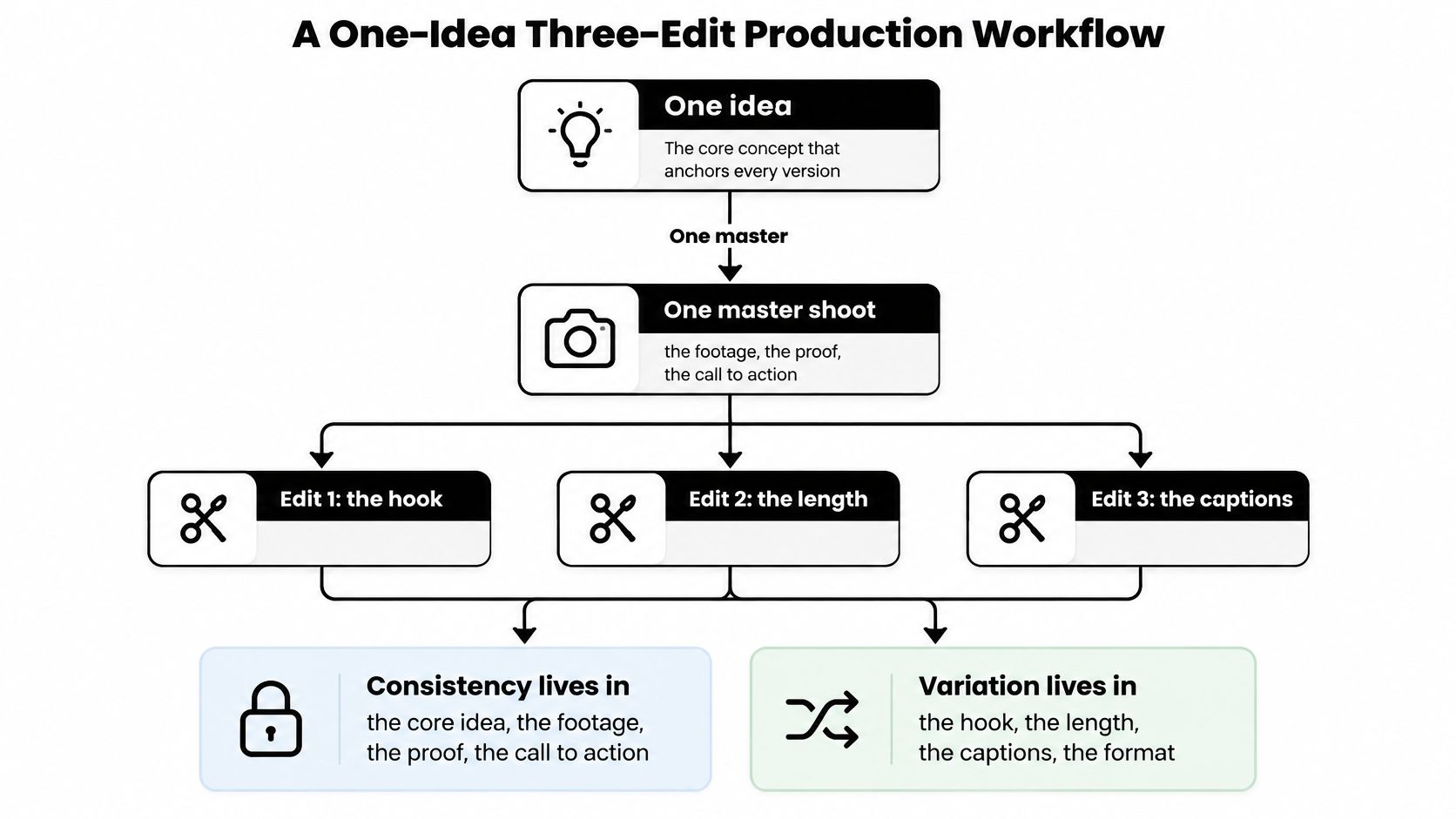
One idea, one master, three edits means you share production assets without publishing an identical finished video everywhere. The core idea, footage, evidence, and business objective stay fixed. The hook, length, captions, structure, and wording of the next step can change.
The production relationship looks like this:
Build a source package worth reusing
Write the payoff before the script. State what someone should understand or be able to do afterward. For the bakery, the payoff is knowing how to keep a boxed cake stable during collection. Record the evidence you need, not just a talking-head introduction.
Shoot a clean vertical master. Use a 1080×1920 canvas for the vertical production workflow. Leave room for captions and interface overlays, capture clear speech, and record close-ups of each important action. Keep original footage alongside the project file.
Create derivatives from the clean source. Don't download a published social video and use that compressed copy as your next edit. A 2024 cross-platform video comparison found typical delivered bitrates of roughly 2–3 Mbps at 720p and 4–6 Mbps at 1080p. Those are observed delivery values, not universal export settings.
Platforms re-encode uploads. Repeatedly exporting already compressed copies can add visible artifacts, especially around movement, fine detail, and small text. Preserve a clean master and build each version from the original project or source assets.
Make the derivatives deliberately
Create the TikTok conversation edit. Select the immediate-problem opening and finish with the relevant reply prompt. Reuse the proof sequence rather than filming a new demonstration.
Create the Instagram reference edit. Add the context, cover, and searchable caption that make the advice easy to recognize and revisit.
Create the explanatory edit. Choose YouTube Shorts or LinkedIn according to the audience and purpose. Give the material the complete explanatory sequence or professional framing it needs.
Inspect the finished files. Watch without sound, check caption accuracy, and inspect fine text and high-motion scenes. Keep the frame rate stable and avoid unnecessary export cycles.
If you're starting with a webinar, interview, or long tutorial, DBotMaker's guide can help you find an AI clip generator. Treat automated selections as candidates: check that each excerpt preserves the speaker's meaning and includes enough context to stand alone.
Quality check: If an edit needs its caption to correct a misleading impression created by the footage, rebuild the edit.
Store the source, transcript, proof assets, covers, and destination files together. A broader content repurposing strategy helps connect those assets to future posts without turning every useful idea into endless near-duplicates.
Batching works best when you define the finish line before recording. A modest set of fully prepared, inspected derivatives is more useful than a folder of unfinished footage.
Scheduling and Distribution That Compound Reach
Choose a publishing cadence you can maintain during a busy week, not only during an enthusiastic launch. A solo creator should start with a manageable short-form queue on a primary platform. A small team can add other destinations or longer productions when editing and review capacity allow.
Don't increase frequency until you know where the work will fit. If publishing crowds out replying to qualified questions or improving the next demonstration, you've overfilled the calendar.
Separate decisions from execution
Use a weekly rhythm with distinct tasks:
- Planning: Gather customer questions, choose topics, and approve the intended payoff.
- Recording: Capture the necessary footage together so you aren't rebuilding the setup for every post.
- Editing: Finish destination-specific versions, subtitles, covers, and captions.
- Distribution: Check the queue, destinations, links, and ownership of replies.
A scheduler removes the need to remember each publishing action. It doesn't replace checking the upload, replying to viewers, or noticing that a scheduled message has become inappropriate because circumstances changed.
Use follower activity information to choose an initial publishing window, then test it against your own results. Don't mistake an audience-wide timing recommendation for a rule about your customers.
Give successful ideas another useful form
A short demonstration that attracts thoughtful questions can justify a deeper tutorial. Related explanations can become a themed recap. A live answer can become a standalone clip if you remove housekeeping and restore the context missing outside the broadcast.
The decision should come from the audience response, not from having footage available. A clip that attracts irrelevant attention isn't automatically the right foundation for a longer production.
Build those decisions into your content distribution strategy. Record what each destination is supposed to contribute so you can stop distributing somewhere that costs time without serving a clear purpose.
When comparing software, TheContentMap's guide to the best posting tools for publishers is a useful starting point. Test your actual video files, account types, caption requirements, and approval process rather than choosing from a feature checklist alone.
Schedule the publishing task. Keep responsibility for the conversation with a person.
For our publishing process, posts scheduled through SleekPost have the same reach as posts made manually. That's not a promise that every scheduled video will perform well, and it shouldn't be generalized to every tool or unsupported publishing method. Evaluate the content and its distribution results rather than assuming manual posting deserves a reach premium.
Templates and a Weekly Measurement Scorecard
Many creators still judge videos mainly by likes, views, and shares. Those figures describe attention and interaction, but they do not show on their own whether the right people became more likely to buy, inquire, or trust your advice.
Give each video a business role before choosing how to score it. A discovery clip and a product demonstration have different jobs, so they need different measures.
Copy-ready creative templates
Awareness cut
- Visual: Show the recognizable problem or surprising result immediately.
- Claim: State one useful point without adding unrelated benefits.
- Action: Invite viewers to follow for the specific kind of help you provide.
For a bakery, show an unstable cake box, demonstrate a secure alternative, and invite viewers to follow for collection advice. Keep ordering details for a separate video.
Explainer
Open with the buyer's question. Add only the context needed to understand the answer, demonstrate the method, then finish with a practical takeaway.
Use this repeatable script: Problem → why it happens → demonstration → what to do next. If the explanation contains separate lessons, split them into distinct videos rather than rushing through them.
Demo or proof cut
Show the problem, the product or process in use, and the observable result. End with a low-pressure invitation that fits the viewer's likely stage, such as asking a question or reviewing the options.
Keep qualifications visible. If a result depends on a particular setup, show that setup instead of suggesting the product works identically in every situation.
Review results by content role
| Content role | Judge it by | Ignore | If it underperforms |
|---|---|---|---|
| Discovery clip | Qualified reach, early view rate, midpoint retention | Follower count alone | Sharpen the opening and make the intended audience obvious |
| Educational video | Saves, shares, profile visits, assisted conversions | Raw views alone | Add a searchable topic and a clearer payoff |
| Product demo | Link clicks, leads, revenue, DM inquiries | Like count alone | Show the result earlier and soften an overly demanding CTA |
| Live session | Watch time, chat participation, replay views | Peak concurrent viewers alone | Create focused standalone clips from the replay |
| Long-form explainer | Average view duration, subscribers, search traffic | One-off virality | Develop topics that already attract sustained interest |
Compare like with like. Platforms may count a view differently, so adding view totals across platforms can hide meaningful differences. Review each platform's results on its own, then compare patterns using the same reporting window and definitions.
For business outcomes, add tagged links where appropriate and record which videos customers mention in inquiries. A guide to tracking social media performance can help organize the review. Prioritize the measures tied to each video's role, rather than treating every available metric as equally important.
Keep untracked influence visible
A viewer may watch a video, search for your business later, or discuss it privately. Ask new inquiries what prompted them to get in touch, and keep recurring DM themes alongside your analytics.
Treat these signals as supporting evidence. A rise in brand searches alone does not prove video caused the increase; repeated patterns across inquiries and analytics give you more useful context.
End the weekly review with a decision: retain the approach, change the opening, improve the demonstration, or stop making that format. A low-view demonstration that brings relevant inquiries may be more valuable than a widely watched clip that reaches nobody you can help.
Your First Week of Social Video
Treat the first week as a controlled production test. Use a small enough scope that you can complete the process, inspect the outputs, and learn where your time goes.
Follow a day-by-day plan
Day one, audit and choose. Review your recent videos, or comparable public videos if you haven't started. Label each by format and business role. Choose a primary destination based on audience fit and your ability to make the right kind of content.
Day two, write the briefs. Give each idea a viewer, problem, payoff, proof requirement, target duration, and next action. Reject ideas that contain several unrelated promises. Prepare the objects, screen examples, or demonstration materials before recording.
Day three, record the source footage. Shoot the master for each approved idea. Capture a clean explanation and close-ups of the evidence. Listen to a test recording before continuing so you don't discover unusable audio after packing away the setup.
Day four, build the destination edits. Produce the versions your chosen platforms need. Name files clearly, keep source assets untouched, and inspect the exported videos rather than relying only on the editor preview.
Day five, prepare distribution. Write the captions, select covers, verify destinations, and queue the finished posts. Check that any promised resource is available and that someone owns incoming questions.
Day six, publish and listen. Record recurring questions and points of confusion. Don't rewrite the entire strategy after an early result, but fix errors or misleading wording promptly.
Day seven, review and decide. Complete the role-based scorecard. Choose the next topic using both audience questions and business signals, while recognizing that recent posts may need more time to produce meaningful outcomes.
Add software only where it removes friction
If manual cross-posting consumes your evenings, shortlist schedulers, including SleekPost, and test them against the same requirements: separate platform edits, a clear content calendar, accessible post records, and compatibility with your measurement routine. If your current tools handle that comfortably, keep them.
In our workflow, you can keep drafts, per-platform post variants, and uploaded media together. Our AI Content Generator creates platform-optimized posts from a pasted YouTube video link, an article link, or a described topic. Use the draft as a starting point, then check that the language matches the footage and the actual claim.
Keep the first test focused on saved effort and publishing reliability. Don't add destinations just because the software makes them available.
The repeatable habit is one idea, three edits, measured weekly. Improve the weakest part of that process before increasing output.
SleekPost offers video and reel scheduling, per-platform post customization, and a media library to help you organize this workflow in one place. Visit SleekPost to prepare your next video batch, keep the platform versions distinct, and queue them for your chosen publishing times.