
You're halfway through a conversation when a deadline lands. Three hours ago, you prepared a strong X thread, but it's still sitting in a document because posting it manually kept slipping behind everything else. By the time you remember, the moment has passed, your audience is less active, and you're deciding whether to publish late or abandon the post entirely.
That's the problem a Twitter post scheduler solves. It turns publishing from a daily interruption into a controlled queue, while still leaving room to respond when news, trends, or audience conversations change. The right tool doesn't make your X presence robotic. It gives you a dependable baseline so you can spend more attention on writing, engagement, and decisions that require judgment.
Table of Contents
- Why Manual Posting Feels Impossible
- How a Twitter Post Scheduler Actually Works
- Built-in Scheduling versus Dedicated Tools
- When Timing Matters Most
- What Teams Actually Gain from Scheduling
- How to Choose and Start Using a Scheduler
- Building a Smarter X Publishing Routine
Why Manual Posting Feels Impossible
Manual posting looks manageable when you have one post ready. It becomes fragile when your content calendar includes threads, links, images, campaign announcements, and posts intended for different audience time zones. Each item creates another reminder to set, another browser tab to reopen, and another opportunity to lose the original context.
The cost isn't only the few minutes required to click Publish. Manual posting forces you to interrupt focused work at a specific moment. A client call, a commute, an unexpected support issue, or a long writing session can push the post past its intended window. Repeating that pattern makes your content plan unreliable even when the underlying ideas are good.

The shift from reminders to a queue
A scheduler separates content preparation from content delivery. You can write several posts while your thinking is already focused on the topic, review them together, and assign each one a time without needing to stop what you're doing later.
That separation also supports a more reliable content creation workflow. Instead of asking, “What should I post right now?”, you can work from defined content themes, prepare variations, and keep the publishing queue supplied.
Practical rule: Automate the predictable work, not the judgment.
A queue shouldn't replace your presence on X. It should protect the work you've already completed from being forgotten. Keep space for replies, timely observations, and posts tied to live events. The benefit is balance. You can maintain a steady publishing rhythm without pretending that every valuable post can be written days in advance.
How a Twitter Post Scheduler Actually Works
At the simplest level, a scheduler has three parts: a composer, a stored queue, and a delivery process. You draft a post, select a date and time, and the system stores the content with its target timestamp. When the post becomes due, the platform or the scheduler's publishing service sends it for release.
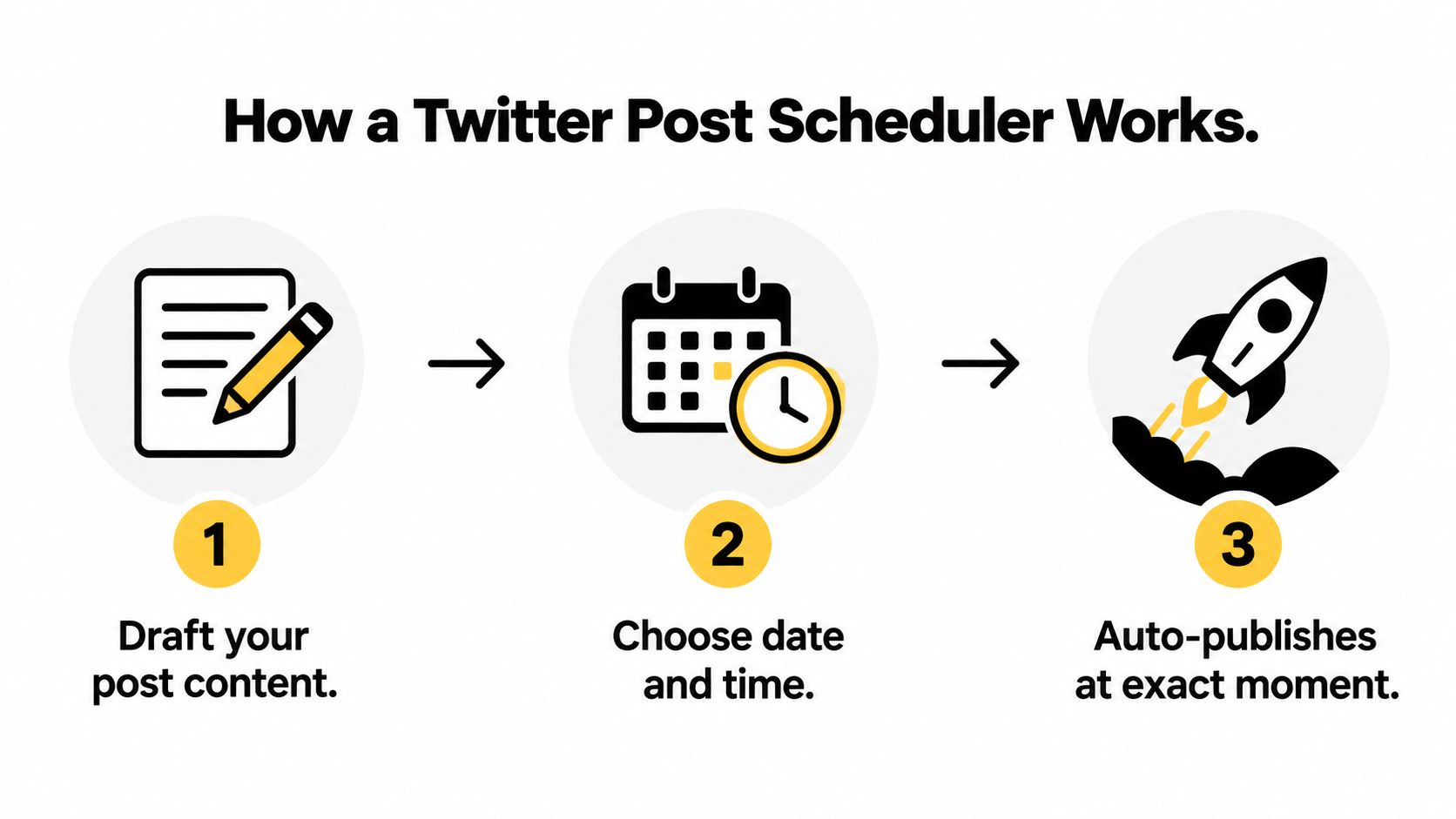
X's advertising documentation shows that scheduled tweets were already supported in its Ads API by at least 2017, with actions to create, modify, view, and delete scheduled tweet objects. The documentation also describes associating a scheduled tweet with a line item, which connects timed publishing with campaign operations rather than treating it as a simple reminder. You can review the historical workflow in X's scheduled tweets documentation.
What happens behind the dashboard
The current standard X API v2 publishes immediately through POST /2/tweets and doesn't provide a native scheduled-post parameter. As a result, a production scheduler needs its own queueing layer, including a persisted target timestamp and a worker or cron-style process that checks when the post is due before triggering publication, as explained in this technical guide to scheduling X posts through the API.
That architecture creates practical differences between tools. A basic interface may save a post and rely on platform functionality. A more capable service manages the queue, retries failed delivery, preserves media associations, handles time zones, and gives you a place to edit or cancel content before publication.
A good queue should expose status clearly. You need to know whether a post is a draft, awaiting approval, scheduled, published, or failed. It should also keep the original media and platform-specific copy attached to the item, rather than forcing you to reconstruct the post after an error.
For a deeper look at queue design, thread planning, and operational safeguards, XBurst post scheduler strategies provides useful context. The important distinction is simple: scheduling isn't merely choosing a time in a calendar. It's building a reliable handoff between prepared content and a platform that may change its access rules or publishing requirements.
A social media scheduler app becomes more valuable when that same queue supports several channels without making you duplicate every step. You still need to adapt the copy and format for each network, but the planning layer can remain centralized.
Built-in Scheduling versus Dedicated Tools
Native scheduling is often enough for an individual who publishes occasionally and works almost entirely inside X. It minimizes setup, keeps the publishing action close to the platform, and avoids adding another dashboard to your routine. The trade-off appears when you need repeatable queues, approvals, multiple accounts, or a record of how content performs over time.
Independent guidance on automatic Twitter posting highlights the limitations that users commonly encounter with native workflows, including access differences between browser and mobile experiences and a focus on individual posts rather than broader publishing operations. Treat those details as features to verify before committing, because platform interfaces and subscription rules can change.
| Feature | Native Browser | Premium Mobile | Dedicated Tool |
|---|---|---|---|
| One-off scheduled posts | Suitable for straightforward publishing | Convenient when available in your account | Supported alongside broader workflows |
| Content queue | Basic visibility | Usually centered on individual account activity | Designed for planned queues and calendars |
| Recurring posts | Limited or unavailable | Limited or unavailable | Commonly available, depending on the product |
| Media library | Minimal | Minimal | Central storage, tagging, and reuse options |
| Team collaboration | Not designed for approvals | Not designed for approvals | Draft reviews, roles, and approval steps may be available |
| Multiple platforms | X only | X only | Often supports several networks |
| Analytics workflow | Platform-native reporting | Platform-native reporting | Cross-channel planning and reporting may be available |
Match the tool to the operating problem
Choose native scheduling if you manage one account, publish a modest amount of content, and don't need a shared approval process. Choose a dedicated tool when your main problem is repetition across accounts or platforms, not the act of selecting a date.
The mistake is buying features for an imagined future operation. Start with the bottleneck you already experience. If missed posts are the issue, a simple queue may solve it. If content approvals, media reuse, and channel-specific edits are slowing a team down, a dedicated system is more appropriate. The practical principles in this guide to how to schedule social media posts apply beyond X because the underlying decision is the same, reduce repetitive execution without removing editorial control.
When Timing Matters Most
A scheduled post has two jobs. It must arrive when you're likely to reach an active audience, and it must remain relevant when that moment arrives. A queue that handles the first job but ignores the second can create polished irrelevance.
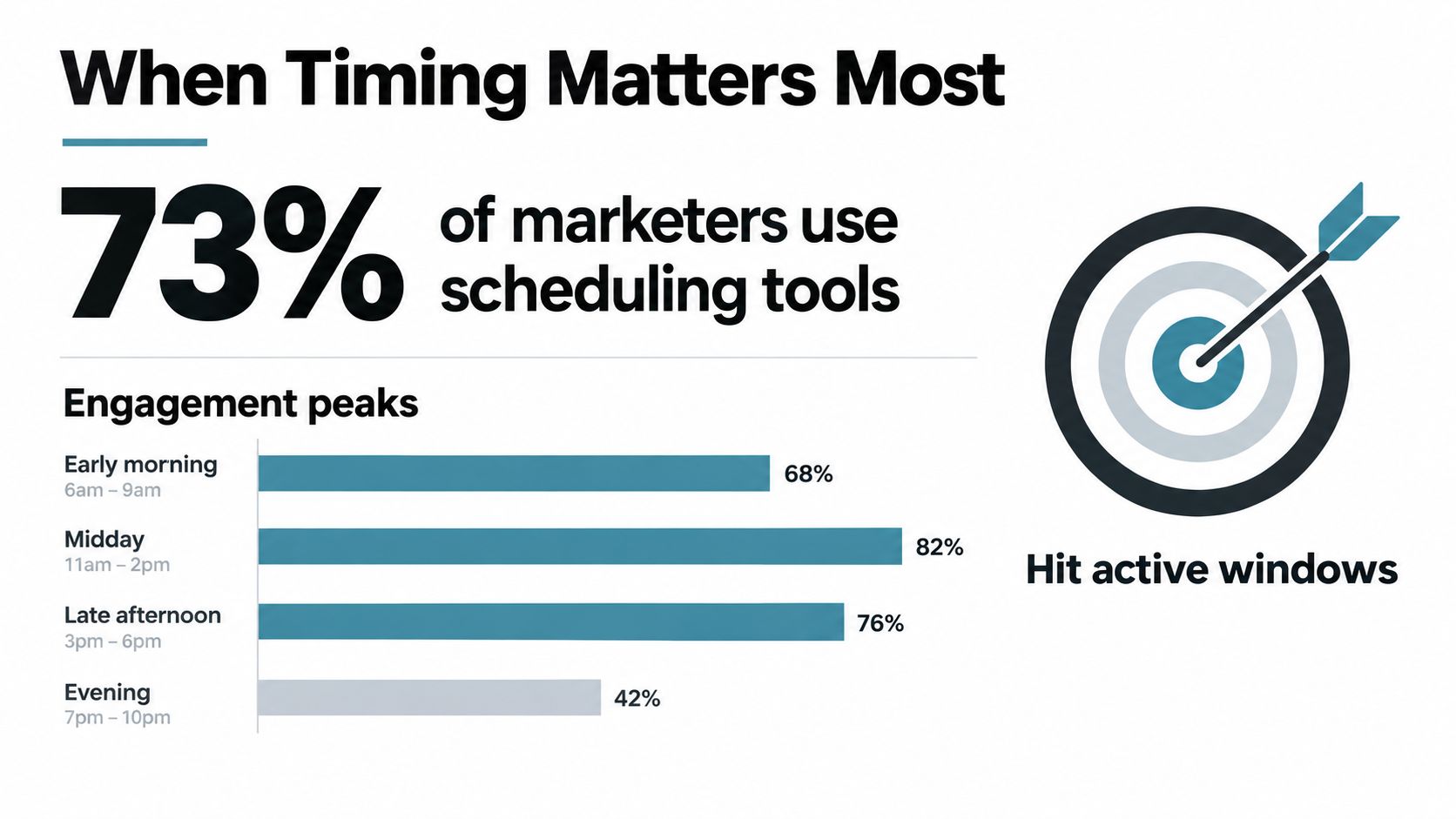
Buffer's benchmarking across more than 8 million posts found the strongest X engagement at 9 a.m. on Tuesday, followed by 10 a.m. and 9 a.m. on Wednesday, based on its published best time to post research. The useful conclusion isn't that every account should copy those hours. It's that your scheduler should support local-time delivery and make it easy to test midweek morning windows rather than forcing one universal schedule.
Build a flexible timing system
Use timing data as a starting hypothesis, then compare it with your own audience activity and post outcomes. A product announcement, a technical thread, and a reply-driven opinion post may succeed under different conditions. Your queue should make those distinctions visible instead of flattening every post into the same publishing slot.
The science behind scheduling content also supports a more careful approach. Planning can improve consistency, but fixed automation shouldn't prevent you from responding to a relevant conversation or changing a post when the surrounding context shifts.
Use three categories in your calendar:
- Evergreen posts: Queue durable advice, explanations, and recurring themes in advance.
- Timed campaigns: Assign launch announcements and event-related content to a defined window, then review them shortly before release.
- Live opportunities: Keep capacity open for news, audience questions, trends, and posts that depend on what people are discussing today.
Your scheduler should make pausing easy. When a serious event affects your audience or a scheduled message becomes tone-deaf, stopping the queue matters more than preserving the original plan.
What Teams Actually Gain from Scheduling
Scheduling earns its place when it changes the economics of daily work. The strongest benefit isn't the novelty of an automated post. It's the removal of repeated context switching, especially for people who create content, manage clients, answer messages, and monitor performance from the same limited block of time.
Independent scheduling research reports that 73% of social media marketers use dedicated scheduling tools, compared with 61% in 2024 and 47% in 2022. The same social media scheduling statistics report an average saving of 6.3 hours per week, or about 328 hours per year, for teams using scheduling tools instead of manual posting.

Consistency becomes an operating habit
The same research says 91% of marketers using scheduling tools report major improvements in posting consistency. It also reports that 78% eliminate missed posting windows after adoption, compared with 41% who frequently missed optimal times before. Those figures don't prove that scheduling alone creates audience growth, but they do show why teams treat it as infrastructure rather than a convenience.
A consistent queue also improves the quality of strategic review. When posts are scattered across personal notes, spreadsheets, and memory, it's difficult to see whether your themes are balanced or whether one campaign has crowded everything else out. A shared calendar gives editors and managers something concrete to inspect before content reaches the audience.
The operational gain is attention. A scheduler gives your team more time to interpret results and participate in conversations instead of repeatedly performing the same publishing task.
For teams managing several accounts, the workflow becomes even more important. A unified process reduces accidental duplication, makes ownership clearer, and lets each person work from the same status information. This guide to managing multiple social media accounts for business is useful when account volume starts turning simple publishing into coordination work.
The gains disappear if nobody reviews the queue. Schedule content in batches, but inspect the next publishing window, check links and media, and keep a clear owner for live engagement. Automation should reduce mechanical labor, not remove accountability.
How to Choose and Start Using a Scheduler
Choose a scheduler around the workflow you already need, not the feature list you might use someday. Start by auditing the last few weeks of publishing: where did posts get delayed, which tasks were repeated, and which steps required another person's approval?
Use this selection checklist
- Platform coverage: Confirm that the tool supports X and the other networks you use.
- Queue controls: Look for time slots, local-time scheduling, recurring posts, and simple pause or reschedule actions.
- Content handling: Check whether the media library stores the formats and file sizes your team publishes.
- Editing flexibility: Make sure you can adapt copy and media per channel instead of sending one unchanged version everywhere.
- Reliability signals: Test failed-post handling, status visibility, account reconnection, and delivery notifications.
- Commercial fit: Compare the plan's account, user, publishing, and analytics limits with your current workflow.
Begin with a small migration. Connect the account, prepare a short queue, test text and media posts, and observe the delivery process before moving an entire content calendar. Then document who approves content, when the queue gets reviewed, and which posts must remain live and manual.
Start narrow, then expand. A scheduler should remove friction during the first week, not create a second system that your team avoids.
Building a Smarter X Publishing Routine
The most resilient X routine combines a prepared baseline with deliberate openings for live participation. Queue evergreen ideas and planned campaigns, review them before release, and leave room for replies, trends, and audience questions that couldn't have been predicted during content production.
Visual assets can support that system when you standardize how posts are adapted for different formats. A practical social media image workflow can help you prepare supporting visuals without turning every post into a separate design project.
The result is a calmer publishing operation. You're no longer choosing between strategic planning and real-time responsiveness. You're using automation for consistency, judgment for context, and your freed-up time for work that compounds.
SleekPost lets creators and teams schedule and publish X posts from one dashboard, customize copy and media by channel, and manage queues, recurring posts, and content across multiple platforms. Visit SleekPost to test a lighter publishing workflow and move your next batch of posts out of the manual scramble.