You've got four client accounts, ten platforms, and a calendar that exists mostly in your head. Monday starts with good intentions. By Tuesday, a client wants a Reel, another needs a LinkedIn post, a third has unanswered comments, and you're rebuilding the same campaign in five different apps. By Friday, you've posted plenty but can't explain which post created a lead.
That isn't a motivation problem. It's an operating problem. Social media management works when you treat it as a repeatable system with goals, production rules, publishing controls, measurement, and workload limits. The aim isn't to perform daily heroics. It's to create a machine you can run next month without resenting it.
Table of Contents
- What Social Media Management Actually Involves
- Set Goals, Audience, and Platform Choices
- Build a Content Engine With a Calendar and Batching
- Adapt Each Post to the Platform Instead of Cross-Posting
- Run a Weekly Analytics Routine That Ties to Revenue
- Protect the Team With Workload Boundaries and Smart Automation
- Your 30-Day Start Plan and Common Questions
What Social Media Management Actually Involves
Social media management is broader than writing captions. It covers the decisions and routines that move an idea from business objective to audience response, including planning, production, platform adaptation, scheduling, community replies, review, and improvement.
Content creation is one input. Paid advertising is another discipline with its own targeting, budgets, creative testing, and compliance requirements. Management connects the moving parts around organic publishing and audience interaction so the work doesn't depend on memory or last-minute effort.
The scale alone makes casual posting a poor operating model. DataReportal's Digital 2025 report counted 5.24 billion social media user identities worldwide, equivalent to 63.9% of the global population, and reported that the typical internet user spends 2 hours and 21 minutes per day on social media. These are user identities rather than guaranteed unique individuals, but the practical implication is clear. Your audience may encounter your brand repeatedly, across markets, devices, and time zones.
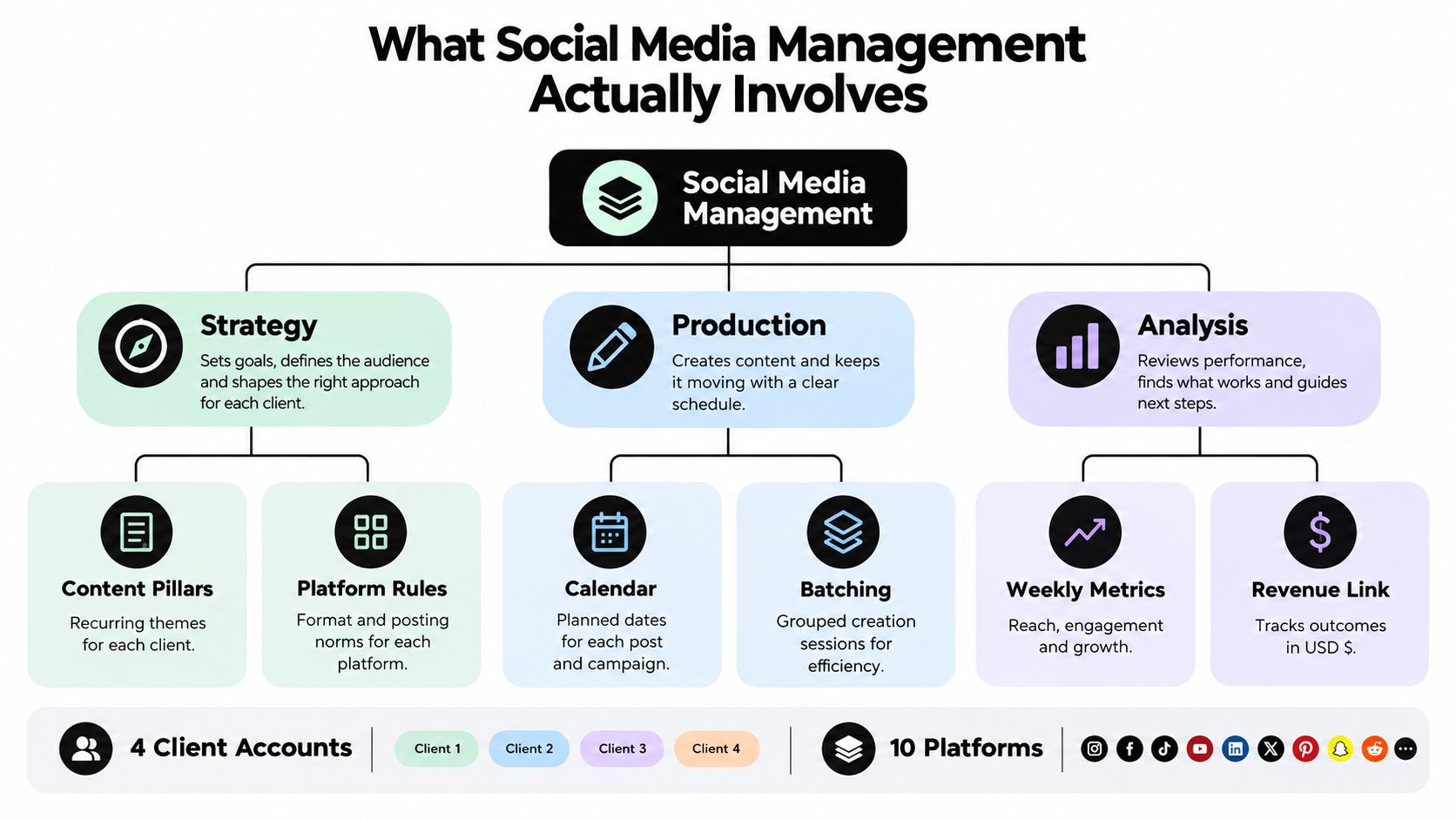
The three operating pillars
A reliable system has three connected pillars:
- Strategy: Decide the business outcome, audience, content jobs, platform choices, and brand rules.
- Production: Create assets, adapt them to each network, place them in a calendar, and schedule them.
- Analysis: Review attention, actions, conversions, and workload, then make one deliberate change.
The typical social media user actively uses or visits an average of 6.75 different social platforms each month, according to DataReportal's platform usage research. That fragmentation makes copy-pasting especially wasteful. One campaign idea may need a video, a carousel, a professional text post, a community update, and a longer explanation.
Central reframe: Social media isn't a task list. It's a small operation with inputs, outputs, quality controls, and limits.
By the end of a sound setup, you should have a strategy page, a content engine, a publishing queue, a measurement routine, a sustainability policy, and a practical 30-day start plan. Scheduler.social's guide to social media workflows is useful background for mapping those recurring stages before you choose software.
Set Goals, Audience, and Platform Choices
Strategy without a business outcome is decoration. Start by choosing one result for the next operating cycle: qualified leads, purchases, retention, email sign-ups, or another action the business can recognize.
Then assign each platform a job. LinkedIn might create qualified conversations for a B2B founder. TikTok might introduce the same company to a wider pool of potential users. Instagram could build trust through demonstrations, while YouTube could answer deeper questions that support consideration.
Write the audience in one sentence, with enough detail to reject weak ideas. “People interested in software” is useless. “Early-stage SaaS founders who need a simpler way to turn product knowledge into consistent social content” gives you a filter for topics, language, examples, and calls to action.
Only 32% of businesses reported being able to connect social activity to ROI, according to the International Journal of Drug Delivery Technology research. That's why your outcome must come before your posting schedule. Copying a competitor's cadence doesn't fix an undefined destination.
Use a strict platform filter
Ask three questions:
- Does the audience already spend attention there?
- Does the platform's native format suit the offer?
- Can the team cover it consistently without creating an always-on job?
A SaaS founder deciding between LinkedIn and TikTok shouldn't choose based on which platform looks more exciting. If the founder sells to operators who value expertise and direct conversations, LinkedIn may deserve the primary role. TikTok becomes sensible only if the team can produce useful short-form demonstrations and respond to the audience those videos attract.
| Audience Type | Primary Platform | Secondary Platform |
|---|---|---|
| B2B buyers and SaaS founders | YouTube | |
| Visual product shoppers and creators | TikTok | |
| Broad consumer discovery audiences | TikTok |
Treat this table as a starting hypothesis, not a permanent rule. Choose two or three platforms, document why they exist, and explicitly reject the rest for now. Fewer accounts with reliable coverage beat ten neglected profiles.
A practical content planning process should capture the outcome, audience sentence, platform job, core topics, and conversion action on one page. Keep that page close to the calendar. Every proposed post should answer three questions: who is this for, what should they do, and how will that action support the chosen outcome?
Build a Content Engine With a Calendar and Batching
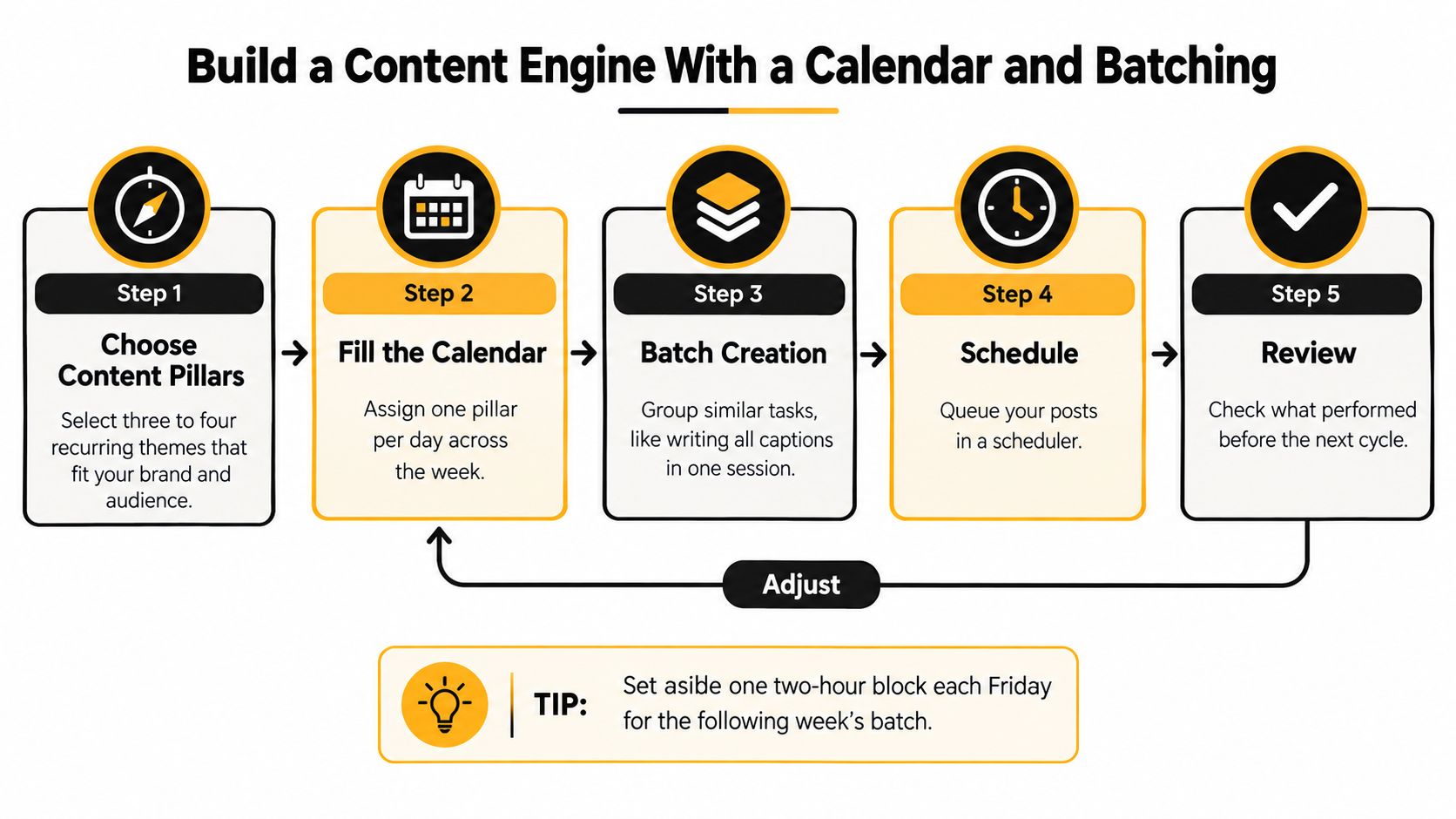
A social channel breaks down fast when every post starts from scratch. You lose time, approvals drag, quality slips, and the team starts posting whatever is easiest instead of what supports pipeline, sales, or retention. Fix that with an operating system, not more last-minute effort.
Start with a 4-week content matrix. Hold the core proposition steady for the month, then vary the hook, format, call to action, and platform version. That structure keeps production sane, gives you repeatable testing, and stops the feed from turning into random acts of content.
Give every post a job
A full calendar means nothing if every post asks for the sale. Assign a clear content job before anyone writes a caption or opens a design file.
| Content Job | What the Post Does | Example |
|---|---|---|
| Discovery | Helps new people notice a problem | A short myth-busting video |
| Trust | Shows judgment, proof, or process | A behind-the-scenes breakdown |
| Consideration | Helps the audience compare approaches | A framework or product walkthrough |
| Conversion | Makes the next action obvious | A focused offer with a tracked link |
| Retention | Helps existing customers get more value | A usage tip or customer update |
Workload and measurement get cleaner fast. If a post is tagged Discovery, judge it by reach, saves, or profile visits. If it is Conversion, judge it by clicks, replies, demos, or sales activity. That is how social media management stops being a posting task and starts acting like an operating discipline tied to revenue.
Batching should follow the actual production flow. Pick one production block. Outline the month's core posts. Gather source material and visuals. Draft the first version. Then adapt each asset for its platform. A visual creator can also batch RAW edits on macOS before uploading finished variations to the media library.
Use tools carefully. SleekPost fits well in the production and queue stages because it stores media, queues posts, handles recurring items, and uses its AI Content Generator to turn a link or prompt into a platform-shaped draft. That saves context switching and reduces manual busywork. It should not choose your message, audience angle, or offer. Edit every generated draft for accuracy, voice, and the post's job.
Establish a cadence, then test it
Set a cadence your team can sustain without turning social into an always-on job. In many audits, 6–7 weekly posts is a workable ceiling. Beyond that, engagement often flattens and production quality drops. Start below your maximum capacity, then earn the right to publish more.
Track changes like an operator, not a gambler. Test one variable at a time: hook, format, posting window, creative, or call to action. Keep the rest stable long enough to see whether the change improved the result you care about. A well-built content calendar for social media planning makes those tests visible, so you can see what changed, what shipped, and what produced a business outcome.
Recurring posts and auto-reposts have a place. Use them for evergreen education, recurring reminders, and durable resources. Do not let them run forever without review. Refresh the creative, update the framing, and remove anything that no longer earns attention or supports the funnel.
Adapt Each Post to the Platform Instead of Cross-Posting
One idea can travel across several platforms. One identical post should not.
Cross-posting saves a few minutes at the point of publication and can make the brand look careless everywhere else. Adapt the first three seconds for TikTok, the slide sequence for Instagram, the reasoning for LinkedIn, the compression for X, and the narrative depth for YouTube.

Suppose the core idea is: “A small team loses time when it manages every platform manually.” The five versions might look like this:
- TikTok: Open with the pain in the first seconds, show the manual workflow, and end with one practical fix.
- Instagram: Build a carousel with the problem, the hidden costs of context switching, the replacement workflow, and a clear save or share prompt. A Reel could turn the same idea into a visual demonstration.
- LinkedIn: Lead with an operational observation, explain the workflow consequence, and invite other managers to describe their process.
- X: Reduce the idea to a sharp statement or a short thread with one point per post. Don't dump every detail into one oversized caption.
- YouTube: Expand the argument into a tutorial with a clear thumbnail promise, chapters, examples, and a conclusion tied to the original business problem.
A tool can centralize the idea without flattening the execution. With per-platform customization in a composer such as SleekPost, the manager can start from one draft, then change the copy and media for each network before scheduling.
Use this adaptation checklist every time:
- Hook: Does the opening match how people consume this platform?
- Length: Is the post short enough for the feed but substantial enough to deliver the point?
- Aspect ratio: Does the media fit the destination without awkward cropping?
- Caption tone: Should it sound conversational, analytical, visual, or direct?
- Hashtags: Are they relevant to the network and the specific audience?
- Call to action: Is the requested action native to the platform and connected to the business outcome?
The distinction between short-lived updates and durable feed content matters too. SleekPost's guide to Reels versus Stories can help you decide whether a message needs discovery potential, temporary interaction, or both.
Don't confuse platform adaptation with reinventing the campaign five times. Keep the proposition and evidence consistent. Change the entrance, packaging, pace, and action so each audience receives a version that belongs where it appears.
Run a Weekly Analytics Routine That Ties to Revenue
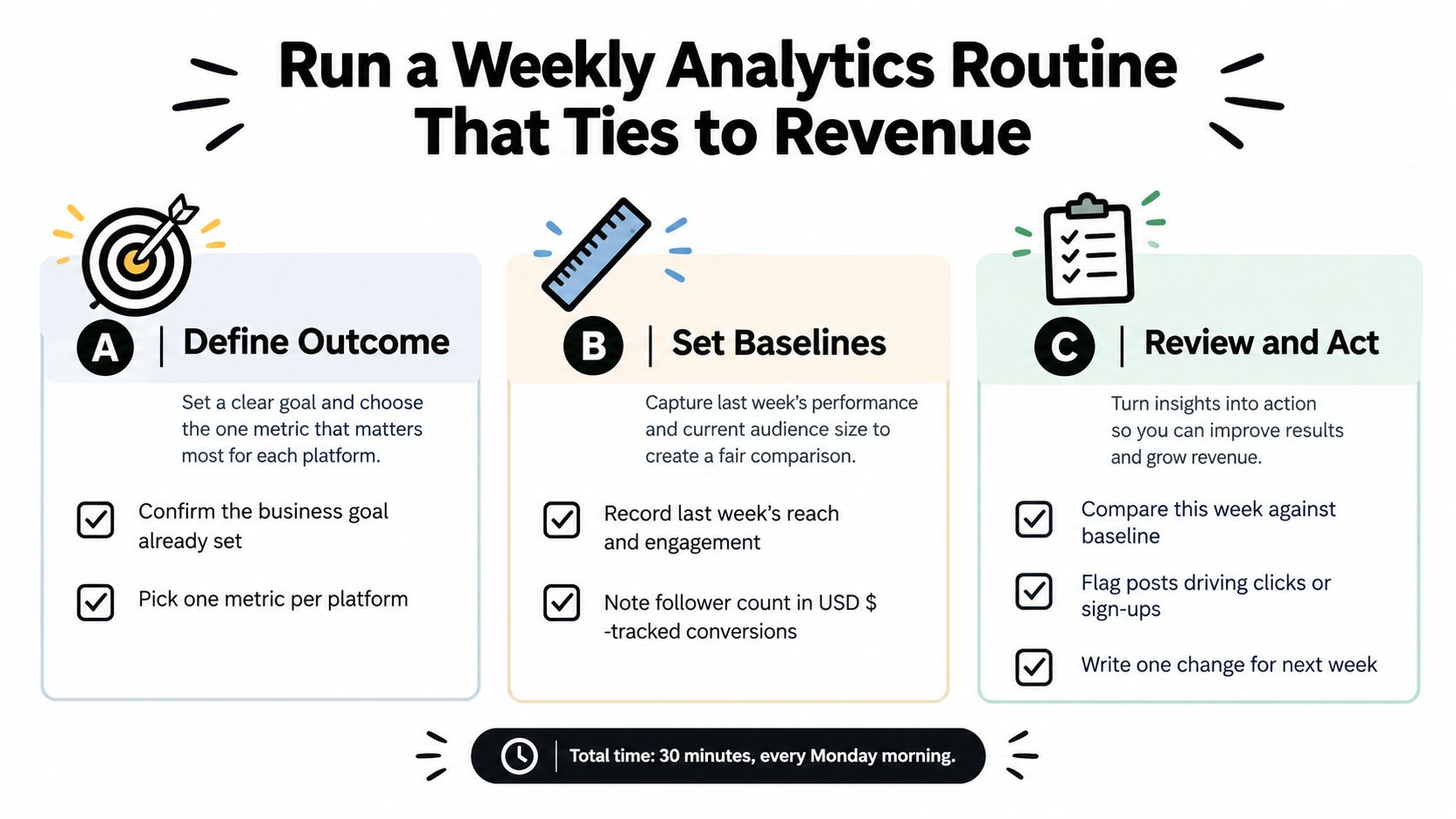
Monday morning is where weak social operations show. The team can list impressions, likes, and follower growth, but nobody can say which posts brought in qualified leads, sales conversations, or revenue. Fix that with a weekly review that ends in decisions.
Start from the business outcome you already chose, then set baselines for reach, engagement rate, clicks, conversion rate, and cost per result. Judge every post against that outcome. If you need qualified leads, a post with average reach and strong replies from the right buyers beats a vanity hit that brings nothing commercially useful.
Visibility gets attention. Persuasion gets action. Revenue measurement shows whether the action was worth anything.
Run the weekly check
Put a fixed review block on the calendar and protect it. Keep it short. Review the top three and bottom three posts against your baseline, then explain the gap instead of just admiring the winners.
- Top posts: Note the format, hook, audience segment, and call to action behind the strongest useful response.
- Bottom posts: Check for weak relevance, poor packaging, a bad platform fit, or an unclear ask.
- Conversions: Track clicks, sign-ups, prospect replies, assisted conversions, and revenue where your setup can support that view.
- Workload: Log which channels consumed too much effort for too little return.
Use UTM-tagged links, platform conversion APIs when available, and CRM campaign IDs. If you can run a holdout or a simple pre/post test, do it. Last-click reporting is too narrow for social. Compare assisted conversions and cohort behavior too, because buyers often see a post on one platform, return through another channel, and convert later.
SleekPost's analytics view gives you a lightweight way to compare publishing performance across connected channels without adding another bloated reporting layer. It will not replace your CRM, attribution setup, or finance records. Those systems still confirm whether a social interaction became a qualified opportunity, a purchase, or a retained customer.
Make the monthly and quarterly decisions
Monthly review is where you reallocate effort. Stop rewarding the platform with the biggest audience by default. Put more time into the channel that supports the chosen outcome and fits the team's actual capacity.
Reassess benchmarks quarterly. Engagement rates shift even when your posting habits stay the same, as noted earlier from the benchmark report cited above, so old targets go stale fast. Use recent internal baselines first. They reflect your audience, your offer, and your current operating reality better than generic targets ever will.
Keep the record clean with reporting best practices, then end every review with one action. Keep the format. Change the hook. Shift effort to another platform. Improve the landing page. Stop producing a content type that wastes time. Twelve observations and no decision is still wasted work.
Protect the Team With Workload Boundaries and Smart Automation
The always-on social manager is not a sign of commitment. It's usually a sign that the operation has no boundaries.
Recent research found that 77% of social media managers were actively or recently experiencing burnout, while 67.2% said they were effectively doing more than one job, as reported by Link in Bio's research summary. A sustainable workflow must measure workload alongside reach and conversions.
Write the rules before the crisis
Define response hours and publish them where clients and teammates can see them. Triage comments into four groups:
- Routine questions: Answer using an approved response pattern.
- Sales signals: Route to the person who can follow up.
- Complaints: Acknowledge quickly, move sensitive details private, and record the issue.
- Risk or crisis: Escalate immediately according to a named owner and decision path.
Rotate on-call coverage for teams. Solo managers should choose two reply windows rather than monitoring notifications all day. Decide what you won't publish when the team lacks the time, expertise, or approval to support it.
Automation should enforce these choices. Scheduling queues, recurring posts, approval deadlines, media libraries, and templated replies reduce repetitive handling. SleekPost's guide to automating social media posts is relevant for designing those routines without turning the account into a fully unattended feed.
Automation should not send fake-personal auto-DMs, reply to sensitive complaints without review, or recycle the same message until people stop noticing. Keep judgment human where context, risk, and relationships matter.
A solo manager who replies during two defined windows can give each conversation more attention than a manager who interrupts production every few minutes. The improvement comes from focus, not from pretending the brand is available around the clock. Write the policy, tell clients when replies happen, and let the queue protect the rest of the work.
Your 30-Day Start Plan and Common Questions
Start on Monday with a simple four-week rollout:
- Week one: Choose one business outcome, write the audience sentence, select two or three platforms, and document each platform's job.
- Week two: Build the 4-week content matrix, define content jobs, and organize the media library.
- Week three: Batch drafts, customize each version, set the publishing queue, and add recurring evergreen posts where appropriate.
- Week four: Run the first analytics review, compare results with the baseline, and make one optimization decision.
How long until results appear? Give the system enough consistent activity to reveal patterns, then judge progress through the chosen business outcome rather than impressions alone.
Should you delete old posts? Remove inaccurate, risky, or clearly damaging content. Keep useful historical material unless it conflicts with the current positioning.
What if a platform stops working? Pause new production there, preserve the useful audience and assets, and redirect effort toward the platform that supports the outcome.
Do you need AI-generated copy? No. It can accelerate drafts, but a quick editor still needs judgment, facts, voice, and platform awareness. Publishing more often won't repair weak audience fit or an unclear offer.
Management is a system, not a vibe. A sustainable system with clear limits beats a heroic sprint every time.
SleekPost gives creators, small businesses, freelancers, and teams one place to queue, schedule, customize, and review social posts across multiple platforms without adding unnecessary operational clutter. Start building your content engine and measurement routine with SleekPost, then use the saved time for strategy, replies, and decisions that require a human.