Most advice about Reposting on LinkedIn tells you to reshare often because it's free reach. That's backwards. A repost is incremental distribution, not a substitute for publishing, and a fast, empty reshare can crowd the original post instead of extending it. The reposts worth keeping earn saves, sends, profile visits, and real conversations over seven and 21 days, not just a brief spike in reactions.
Table of Contents
- Pick a Repost Path Before You Share
- How to Repost on LinkedIn Step by Step
- Time the Share So You Do Not Crowd the Original
- Score the Repost at Seven and 21 Days
- Repost Etiquette for Profiles and Pages
- Schedule Your Own Follow-Up for Day Seven
Pick a Repost Path Before You Share
Choose the distribution job first. The clicks, credit, and measurement all change once you pick a path, and picking halfway through the composer usually produces a vague share with no clear owner.
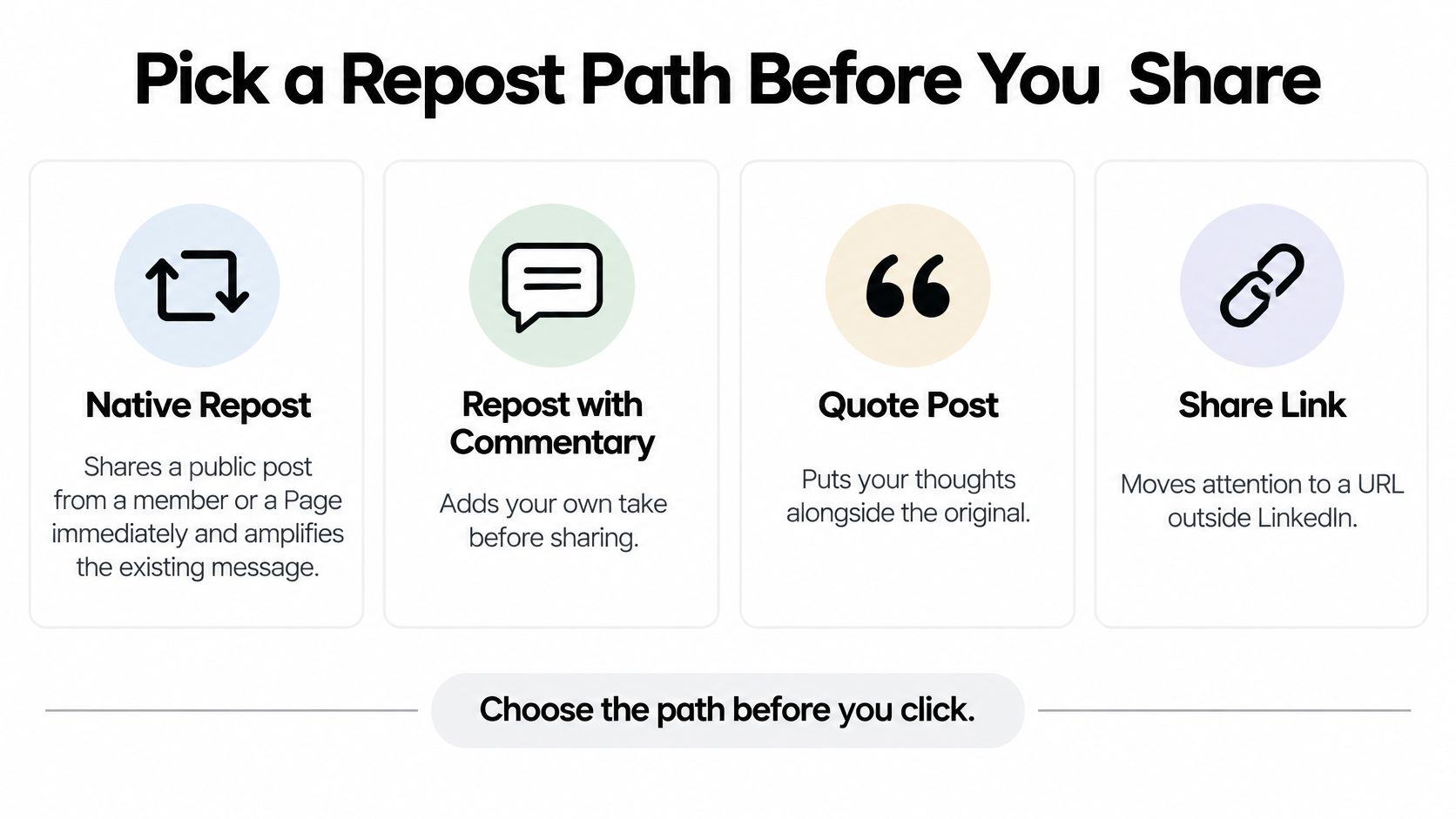
Four Ways to Redistribute a LinkedIn Post
| Method | Best when | What the audience sees | Main risk |
|---|---|---|---|
| Direct Repost | A public post you only need amplified | The original on your profile, activity, and Feed | Looks empty or derivative |
| Repost with your thoughts | You have a real point of view | Original plus commentary and optional @ mentions | Commentary that only restates the headline |
| Copied adaptation | Source is not public or needs a new frame | A new post in your voice, with the idea credited | Stripped context or a close paraphrase |
| Scheduled resurface | Your own post still has life | A later post you control, ideally with a new opening | Duplicate copy competing with the original |
The native system gives you the first two paths. The LinkedIn Help guidance on reposting describes selecting "Repost" to share an existing public post immediately or "Repost with your thoughts" to add original commentary before distributing it, for public posts by individual members and LinkedIn Pages. It also supports @ mentions for people, companies, or schools connected to the topic.
That distinction matters more than the button label. A direct repost mainly amplifies an existing message. A commentary repost adds interpretation and personal authority without forcing you to build a blank update from scratch.
Match the Path to a Concrete Job
Say a colleague announces a new role or an event registration deadline. You don't need to interpret it, you need the right people to see it, so a direct repost does the job and keeps their wording intact.
A report, hiring note, or customer story is different. Your audience needs a reason to stop, and that reason is your take on what the finding means for their team, budget, or next decision. Use Repost with your thoughts there, and write commentary that could stand even if someone never opens the attachment.
- Copied adaptation: Use this when the source isn't public, needs different wording for your audience, or needs your own image or document. Credit the author, rewrite the framing, and publish it as a new post rather than pretending it's a native share.
- Scheduled resurface: Use this only for your own post, carousel, or document after its first run. It's a second edition, not a copy and paste job, and it fits a broader content repurposing strategy when the underlying idea still solves a current problem.
Practical rule: If your added sentence could be attached to almost any post, pick a different path or don't share it yet.
I would circle one path on paper, or in your planning doc, before opening LinkedIn. It prevents the common drift where a post that needed a fresh adaptation becomes a lazy direct repost, and a timely announcement gets buried under commentary nobody asked for.
How to Repost on LinkedIn Step by Step
Don't start with the share icon. Start with relevance, because no composer trick fixes a post your audience wouldn't recognize as useful to their work.
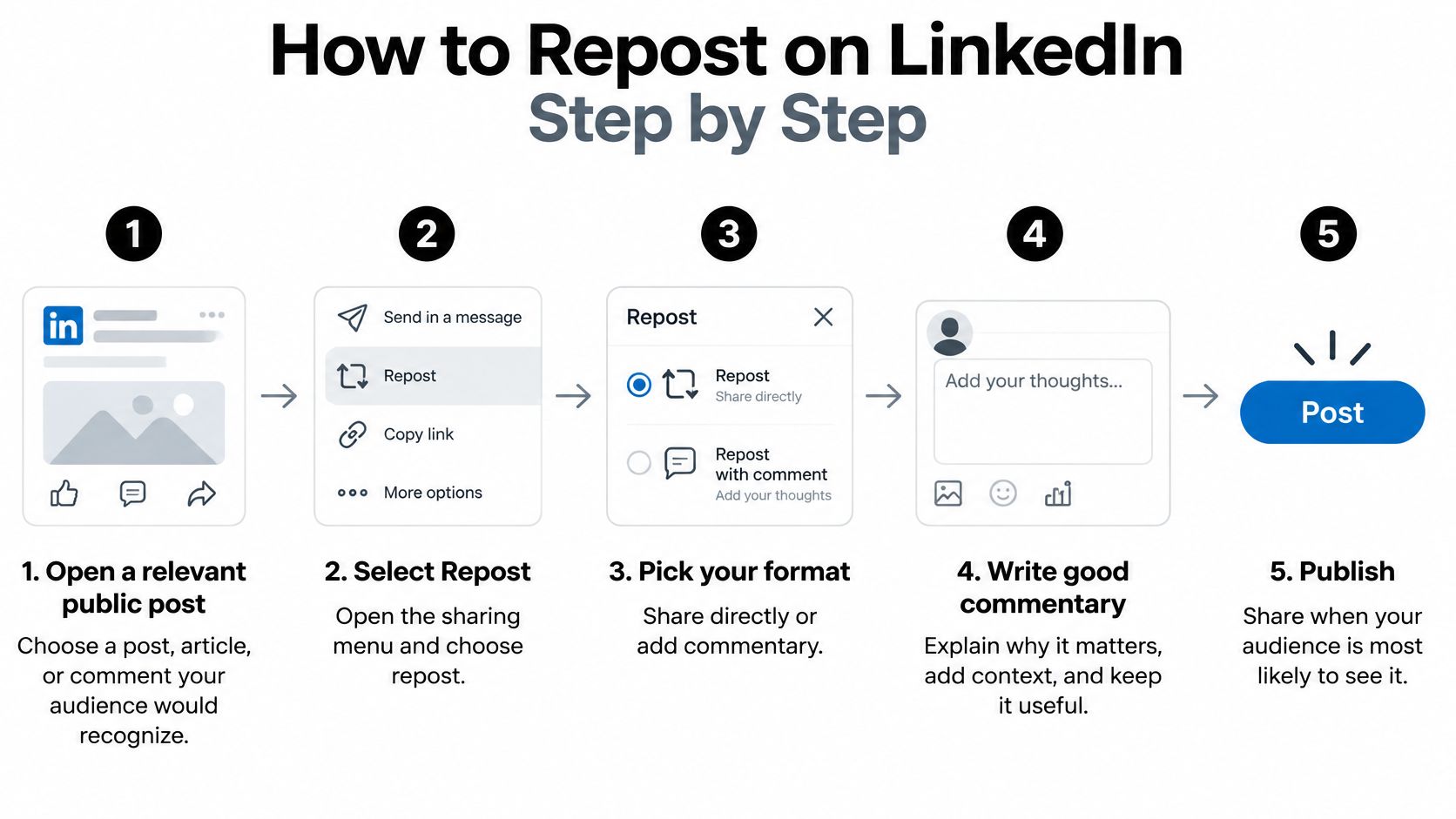
Use the Native Composer in Order
- Open a relevant public source: Pick a post, article, or comment with a clear connection to your audience's role or problem. This prevents resharing something merely because it performed well elsewhere.
- Select the format: Choose Repost for amplification as-is, or Repost with your thoughts when you can add interpretation. Don't use the direct option as a time saver for content that needs context.
- State your view in one or two sentences: Say what you agree with, what you'd qualify, or what changes because of it. A paraphrase of the headline adds no reason to engage.
- Add one actionable implication: Give readers a question to ask their team, a number to check, or a next step to test. Specificity turns passive viewing into a reply.
- Mention only genuine participants: Use @ for people, companies, or schools featured in the work. Decorative tagging reads as reach hunting.
- Add media only when it changes the point: An image or video should supply evidence, a contrasting example, or a clearer view of the asset. Decoration makes the share look padded.
- Check your publishing identity: If you manage a Page, decide before publishing whether this goes out as the Page or as you. That choice affects tone, notifications, and who should answer comments.
- Publish and confirm: Send it and check the confirmation LinkedIn shows. Then record the time and format so you can evaluate it later instead of relying on memory.
That workflow aligns with the LinkedIn marketing guide on algorithm best practices, which recommends adding organizational perspective, using relevant @mentions, and prioritizing clear, actionable content over overt promotion. It also frames the central pitfall plainly: distribution without interpretation gives the audience little reason to discuss the post and can make a brand appear promotional or derivative.
Write Commentary That Earns Its Place
Good commentary does three jobs quickly. It names the useful detail, explains why it matters to a defined reader, and ends with an implication they can accept, challenge, or apply. If you can't do the second job, you probably don't have a repost yet.
For distribution planning beyond a single share, the context in pipeline growth insights from Sprints & Sneakers is useful because it treats distribution as a deliberate system rather than a final click after publishing. Apply that thinking at post level by deciding who should amplify, in what voice, and toward what response.
Adapt a Non-Public Source Without Copying It
- Note the source in your own words: Record the idea, author, and origin for your credit line.
- Lead with your audience's problem: Rewrite the opening around their decision, not the source headline.
- Credit reused ideas or data by name: Put the credit where readers will see it, not buried at the end.
- Attach only media you can use: Use an image or document you made or have rights to publish.
- Publish as your own post: Keep your voice and structure throughout. Never paste the source text and call the result an adaptation.
Compare the finished repost against your own original posts on a similar topic, in a similar window, with a similar ask. Count reactions plus comments plus further reposts together, and record impressions separately so you don't mistake visible applause for reach.
Time the Share So You Do Not Crowd the Original
There's no validated magic wait. Treat any claim that you must wait exactly one hour, one day, or one week as a hypothesis, not a rule, because audience overlap and commentary quality change the result.
The image below captures the practical setting for this decision, where one person may be coordinating a profile, a Page, and several colleagues from the same desk.

Why Speed Can Reduce Incremental Reach
A rapid repost by the original author, or a pile-on from a Page and employees with overlapping followers, can split early attention across near-identical items. Readers who've just seen the source get little new value, while comments and reactions scatter instead of building on one post.
That risk is the unresolved timing question raised in a LinkedIn post on repost timing and audience overlap, where exact timing windows are not independently validated. A commentary repost with original insight is materially different because it gives a second audience, or the same audience at a later moment, a new reason to respond.
Use timing research as a starting window for your test slots, including guidance on the best time to post on LinkedIn, but keep the slot consistent across test cells. Otherwise you won't know whether the delay or the hour changed the outcome.
Run a Three-Cell Timing Test
- Cell A, direct and early: Publish a direct repost while the original is still fresh. This tests pure amplification.
- Cell B, commentary and early: Publish at a similar time, but lead with clearly different interpretation. This tests whether a new angle reduces overlap fatigue.
- Cell C, commentary and delayed: Hold the same kind of commentary for several days. This tests whether spacing extends the content's life.
Keep topic type, format, audience, and time of day as consistent as you can across multiple posts. Judge incremental impressions and qualified actions versus the original, not the repost's raw total. A repost viewed mostly by people who already saw the source hasn't added much distribution, even if its reaction count looks tidy.
The short walkthrough below is useful as a visual reminder of the mechanics before you set up the test in your own accounts.
A workable pattern for small teams is same-day commentary from a different person with a distinct audience, a multi-day wait for the original author, and staggered employee shares. Don't ask five people to publish identical praise within the same hour. Stagger them, give each person a different legitimate angle, and stop the sequence if comments show readers repeating that they've already seen it.
Score the Repost at Seven and 21 Days
A repost hasn't failed just because day one looks quiet. Score it on a fixed sheet, at fixed checkpoints, against the original's baseline and against comparable posts from the same account.
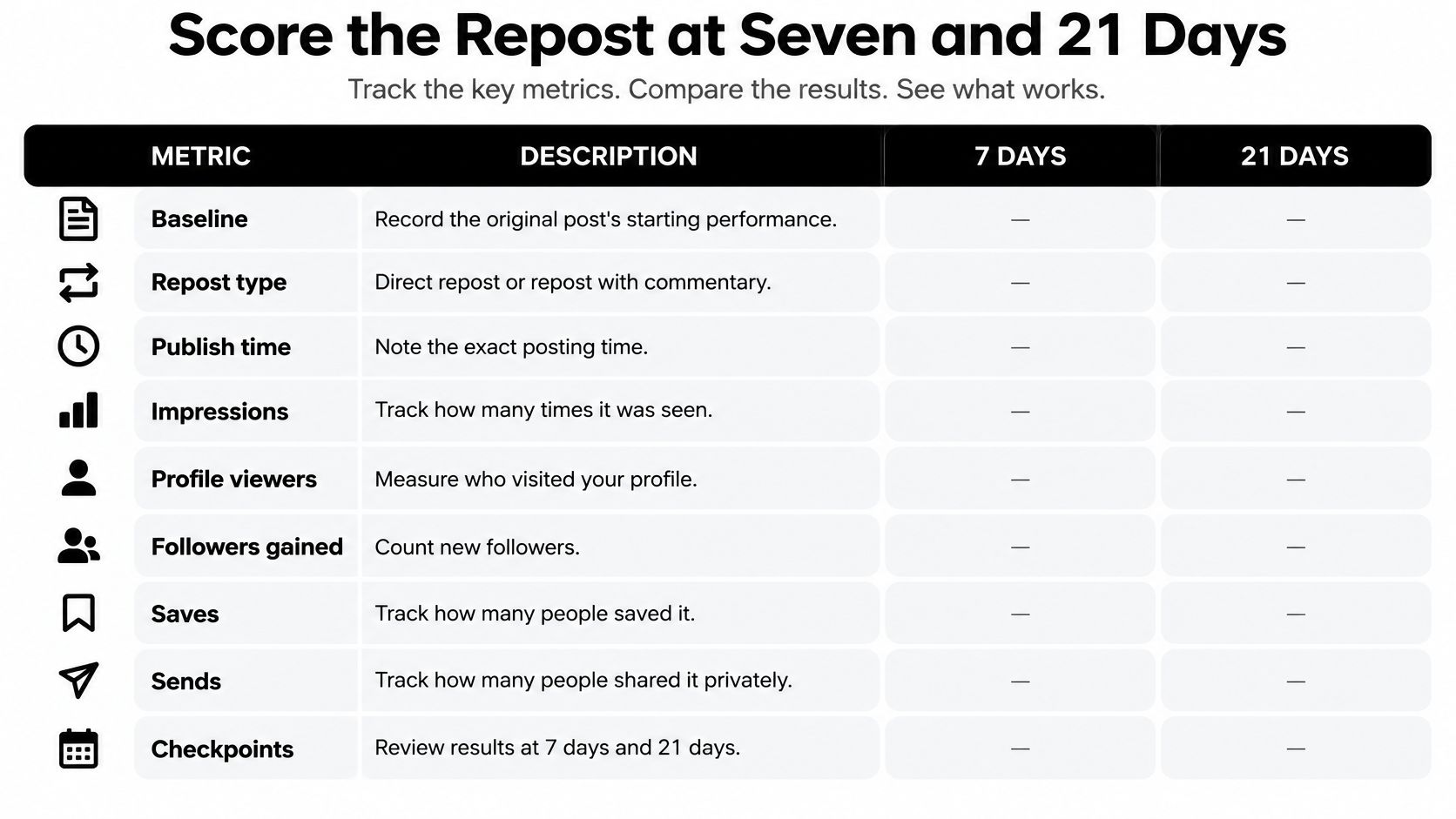
Build One Scorecard and Keep the Column Order
Record the source post, its baseline, whether your share was direct or with commentary, publish time, impressions, profile or Page viewers, followers gained, saves, sends, and comments that continue the point. Keep the same order for every row so the seven-day and 21-day reads line up without cleanup.
| Signal | How to record it | When to read it | Benchmark or judgment |
|---|---|---|---|
| Engagement rate | Reactions + comments + reposts, divided by followers | 7 days | Median 0.32%; top quartile at least 0.83% in a 134,522-post study |
| Repost propensity | Reposts per 100 reactions | 7 days | About 9 for company posts; 1.5 for text-only to 8.4 for documents on personal profiles |
| Share coverage | Share of company posts reshared at least once | 7 days | 67% in the same company-post dataset |
| Impressions | Incremental impressions versus the original post | 7 and 21 days | Growth after day 7 means it is still traveling |
| Saves and sends | Private keeps and private recommendations | 7 and 21 days | Stronger usefulness signal than a reaction spike |
| Discovery and pipeline | Profile or Page visits, followers, inquiries, conversations | 21 days | A quiet repost can still be the one that starts a conversation |
Those benchmark rows come from the Hootsuite guide to the LinkedIn algorithm, which reports that everyday professionals had a median engagement rate of 0.32% in one large observational study of 134,522 LinkedIn posts, calculated as reactions, comments, and reposts divided by followers, while the top quartile reached at least 0.83%. A separate dataset in the same guide reported about 9 reposts per 100 reactions for company posts and 67% of company posts reshared at least once. Treat these as reference points, not promises for your audience or format.
Read Day Seven for Travel and Day 21 for Value
At seven days, ask whether the repost is still moving. Impressions, saves, or sends that continue to grow after the first read suggest the content is traveling beyond the initial audience. A flat line by day seven usually means the share has finished its useful run.
At 21 days, ask whether it created durable value. Note profile visits, newsletter sign-ups, inquiries, and sales conversations separately from public engagement, because a post can look ordinary in reactions while sending the right people to your profile. That's the fuller logic behind learning how to track performance across both visible and downstream signals.
A save or a private send often means someone judged the post useful enough to keep or recommend, which is a stronger editorial signal than a polite reaction.
Run 8 to 12 annotated reposts before drawing a pattern, and change one factor at a time: opening perspective, media format, or audience tag. Don't compare before day seven, don't change the commentary and timing in the same test, and don't compare a small personal profile against an unrelated company Page. The cleaner comparison teaches you which editorial choice moved distribution.
Repost Etiquette for Profiles and Pages
Etiquette starts with visibility. A repost isn't a quiet bookmark or a private recommendation, so assume other people will judge your judgment from what you choose to amplify.
The LinkedIn Help documentation on repost visibility says reposts can appear on the reposter's profile, in the activity area, and in the Feed, may generate notifications to members of the reposter's network, and can be visible beyond the immediate network, potentially to people on or off LinkedIn, depending on visibility settings. It doesn't provide a guaranteed impression count or algorithmic boost percentage, so don't promise one internally.
Decide Identity Before Anyone Clicks
Page administrators can repost as the Page or as an individual member. Decide in advance which identity owns advocacy for each campaign, who replies to comments, and whether an executive's personal interpretation would be more credible than a logo repeating the same claim. Don't publish identical sentences from both identities at once.
That identity discipline matters even more in regulated or trust-sensitive work, where profile claims and shared content need to stay consistent. The guidance to build a compliant LinkedIn profile from Advisor Momentum is a helpful prompt to align the person, the profile, and the material being amplified before distribution begins.
Keep a Short Do Not List
- Do not tag for reach: Mention someone only when they're directly involved in the work or relevant to the discussion.
- Do not stack bare reshares: Daily forwarding makes a profile look like a relay and weakens the work of LinkedIn personal branding.
- Do not duplicate copy across accounts: Identical commentary from a Page and several employees signals coordination without conviction.
- Do not add a sales pitch: The original post already made its offer. Your note should add context, not attach a second advertisement.
You can repost a comment as well as an original post, and the composer allows thoughts, mentions, video, or images. Use that flexibility carefully, because reposting a comment can lift a sharp observation out of a thread, but it can also strip away the exchange that made it fair.
If the original author wouldn't thank you for the share, rewrite it as your own sourced note or leave it alone. One commentary repost you'd defend in a meeting beats five empty reshares.
Schedule Your Own Follow-Up for Day Seven
Use native reposting for someone else's public post. When the asset is yours, schedule a rewritten follow-up only if the first version earned another look.
Turn the Day Seven Read Into One Action
- Pick one published post: Choose a post, document, or carousel with saves, sends, substantive comments, or profile activity at day seven. If it flattened, rewrite the idea instead of queuing the same asset.
- Write a new opening: Lead with a fresh problem, a result, or a lesson that wasn't in the first version. The new line must give returning readers a reason to continue.
- Schedule the variant for day seven: Queue that version rather than copying it by hand each week. Our scheduling options include auto-repost and recurring settings, which helps you plan the follow-up without turning it into an identical repeat.
- Review again at day 21: Check saves, sends, profile visits, and any real conversation before deciding on a third look. Stop when downstream actions stop, even if reactions continue.
If you need to locate a native item you've already queued, the practical steps to find scheduled LinkedIn content with PostPulse can save time before you add another variant. For the scheduling workflow itself, use the process for how to schedule posts on LinkedIn and give the follow-up its own time slot rather than stacking it against a new original.
Posts scheduled through SleekPost have the same reach as posts made manually, so the editorial choice is about timing and revision, not a scheduling penalty. On average, each active user saves about 3.6 hours per week using SleekPost, time that's better spent writing the new opening and reading comments than manually reposting the same file.
Don't use a scheduler to impersonate a native reshare of someone else's update. Credit, context, and the attached original matter there. Scheduling works best for content you own, can revise, and can retire when the 21-day evidence says it's done.
Pick one of your own posts that earned saves, sends, or a real conversation, write a new opening for day seven, and queue the follow-up instead of resharing it unchanged. SleekPost lets you schedule that variant, use recurring or auto-repost settings for content you own, and keep the rest of your LinkedIn publishing in the same clean dashboard. Start with one earned follow-up, score it at seven and 21 days, and keep only the version that brings people back for a reason.