A free trial cancel anytime offer lets you stop future auto-renewals before the trial ends, but it doesn't guarantee a refund after you miss the deadline and get billed. A major 2026 consumer survey found that 79% of U.S. consumers had intended to cancel a free trial but forgot, then faced an average forgotten-trial cost of $45 per month, or about $540 per year.
That makes the popular advice, “Just cancel anytime,” dangerously incomplete. The key question isn't whether a cancel button exists. It's when cancellation takes effect, whether billing has already been authorized, what access remains afterward, and whether the company sends a useful reminder before charging you.
A free trial is often a billing arrangement disguised as a product test. Read the offer as a contract, record the deadline, and treat every saved payment method as a possible future charge.
Table of Contents
- The Reality Behind the Cancel Anytime Promise
- Your Legal Rights and Regulatory Protections
- How to Cancel Effectively and Verify Success
- Trial Models and Post-Cancel Access Rules
- Navigating Retention Flows and Hidden Traps
- The True Cost of Forgetting and How to Avoid It
The Reality Behind the Cancel Anytime Promise
“Cancel anytime” sounds like permission to leave whenever you want. In most free trials, it means something narrower: you can stop the next automatic renewal if you cancel before the trial expires. It generally doesn't mean you can ignore the deadline, get charged, and demand an automatic refund afterward.
The mechanism is called negative-option billing. The service starts you in a trial and sets the default account state to continue into a paid plan unless you take action. If you provide a card during signup, the merchant can use that saved payment method when the trial ends. The Federal Trade Commission's guidance on free trials and negative-option subscriptions describes this basic structure, where the consumer carries the burden of cancelling before the cutoff.
That design changes how you should interpret the word “free.” The trial may cost nothing during the initial period, but your inaction becomes the event that triggers a paid subscription.
The conversion design behind the trial
Companies ask for payment details because they want a smooth transition from trial user to paying customer. That convenience can help an interested customer continue using the product, but it also removes the need for a fresh purchase decision when the trial ends.
The important distinction is:
- Cancellation before expiry: recurring billing is turned off, so the account shouldn't convert to the paid plan.
- Cancellation after conversion: the subscription may stop future renewals, but the first paid charge has already occurred.
- Refund request after billing: the merchant may approve it, but “cancel anytime” alone doesn't guarantee one.
This is why a no-commitment offer deserves more than a glance at its headline. Compare the promise with the details on the no-commitment pricing guide, especially the trial length, payment requirement, renewal price, and cancellation deadline.
Practical rule: Treat the trial-end date as a payment deadline, not as the date when you plan to remember the subscription.
A service that makes signup effortless but cancellation obscure is shifting risk onto you. Before entering a card, find the cancellation instructions and ask one plain question: If I cancel today, will I keep access until the trial ends, or will access stop immediately?
Your Legal Rights and Regulatory Protections
The law increasingly treats “cancel anytime” as more than casual marketing language. Regulators and courts have focused on whether the promise is supported by clear disclosures, simple cancellation, and a fair path out, particularly when a free trial automatically becomes paid.
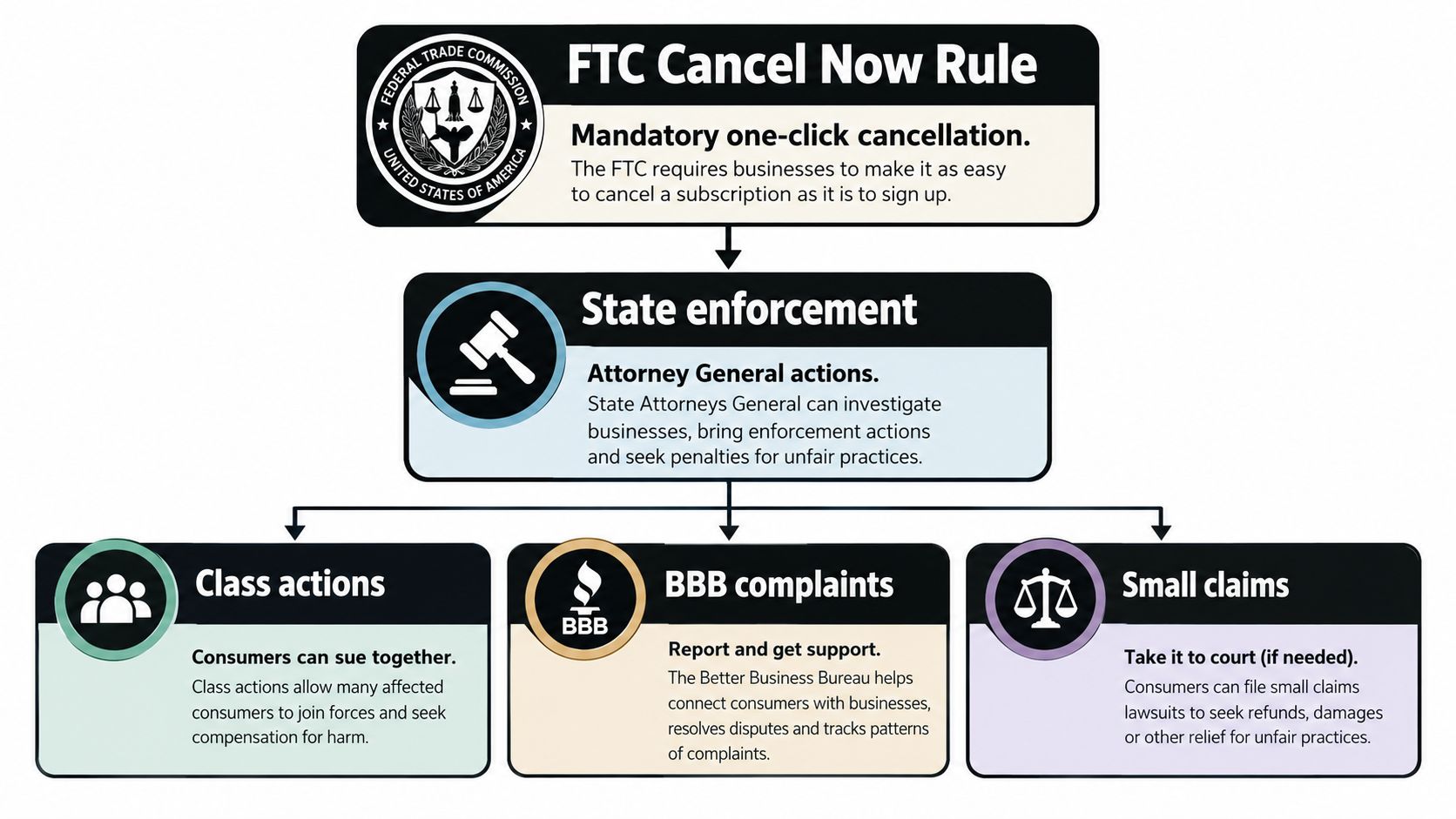
The rules can differ by location. In California, free trials lasting longer than 31 days require reminder notices sent between 3 and 21 days before the trial ends. Massachusetts requires the consumer to receive the calendar date by which cancellation is needed to avoid charges. The District of Columbia requires affirmative consent again at the end of a free trial lasting one month or more. These requirements are summarized in legal coverage of subscription practices and auto-renewal enforcement at Davis & Gilbert's subscription compliance analysis.
What a transparent offer should disclose
A legitimate trial page should make the financial sequence visible before signup. Look for:
- Trial duration: The offer should state how long the free period lasts.
- Renewal date: You should know when the first charge will occur.
- Renewal price: The paid amount shouldn't be buried in a separate page.
- Payment requirement: The company should say whether a card is needed.
- Cancellation method: The route should be available online if signup happened online.
- Post-cancel access: The terms should explain whether access continues through the trial.
A 2025 FTC-related court record reported that 58.0% of surveyed free-trial users had signed up for at least one free trial during the prior 12 months, while 85.0% said their most recent trial automatically converted to paid membership or would have done so without cancellation. Those figures explain why cancellation parity matters. A company shouldn't create a one-click signup and then require a maze of menus, phone calls, or retention conversations to leave.
Keep screenshots of the offer and cancellation page. If the company charges you despite a confirmed cancellation, contact support with the evidence, ask your card issuer about a dispute, and report a deceptive pattern to the relevant consumer authority. Terms of service can explain a company's process, but they can't turn an unclear or obstructive flow into a clear one. Review the provider's terms of service before accepting a trial, not after a billing dispute begins.
How to Cancel Effectively and Verify Success
Don't stop at clicking a button labelled “cancel.” You need proof that the billing instruction changed.
Most subscription systems implement cancellation by disabling recurring billing or setting the subscription to expire at the end of the trial while preserving access until that date. Microsoft's explanation of subscription cancellation describes this operational distinction in its subscription cancellation documentation. The exact wording varies, but “cancelled” should mean the next renewal won't happen.
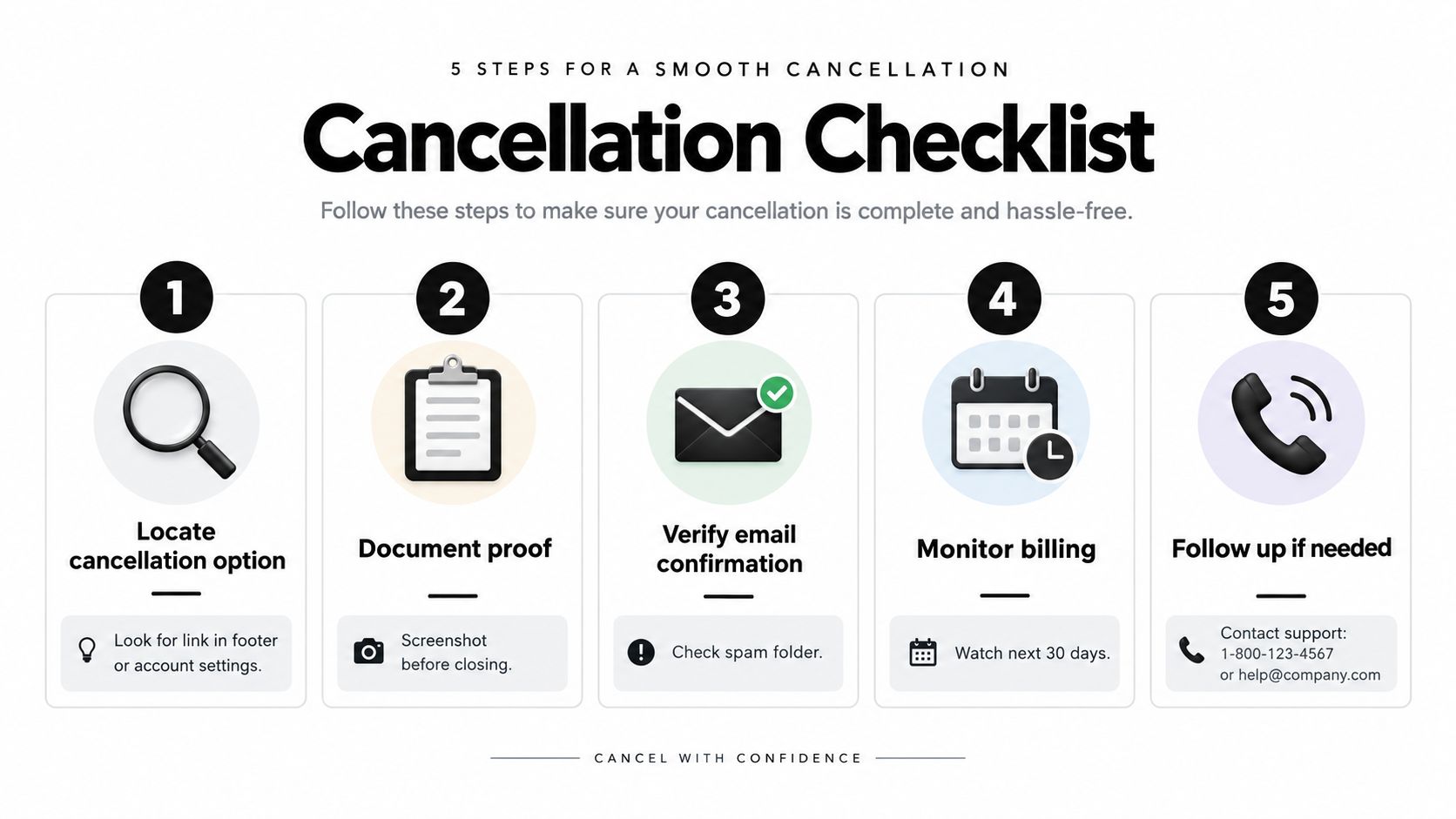
Use this sequence:
- Open the account settings: Look under Billing, Subscription, Plan, or Manage account. Don't assume deleting the app or logging out cancels anything.
- Choose cancellation, not pause: A pause preserves the subscription relationship. A downgrade may still renew. Select the option that explicitly stops recurring billing.
- Read the final confirmation: Check the stated end date and the message about future charges. If the screen says “scheduled to end,” save it.
- Capture evidence: Take a screenshot showing the cancellation status, date, and account identifier. Save the confirmation email, including its arrival time.
- Check the payment account: Watch for the expected billing date and review the next statement. If a charge appears, contact the merchant promptly.
A useful resource for understanding how to modify your plan is Carti's help documentation, which illustrates the kind of plan-management instructions users should expect from a subscription service. The point isn't to follow one provider's exact interface. It's to recognize whether the account has moved from renewing to ending.
If the service presents a retention offer, decline it unless you want a new commitment. Before closing the page, confirm three facts: the renewal is off, the end date is visible, and the confirmation exists. You can also compare the wording with the provider's pricing information, since a mismatch between the dashboard and pricing page is a reason to ask support for written clarification.
Trial Models and Post-Cancel Access Rules
The most useful cancellation question is also the one many trial pages fail to answer: Does cancellation stop billing immediately, or does it only stop the next renewal? Consumer guidance on identifying trial offers highlights this gap and recommends clear wording about trial length, conversion, and post-cancel access in this free-trial offer guide.
There are two basic models.
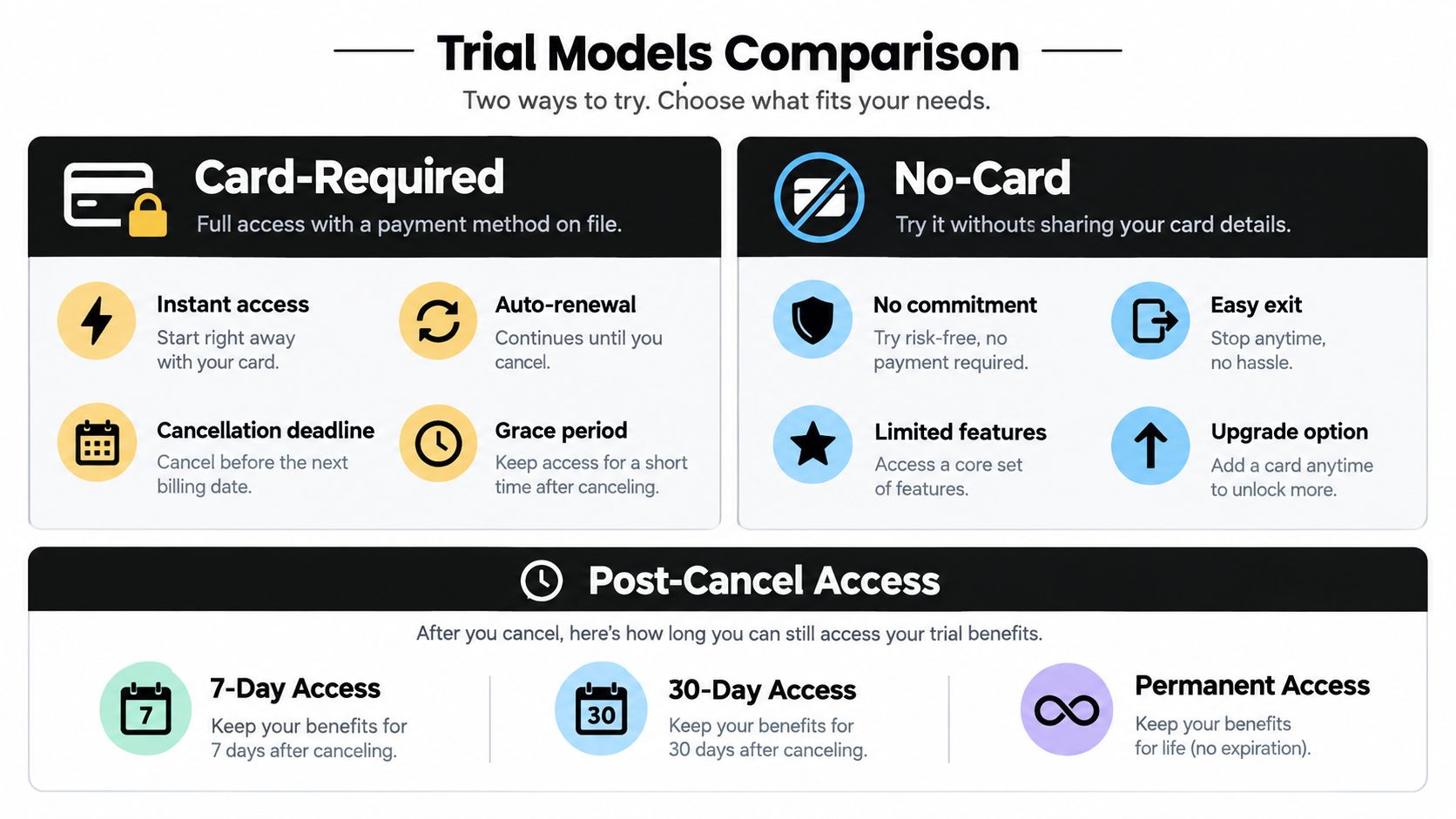
Card-required trials
A card-required trial gives you immediate access while placing a payment method on file. The account usually remains active after cancellation until the stated trial end, but the provider may configure the account differently. Read the confirmation screen instead of guessing.
This model is risky if you don't record the renewal date. It can also be useful when you want to test a full workflow, provided you cancel as soon as you've decided not to continue. Don't wait until the final hours. Technical problems, time-zone differences, or a forgotten login can turn a simple task into a charge.
No-card trials
A no-card trial normally expires without a payment transaction if you don't add payment details. It removes the most direct auto-renewal risk, although the provider may limit features, restrict usage, or ask you to upgrade to continue.
For SaaS and creator tools, no-card access can be the safer testing route when available. You can evaluate the actual workflow without turning forgetfulness into a billing event. If a provider offers only a card-required trial, check whether it lets you cancel immediately while preserving trial access.
| Question | What to confirm |
|---|---|
| After cancellation | Does access continue until the trial end date? |
| At trial expiry | Does the account expire, downgrade, or convert to paid? |
| After a paid period | Does cancellation stop access now or at the billing period's end? |
| Refunds | Is there a stated refund window after an accidental charge? |
Billing mistakes are also a business risk, not just a consumer inconvenience. For a broader explanation of how failed subscription controls can create revenue leakage, see Loopfour's billing analysis. From the user's side, the solution is simple: don't rely on the label. Confirm the exact effect of cancellation in writing, and choose a plan whose access and billing rules match how you intend to test it. For a broader pricing comparison, review limited versus unlimited plans before starting a trial.
Navigating Retention Flows and Hidden Traps
A cancellation can fail even when the button exists. The path may lead through multiple menus, emotional prompts, discounts, or a “pause” option that leaves recurring billing active.
A 2025 FTC-related testimony described sellers promising free trials while hiding recurring charges or cancellation deadlines. It also noted that cancellation paths can sit behind retention scripts and multiple menus, as documented in the click-to-cancel testimony.
Use a defensive cancellation routine
- Choose the literal exit: Select “Cancel subscription” rather than “Pause,” “Change plan,” or “Remind me later.”
- Reject delay tactics: A discount or temporary pause doesn't remove the renewal unless the confirmation says it does.
- Ignore guilt prompts: A company can ask why you're leaving. You don't need to justify the decision to complete cancellation.
- Watch for a new commitment: A retention offer may replace the original plan with another billing cycle or promotional term.
- Read the last screen: Some flows require a final confirmation after the first cancellation request.
Don't confuse a prorated credit with a cancellation confirmation. A credit may address an existing charge while the account remains scheduled to renew. Likewise, deleting an account may remove your data but leave a separate app-store subscription active.
If the final page doesn't show whether the next charge is disabled, the process isn't finished.
Take a screenshot at every meaningful stage, especially when the service offers a discount. If the company later claims you never cancelled, timestamps and confirmation emails give you something stronger than memory.
The True Cost of Forgetting and How to Avoid It
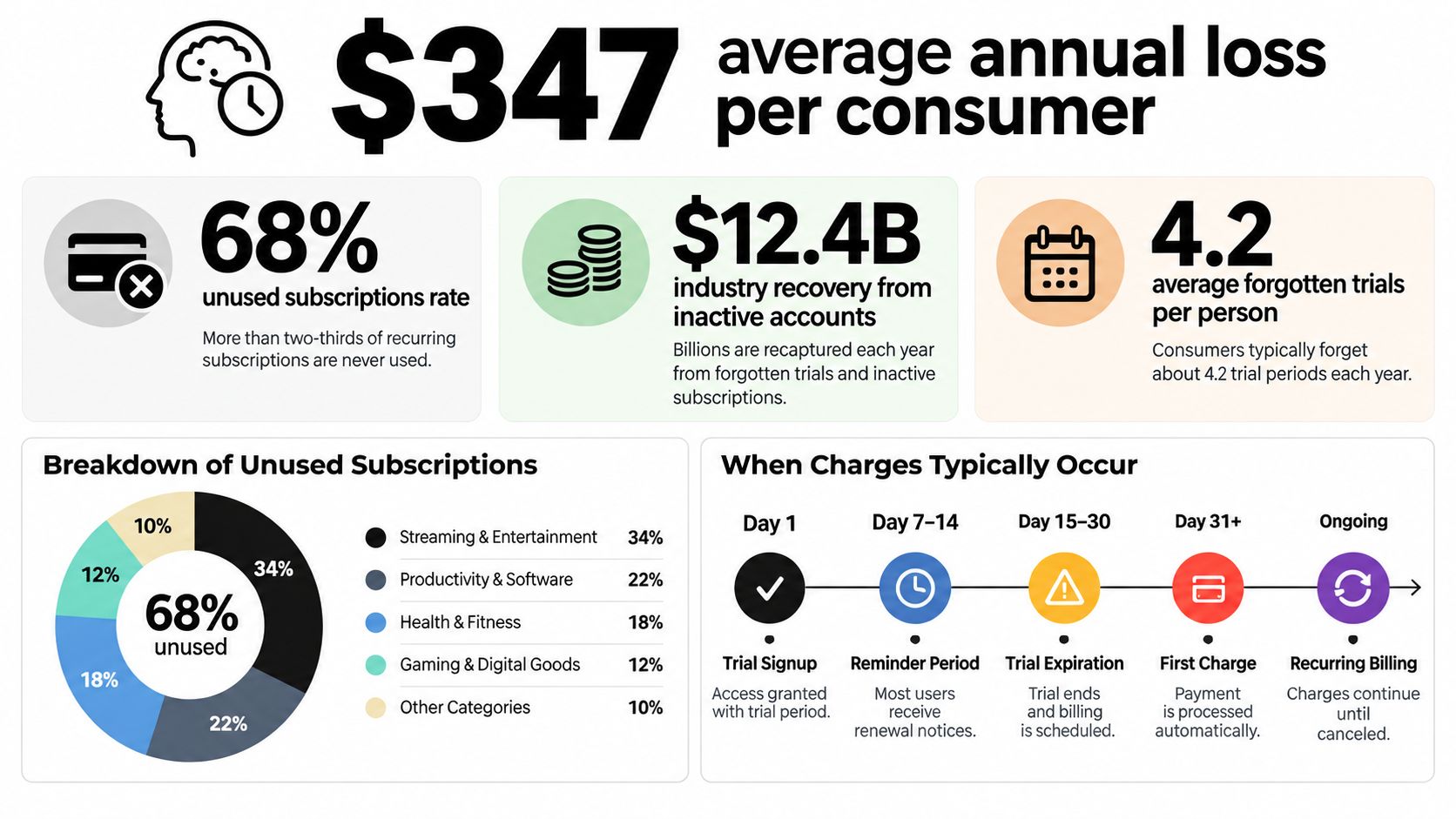
Trial amnesia is expensive because people don't usually forget that they disliked a product. They forget that a billing decision still needs to be made. The survey data makes the risk concrete: 79% of U.S. consumers in a major 2026 survey had signed up intending to cancel, then forgot and were charged, with an estimated average cost of $45 per month or about $540 per year. Read the underlying reporting at Yahoo Finance's coverage of forgotten free-trial charges.
The same reporting found that 25% of respondents had accidentally remained subscribed to at least one trial, 1 in 8 had forgotten at least two, and the highest average single charge from a forgotten trial was $87. It also found that 41% had created fake accounts to access free offers. That behavior shows how strongly consumers want to test products without creating a lasting billing relationship.
Build a system that doesn't depend on memory
Set a calendar reminder when you start the trial, then add another before the renewal date. Put the service name, trial-end date, renewal price, and cancellation link in the event description. If you cancel immediately, keep the reminder anyway so you can verify that access and billing behave as promised.
A virtual card or bank-controlled payment number can add another safeguard, but it shouldn't replace cancellation. Some merchants may retry failed payments, suspend access, or send the balance to collections depending on their terms. The cleanest protection remains a documented cancellation before the cutoff.
For tools used to plan content, a service such as the free social media post scheduler can be evaluated with the same discipline: record the end date, test the core workflow, and cancel as soon as you know whether it fits. Keep a simple subscription list with the provider, payment source, renewal date, and confirmation status. That small habit turns “cancel anytime” from a vague promise into a decision you control.
SleekPost gives creators, marketers, and small businesses one dashboard to schedule and publish content across major social platforms, with an AI Content Generator for turning links or prompts into platform-ready posts. Start the 7-day free trial, record the renewal date, and visit SleekPost to test the workflow while keeping the cancellation terms visible.