
A busy calendar can hide a weak strategy. Filling every day with posts doesn't mean your audience is receiving useful information, your team can maintain production, or your business is moving toward a measurable outcome. A calendar works when it connects a repeatable workflow to a defined audience, a specific job, and the format each platform handles best.
That changes how you evaluate content calendar ideas. The question isn't only “What should we publish?” It's also “What operational problem will this system solve?” The ten approaches below focus on reuse, consistency, trust, conversion, community, speed, and relevance. You don't need all of them. Choose one as your operating model, add a complementary layer, and leave room for timely opportunities.
Audience behavior makes that flexibility essential. The typical social-media user engages with approximately 6.84 platforms each month, while many marketers plan only short periods ahead, according to Planable's social media statistics roundup. A practical calendar therefore adapts one idea instead of copying one post everywhere. SleekPost can serve as an optional execution layer for batching, customizing, and scheduling those platform-specific versions across channels.
Table of Contents
- 1. Pillar Content and Cluster Strategy
- 2. Themed Month Campaigns
- 3. The 10/4/1 Content Mix Formula
- 4. Platform-Specific Content Series
- 5. Batching and Batch Day Calendar
- 6. User-Generated Content Spotlight Calendar
- 7. Educational Funnel Content Calendar
- 8. Newsjacking and Real-Time Response Calendar
- 9. Repurposing and Content Recycling Calendar
- 10. Community Engagement and Conversation Starter Calendar
- 10 Content Calendar Strategies Comparison
- Build the Calendar Your Workflow Can Sustain
1. Pillar Content and Cluster Strategy
A pillar-and-cluster calendar solves the reuse problem. Start with one substantial source asset, such as a detailed guide, webinar, product demonstration, founder interview, or long-form video. Then extract smaller pieces that answer one question, illustrate one point, or offer one practical action.
The source asset supplies depth. The cluster content gives each platform a native entry point. A guide about onboarding software might become a LinkedIn framework, an X thread about common mistakes, an Instagram carousel with a process summary, short videos answering individual questions, and an email linking back to the full resource.
Design the relationship, not just the schedule
Every cluster item should point back to the same central idea, but it shouldn't repeat the same wording. LinkedIn readers may respond to a professional argument, while TikTok viewers need a clear opening frame and fast visual context. A blog post can carry search-oriented depth, whereas an Instagram Story can test a question before you expand it into a larger asset.
Use a simple record for every derivative:
- Source asset: Identify the guide, recording, interview, or research note behind the post.
- Audience problem: State the question this version answers.
- Platform adaptation: Specify the format, tone, opening hook, and call to action.
- Connection: Link the derivative to the pillar, related cluster posts, or next useful step.
This structure turns reuse into editorial architecture rather than random reposting. It also supports a documented content planning process, where owners, assets, deadlines, and measurement fields stay visible.
Sustainable reuse doesn't mean stretching one idea until it becomes stale. Retire derivatives that no longer add a distinct perspective, and refresh the pillar when the underlying advice changes.
2. Themed Month Campaigns
When posts feel disconnected, a themed month restores continuity. Choose a central topic tied to an audience need, seasonal moment, industry observance, or business priority, then assign each week a distinct angle, such as education, proof, participation, or conversion.
An accounting firm could build a tax-season theme around preparation, filing mistakes, document organization, and consultation readiness. A cybersecurity company might use an awareness theme to explain threats, demonstrate safer habits, answer audience questions, and introduce its service after establishing useful context.
Build a narrative with enough variation
A theme should connect the calendar without forcing every post into one format. Combine different purposes:
- Educational posts: Explain a concept or help the audience complete a task.
- Evidence posts: Show a process, customer experience, product workflow, or expert perspective.
- Community posts: Ask followers for experiences, objections, or examples.
- Promotional posts: Present an offer once the audience has enough context to understand its value.
Set fixed events and major campaigns early, while leaving room to adjust the details. Seasonal relevance can shift, and a rigid six-month queue may exclude a new product update or timely audience question. Keep a dependable base of planned posts, with protected publishing capacity for timely responses.
For agencies, the theme can simplify approvals. One creative brief can establish the month's message, visual direction, approved claims, landing destination, and platform variations. SleekPost's recurring posts, media library, and queue can help teams batch production while adapting copy and media to each channel.
The main risk is scope. “Wellness” or “innovation” is too broad to guide individual decisions, while an overly narrow topic may exhaust its useful angles. Choose a theme that answers several audience questions and leads to at least one meaningful business action. Then adapt the execution by channel, using platform-specific formats without losing the month's central thread.
3. The 10/4/1 Content Mix Formula
Accounts that publish too much promotion can lose trust faster than they gain attention. The 10/4/1 mix offers a starting hypothesis: 10 educational or curated posts, four personal or behind-the-scenes posts, and one direct promotional post. Use it as a planning guardrail, not a fixed rule.
Educational posts might interpret industry developments, demonstrate a practical task, recommend a relevant third-party resource, or answer a recurring question. Personal posts can show how work gets done, introduce the people behind a service, explain a project lesson, or clarify a decision. The promotional post should state the offer, identify who it serves, and give readers a clear next step.
Adjust the mix by audience and platform
A professional services brand may need more proof and decision-stage material than a personal creator. A creator launching a course may publish more personal narrative before the launch, then increase conversion content during the campaign. Audience expectations, the purchase cycle, and the trust required by the offer should determine the balance.
Label calendar entries as education, experience, proof, or promotion. These labels expose an imbalanced week before publication. They also help teams reserve space for timely posts instead of filling every slot with scheduled sales content.
Use these operating rules:
- Curate with a point of view: Explain why a resource matters, what it helps the audience do, and where its limits are.
- Make behind-the-scenes content useful: Show a decision, process, failure, or lesson rather than an empty office update.
- Make promotion specific: Name the audience, problem, offer, and next step.
- Review the ratio by channel: LinkedIn may support deeper commentary, while TikTok may need a strong visual demonstration before a direct offer.
The mix should protect trust while keeping the account's commercial purpose visible. Adjust the ratio after reviewing responses, leads, and conversion behavior by channel. For more guidance on balancing promotional and non-promotional communication, use SleekPost's media marketing mix guide.
4. Platform-Specific Content Series
Cross-posting the same cut everywhere gives audiences little reason to stop. Give each channel a recurring format built around its native behavior, audience expectations, and production strengths. A weekly LinkedIn teardown, TikTok customer Q&A, or Instagram tutorial Reel creates a recognizable publishing rhythm while leaving room for timely subjects.
A LinkedIn series might examine one marketing decision each week. TikTok could answer one customer question through a direct-to-camera video. Instagram might pair a tutorial Reel with Stories that collect objections. X could carry a short thread with a sharp opening argument and a practical conclusion.

Give every series a production brief
Define the series name, audience, recurring promise, visual treatment, opening pattern, length, approval requirements, and primary action. A “Tuesday teardown” may need research and screen capture. A weekly customer interview requires scheduling, consent, recording, and editing.
Build the calendar around the work each format demands. Keep a protected slot for timely posts, since a fixed series should not crowd out a relevant response to a product update, customer question, or industry event.
Do not publish identical cuts everywhere. Adapt the thumbnail, caption, subtitles, opening seconds, aspect ratio, and call to action. A polished LinkedIn document can become a spoken TikTok explanation, rather than a PDF uploaded unchanged.
SleekPost's platform guidance for content creators can help teams decide where each format belongs. Per-platform editing then turns one source idea into distinct posts instead of duplicated content.
Test a series long enough to identify production friction and audience response, but retire it if the name is the only reason it remains. Track saves, comments, clicks, completion behavior, and conversions where relevant. If production takes too long without prompting a useful audience action, simplify the format or remove it.
Series improve consistency through repetition, while repetition can make an account predictable. Keep the structure stable and rotate the subject, example, guest, or visual approach.
The video source below can help teams plan a production workflow before adding a recurring format to the calendar.
5. Batching and Batch Day Calendar
Constant context switching makes publishing inconsistent. Group similar tasks into focused sessions instead: one setup can produce several videos, while one sprint can cover a client's campaign.
Build a batch around a source theme
Start with a brief covering the audience, promise, format requirements, and calls to action. Produce the source material first, then adapt it for each channel. One recorded conversation could become a full video, short clips, a LinkedIn post, an email summary, and question prompts.
Templates reduce formatting work for recurring formats, but editorial judgment still belongs with the team. AI can turn notes or a source link into channel-specific drafts. Review every version for accuracy, voice, permissions, accessibility, and platform constraints before approval.
A batch-day workflow can follow this sequence:
- Plan: Choose the theme, source assets, audience stage, and platform outputs.
- Produce: Record or draft the source material before changing formats.
- Adapt: Rewrite hooks, captions, visuals, subtitles, and calls to action for each channel.
- Review: Check claims, usage rights, accessibility, links, subtitles, and brand standards.
- Schedule: Queue approved posts and mark items requiring live engagement.
Platform adaptations should reflect the job of each channel. A long video may supply short vertical clips, a LinkedIn document, and an email explanation, but each version needs its own opening, pacing, and call to action. Reusing the source does not mean publishing identical cuts everywhere.
Set aside capacity for timely content. A calendar filled entirely with batched posts cannot respond quickly to customer questions, launches, or relevant events. Leave room for live engagement and judgment, especially when approvals or platform trends change.
For a practical explanation, see what content batching means. Teams increasing output can also consult this faster content output guide, then adjust the process to their staff, review stages, and actual publishing capacity.
6. User-Generated Content Spotlight Calendar
Your customers already create valuable proof. A UGC calendar reserves space for testimonials, tagged posts, reviews, product demonstrations, fan art, community milestones, and creative interpretations of your brand. It gives the publishing team a reliable way to feature real experiences without asking staff to originate every story.
Start with examples that fit the channel and audience. A fitness coach could feature a client's training setup, with permission. A software company might share a customer's workflow screenshot and explain the problem it addressed. A product brand could run a recurring creator spotlight, provided the editorial value comes from the person's experience rather than a thin repost.
Build rights and context into the workflow
Record the original post, creator handle, approval status, permitted channels, expiry conditions if relevant, and required edits. Public visibility does not grant unlimited commercial usage, so confirm permission before scheduling.
Give customers a clear submission path through a branded hashtag, form, email address, or direct-message instruction. Curate each contribution against four practical checks:
- Relevance: Does it show a real use, question, or experience?
- Clarity: Can viewers understand the context without opening another app?
- Safety: Have you checked privacy, permissions, sensitive information, and claims?
- Attribution: Will the creator receive visible credit and a meaningful reason to participate?
Keep the calendar varied. Rotate customer education, product use, creative submissions, reviews, and answers to common questions instead of publishing identical testimonials. A “Feature Friday” slot can establish a dependable rhythm, while campaign moments and product launches may call for focused UGC coverage. Reserve some space for timely contributions so the schedule can respond to relevant conversations rather than forcing every post into a fixed pattern.
UGC gives the audience's language and imperfections a visible place in the brand's publishing mix. Original content offers tighter messaging, while creator contributions often carry more personal context. Keep the details that make each submission credible, then add only enough framing to explain why it matters.
7. Educational Funnel Content Calendar
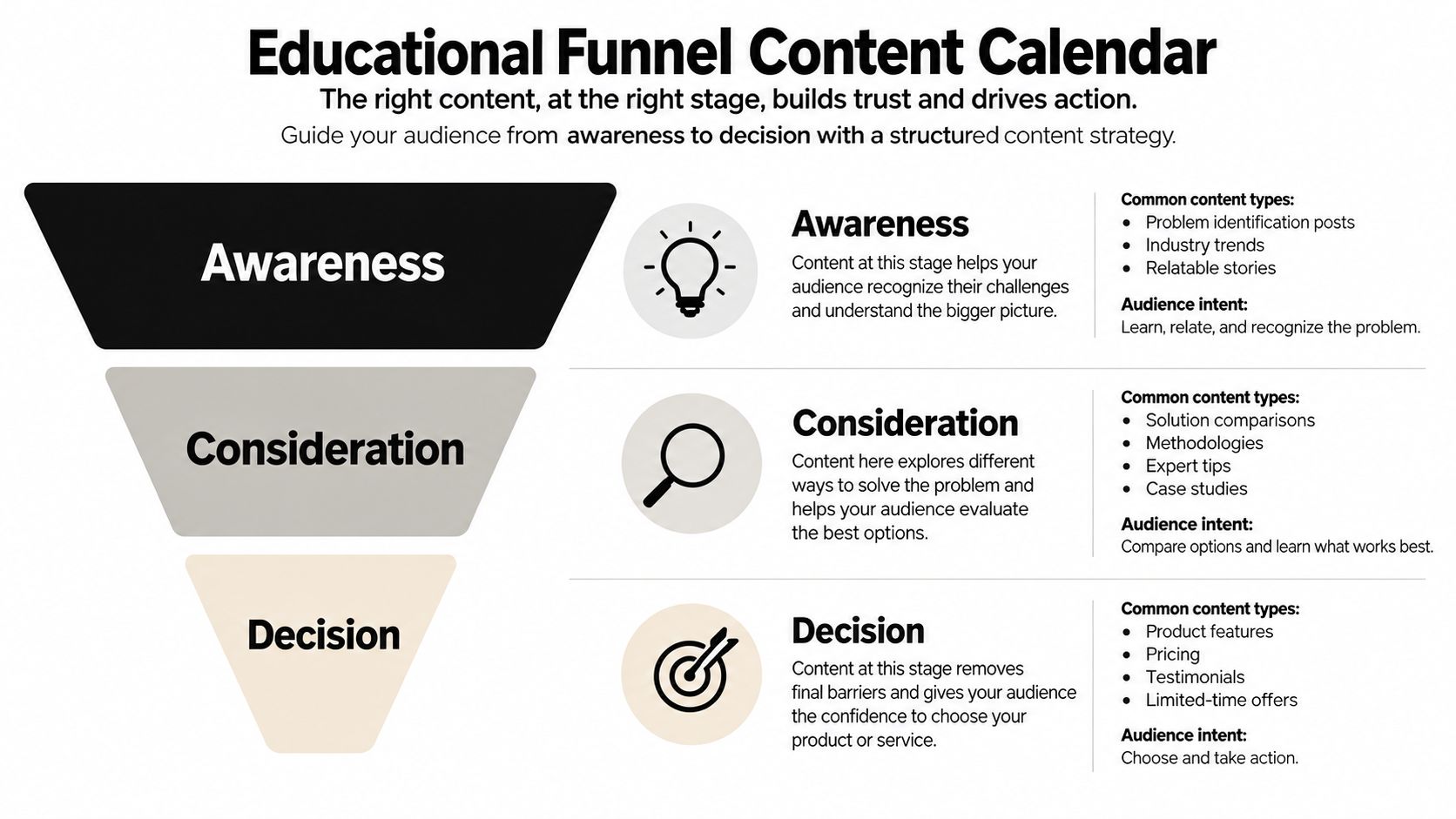
A high-reach video that produces no qualified action is wasted reach. Build the calendar around the decision stage each post serves: awareness names a problem, consideration helps people compare approaches, and decision gives qualified prospects enough evidence to evaluate an offer.
A project-management software company could start with missed-handoff examples, then publish workflow comparisons and implementation guidance, followed by a product walkthrough or consultation invitation. A fitness coach might explain training obstacles, demonstrate a method, then outline coaching structure and who it suits. The sequence creates a path, while each post still needs to stand on its own for people who enter through search, recommendations, or a social feed.
Give every post one job
“Engagement” is too broad to guide production. Set a primary action, such as recognizing a pain point, saving a framework, joining an email list, requesting information, starting a trial, or returning for support.
Record five fields for each planned item:
- Audience stage: Awareness, consideration, decision, retention, or feedback.
- Reader problem: The question or obstacle behind the post.
- Proof requirement: A demonstration, comparison, customer language, process detail, or expert explanation.
- Next step: A related post, landing page, email, product action, or conversation.
- Measurement field: The signal that indicates whether the post did its job.
Adapt the same stage to the channel. A short video can introduce the problem, a carousel can compare options, and an email or landing page can handle detailed objections. Leave protected calendar space for timely posts, since a rigid funnel can make a brand sound mechanical.
Review the handoff between stages. Pin a consideration resource to an awareness post, place a decision link in the profile, or use a follow-up email to continue the lesson. A commercial invitation works better when it answers the audience's next question rather than interrupting useful education.
8. Newsjacking and Real-Time Response Calendar
Trends cannot be scheduled, but your response to them can be. A real-time calendar creates a monitored, pre-approved path so a fitting development can be addressed within hours rather than days. Reserve space for these posts instead of filling every slot with planned campaigns.
A technology company might comment on a major product change, a retailer could answer a seasonal buying question, or a food brand might join a cultural moment when the connection feels natural. The useful response adds an informed perspective, clear explanation, or well-timed humor. Repeating the headline gives the audience little reason to stop.
Prepare the response system before the moment
Connect listening sources to a clear review process. Define escalation rules, approved spokespeople, decision rights, and who checks replies after publication. Adaptable templates such as “what changed,” “what it means,” “three questions to ask,” and “our practical response” reduce production time while preserving room for accurate, topic-specific analysis.
Use this test before assigning a post:
- Audience fit: Does the topic matter to the people you serve?
- Brand fit: Can your organization add credible context?
- Timing: Will the post remain useful if approval takes longer?
- Risk: Could it trivialize harm, confuse customers, or make an unsupported claim?
- Action: What should the audience understand or do next?
A trend that fails the test should not displace evergreen or campaign work. Keep scheduled content moving, and record the decision so the team can apply the same standard later. This protects the calendar from reactive publishing while leaving room for genuine opportunities.
SleekPost's quick-publish workflow can help after approval, but the tool does not replace editorial judgment. Set the approval owner, factual reviewer, and reply monitor in advance. Speed matters only when the message is accurate, appropriate, and ready for the platform where it will appear.
9. Repurposing and Content Recycling Calendar
Good content should not disappear after one publication. A recycling calendar keeps evergreen assets active by matching each return to the current platform, audience, and publishing goal. It also protects production time, provided the team refreshes the substance rather than reposting a date-stamped copy.
Start with an asset library that records the original publication, source file, audience, format, results, refresh date, and next adaptation. A webinar can supply short clips, a practical carousel, an email summary, and a blog article. A strong LinkedIn post may become a deeper article or an X thread, while a product guide can return with new screenshots, clearer examples, and a different call to action.
The reuse decision should consider more than reach. A post with modest visibility may have produced useful inquiries, while a widely viewed video may have created little business value. Review the asset before placing it back on the calendar:
- Facts: Remove outdated claims and update examples.
- Context: Rewrite the opening for the current conversation.
- Format: Rebuild it for the channel, including its dimensions and caption style.
- Action: Reassess the call to action and destination.
- Rights: Confirm that images, quotes, music, and customer content remain usable.
SleekPost's content repurposing strategy can support an asset-library workflow when a team needs to locate an original file and prepare platform-specific versions.
Recycling carries a credibility risk. Audiences notice stale advice presented as new. Add a current observation, example, visual, question, or counterpoint so each version earns its scheduled place. Reserve calendar space for timely content, too, since a full recycling queue can otherwise make the brand sound detached from live conversations.
10. Community Engagement and Conversation Starter Calendar
Followers are not a broadcast list. Reserve calendar slots for polls, prompts, Q&As, caption challenges, debates, and requests for examples, so participation becomes part of publishing rather than an accident.
Match each prompt to the platform and the insight you need. An Instagram Story poll can reveal which feature confuses customers. A LinkedIn post can ask practitioners to choose between two workflow approaches and explain their reasoning. An X thread can invite disagreement around a focused professional question. Keep a protected slot for timely replies when a live discussion creates a better opportunity than the planned post.
Design for replies your team can handle
A prompt needs an operating plan. Assign someone to monitor early comments, answer useful questions, remove harmful contributions, and capture language that could shape future content. If the team lacks moderation capacity, publish fewer prompts or choose formats that do not require rapid responses.
Use native features according to the job:
- Polls: Compare preferences, priorities, or current practices.
- Question stickers: Collect customer language for future education.
- Open prompts: Invite examples, objections, or alternative approaches.
- Duets and remixes: Let participants respond through the platform's native format.
- Follow-up posts: Summarize community contributions and explain what happens next.
Specific questions outperform vague engagement requests. “Do you agree?” gives people little direction. Ask for a choice, a reason, a trade-off, or a concrete experience.
Treat responses as research input. Save recurring questions and objections in a content bank, then apply them to product education, sales enablement, onboarding, and future posts. A conversation calendar should generate useful understanding, not just a larger comment count.
10 Content Calendar Strategies Comparison
| Strategy | 🔄 Implementation complexity | ⚡ Resource requirements | 📊 Expected outcomes (⭐ effectiveness) | 💡 Ideal use cases | ⭐ Key advantages |
|---|---|---|---|---|---|
| Pillar Content + Cluster Strategy | Medium, needs upfront research & editorial calendar | Medium, research, repurposing tools, occasional production | Strong topical authority, improved SEO & cross-platform reach (⭐⭐⭐) | Agencies, SaaS, indie founders | Efficient research reuse; consistent messaging; SEO authority |
| Themed Month Campaigns | Medium, monthly planning and asset coordination | Medium, design assets, campaign hashtags, scheduling | Cohesive narrative & higher engagement during theme window (⭐⭐) | Small businesses, social managers, agencies | Creates momentum; easier briefs; unified cross-platform story |
| 10/4/1 Content Mix Formula | Low, set a simple ratio and workflow | Low, curation tools, light original content | Balanced trust & steady promotion; reduced audience fatigue (⭐⭐) | Personal brands, startups, coaches | Clear posting rules; sustainable consistency; audience-friendly mix |
| Platform-Specific Content Series | High, bespoke formats per channel, recurring schedule | High, format-specific production, platform expertise | Higher engagement & follower retention on each platform (⭐⭐⭐) | Multi-platform creators, influencers, diverse-audience brands | Leverages native features; builds loyal platform audiences |
| Batching & Batch Day Calendar | Medium, requires disciplined planning and sessions | Medium, focused time blocks, templates, scheduling tools | Large time savings and consistent output (⭐⭐⭐) | Solopreneurs, busy professionals, agencies | Saves time; improves quality; ideal for bulk scheduling |
| UGC Spotlight Calendar | Low–Medium, systems for collecting, curating, rights | Low, community outreach, moderation, basic curation | Increased engagement, social proof, lower production costs (⭐⭐⭐) | E‑commerce, community brands, customer-centric startups | Authentic content; cost-efficient; builds community loyalty |
| Educational Funnel Content Calendar | High, audience research and stage mapping required | High, sustained content volume, tracking & analytics | Strong long-term conversion and thought leadership (⭐⭐⭐) | SaaS, consultants, education-driven e‑commerce | Guides buyers through stages; measurable funnel progression |
| Newsjacking & Real-Time Response Calendar | High, continuous monitoring and fast approvals | Medium–High, monitoring tools, rapid creative capacity | Potential for viral reach and relevance but high variance (⭐⭐) | Consumer/lifestyle brands, agencies handling trendy clients | Freshness and timeliness; strong short-term reach potential |
| Repurposing & Content Recycling Calendar | Medium, identify winners and schedule rotations | Low–Medium, analytics, editing for new formats | Maximized ROI per asset; extended content lifecycle (⭐⭐⭐) | Creators, agencies, resource-constrained startups | Extends value of top content; reaches format-diverse audiences |
| Community Engagement & Conversation Starter Calendar | Low–Medium, plan prompts and moderation workflows | Medium, moderation time, timely responses | Higher engagement, richer audience insights, better reach (⭐⭐⭐) | Personal brands, community-driven businesses, engagement-first creators | Builds loyalty; yields audience feedback; low production effort |
Build the Calendar Your Workflow Can Sustain
The best content calendar ideas aren't the most ambitious ones. They're the systems your team can operate when client work increases, a launch changes direction, or the person responsible for publishing has less time than expected. A calendar should reduce decision fatigue, not create another demanding project that collapses after a few weeks.
Start with the operational problem in front of you. If publishing is inconsistent, choose batching and define a repeatable production day. If your team keeps creating one-off posts, choose pillar-and-cluster planning and build several platform adaptations from one source asset. If attention is high but qualified actions are rare, map content to an educational funnel and assign every post a primary job.
Choose a different starting point when participation is the main weakness. A UGC spotlight calendar can bring customer experiences into the publishing system, while a conversation calendar can turn audience questions into both engagement and research. If your brand needs relevance, add a real-time response layer instead of abandoning the planned calendar every time a trend appears.
Practical rule: Use one primary framework to organize the calendar, then add one complementary layer. Don't make every post satisfy every framework.
A sensible combination might be a batch-day calendar as the base, pillar-and-cluster planning for reuse, and protected space for timely content. A service business could use funnel labels inside that same system. A community-led brand might make UGC and prompts part of the weekly production workflow rather than treating them as occasional extras.
Keep each calendar record operational. Include the objective, audience segment, platform, format, hook, source asset, call to action, owner, approval status, publication window, repurposing status, and primary metric. A visual scheduling tool helps here, though a spreadsheet works if the team maintains it consistently. The tool matters less than the clarity of the workflow.
Measurement should connect content to outcomes without pretending that every post has the same purpose. The Content Marketing Institute's 2024 B2B benchmark found that 84% of marketers said content marketing helped create brand awareness, 76% said it helped generate demand or leads, 63% said it helped nurture subscribers, audiences, or leads, and 58% said it helped generate sales or revenue. The same research reported that 46% of B2B marketers agreed their organizations measured content performance effectively, while 84% identified integrating or correlating data across multiple platforms as the leading measurement challenge.
Those findings support a simple discipline. Give each item one primary objective, track the metric closest to that objective, and review groups of related posts rather than judging one post in isolation. Useful fields can include conversions, email engagement, website traffic, website engagement, and social analytics, all of which the benchmark identifies among commonly used measures.
Don't expand the system until the current version is stable. Review what took too long, which formats the team skipped, which posts created useful audience actions, and which planned items no longer deserve space. Then remove low-value work before adding more channels. A workflow for scaling content production is only useful when it protects quality and capacity as output grows.
SleekPost can function as an optional execution layer for this approach. Use it to organize a visual calendar, attach media, tailor copy by platform, queue recurring posts, and manage approved variations from one dashboard. It won't decide which system fits your audience, but it can reduce the manual work between a clear plan and a published post.
SleekPost gives creators, marketers, agencies, and small businesses one dashboard for organizing, customizing, and scheduling platform-specific content across channels. Use its calendar, queues, recurring posts, media library, and AI Content Generator to turn the system you choose into a workable publishing routine, then visit SleekPost to see how it fits your workflow.