A full content calendar can still produce an empty feed. A scheduler may accept the post, a media upload may fail without a useful warning, or one platform may degrade while every other channel continues normally. Reliable posting isn't the act of filling a queue. It's the ability to publish predictably, detect failure, recover safely, and keep one broken delivery path from stopping the rest of the operation.
That distinction matters more as teams publish different formats across several networks. A text post, a carousel, a Reel, and a long video don't share the same delivery risks. The workflow that handles them should behave less like a calendar and more like a production service, with clear ownership, verification, retries, and fallbacks.
Table of Contents
- Why Scheduling Alone Does Not Guarantee Reliable Posting
- Planning a Predictable Cadence and Timing Strategy
- Configuring Queues and Platform-Specific Media Settings
- Measuring Publishing Reliability and Success Rates
- Handling Errors and Platform Outages Without Double-Posting
- Sample Schedules for Creators and Agencies
Why Scheduling Alone Does Not Guarantee Reliable Posting
A scheduled timestamp proves only that someone asked a system to publish. It doesn't prove that the platform accepted the request, processed the media, created the post, or made the result visible to the audience. That gap between queued and live is where many social publishing failures occur.
Partial outages are especially difficult. A platform may load normally while rejecting media uploads, returning delayed API responses, or failing only for a specific account type. A scheduler can show a green status even though the intended Reel never appeared. If the team assumes success and moves on, the campaign develops a silent gap. If the team retries blindly, it may create a duplicate.
Recent benchmarking illustrates why tool selection alone doesn't settle the question. One 2026 comparison reported scheduling reliability ranging from 94% to 99.8% in testing, reinforcing that posting glitches and partial service failures can matter more operationally than a complete blackout. See the publishing tool reliability comparison for the underlying discussion.
Reliability means containment
A resilient workflow doesn't promise that every platform will remain healthy. It limits the damage when one isn't. A failed TikTok upload shouldn't hold a LinkedIn text post in the same campaign, and a temporary Meta issue shouldn't erase the audit trail for content that successfully published elsewhere.
Operational rule: Treat every scheduled post as a stateful job, not a calendar decoration.
That means each item needs a lifecycle such as draft, approved, ready, publishing, published, failed, awaiting verification, or paused. The state should survive a worker restart and remain understandable to the person responsible for recovery.
The silent failure problem
Visible errors are inconvenient. Silent errors are expensive because they distort reporting and delay intervention. A post may be marked complete when the media processing step failed, or the platform may return a response that doesn't confirm the post is publicly available.
A reliable system therefore checks the outcome after the request. It records the platform post URL when available, compares the result with the intended format, and alerts a human when confirmation is missing. The strongest design isn't the one that never encounters a failure. It's the one that keeps a local issue from becoming a campaign-wide collapse.
Planning a Predictable Cadence and Timing Strategy
Reliable posting starts with a cadence the team can sustain. High-frequency manual publishing often looks productive, but it creates a fragile dependency on someone's availability, attention, and memory. HubSpot reported in 2025 that 19.7% of marketers posted multiple times per day, while 64% posted less than daily, a pattern that supports scheduled workflows rather than constant manual intervention. The same source identifies Tuesday through Thursday between 8 a.m. and 1 p.m. as a safe broad window, while timing should still be refined with account-level data in this guide to the best time to post on social media.
Start with a weekly baseline, then create enough variety inside it to avoid making the feed predictable in the wrong way. Separate educational posts, product or promotional updates, community prompts, customer-facing answers, and evergreen material. A queue built from these buckets gives the team options when a video isn't ready, an approval is late, or a planned campaign needs to pause.
Build a buffer, not a backlog
A buffer should contain approved content that can publish without another round of production. It isn't a pile of unfinished drafts. For each platform, maintain a mix of:
- Core posts: Planned content tied to launches, campaigns, or editorial themes.
- Flexible posts: Useful updates that can move to another day without losing relevance.
- Evergreen posts: Durable advice, product context, or recurring education that can be reposted when appropriate.
- Fallback posts: Text-first or image-based alternatives for campaigns dependent on a fragile media format.
Distribute effort across the week. If every planned item depends on a high-production video, one editing delay can create a publishing hole. Pair demanding media with lighter text updates, questions, links, or community content so the queue can continue without lowering standards.
Use timing as a reliability control
Timing isn't only an engagement variable. It also affects operational coverage. Publishing important content during a window when someone can inspect failures gives the team a better chance to catch a rejected upload, refresh an expired connection, or pause a queue before a duplicate appears.
Start with the broad Tuesday-to-Thursday window from the cited timing research, then compare it with your own audience response and team availability. Don't treat a generic peak period as a command to publish everything at once. Spread posts across the window so a delayed media job doesn't create a cluster of simultaneous recovery tasks.
A dependable cadence is therefore a compromise between audience activity, production capacity, and failure response. The right schedule is one your team can maintain, verify, and repair.
Configuring Queues and Platform-Specific Media Settings
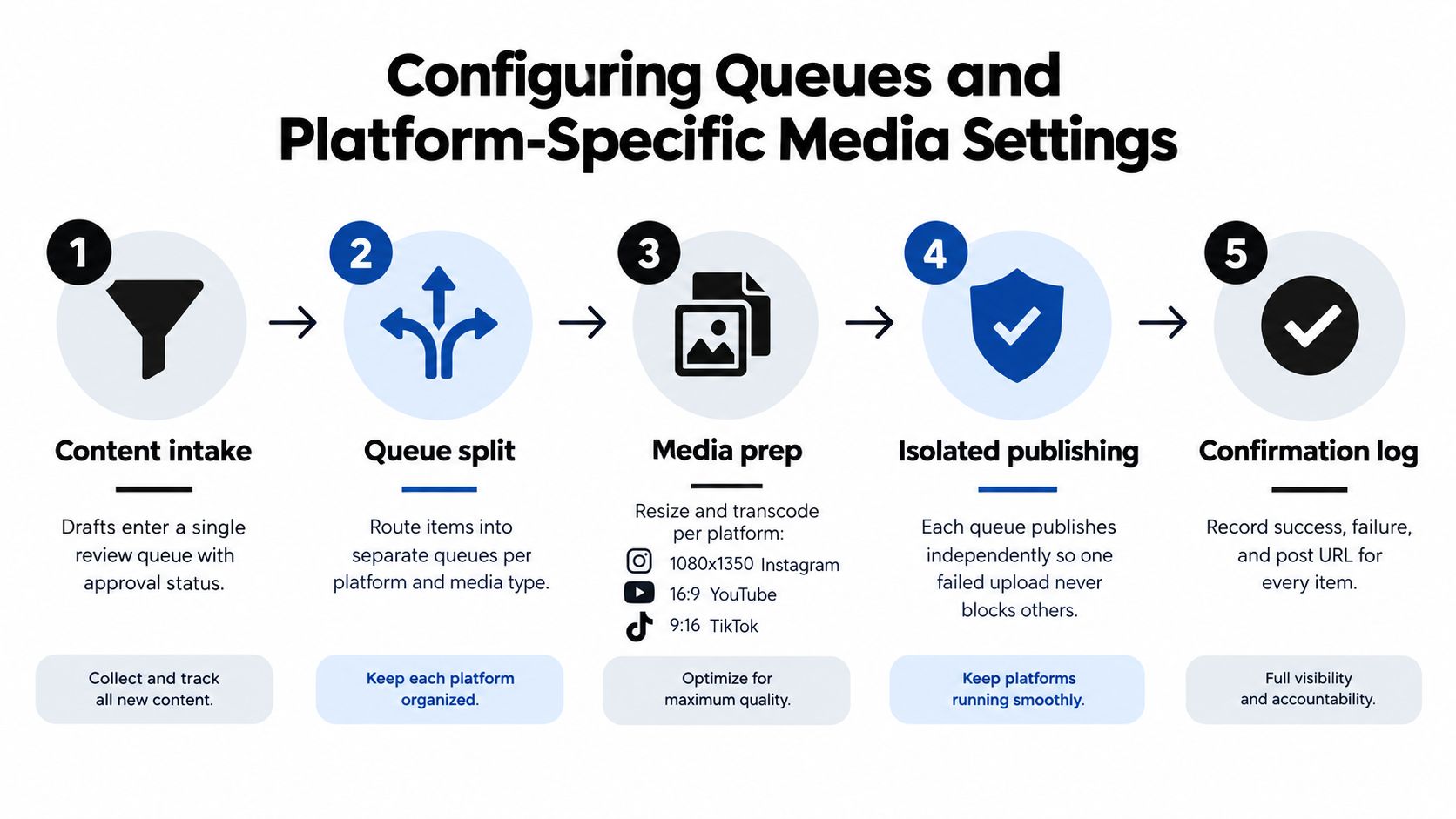
The safest queue architecture separates work by platform and media type. A failed Instagram Reel should enter a recovery path without blocking a LinkedIn text update, and a video processing delay shouldn't stop an approved image post from moving forward.
Begin with one intake queue for drafts and approvals. Once an item is approved, create platform-specific delivery jobs rather than one universal publishing task. Each job should hold its own copy, media reference, destination account, scheduled time, and status. That structure lets you adjust a caption for X, shorten a LinkedIn version, or replace a format that a particular network can't accept.
Use a central media library, but don't assume one asset is suitable everywhere. Store the original file alongside platform-ready variants, and label each variant clearly. A format-specific fallback might retain the message as text with a still image when a video upload fails. It should not publish the wrong asset unnoticed or retry a rejected file forever.
Configure the queue logic
Set a clear order of operations:
- Approve the content: Confirm copy, destination, media, and campaign status before the item enters a publishing queue.
- Split the delivery jobs: Create independent jobs for each platform and media type.
- Validate the asset: Check that the file is present, readable, and appropriate for the target format before the scheduled time.
- Publish independently: Let each platform report its own result instead of treating the campaign as one all-or-nothing transaction.
- Verify the outcome: Save the resulting post URL or move the job to a human review state when confirmation is incomplete.
For recoverable technical failures, one guide describes three total attempts, with retries spaced about three minutes apart as backoff doubles. Byte uploads can retry sooner when resuming is safe, but a complete publish request needs more caution because the first attempt may have succeeded even if the response was lost. The queue management system guidance is useful when translating these rules into a practical operating setup.
Make fallbacks explicit
A fallback should be prepared before the outage. Define what happens when a Reel fails, when a carousel contains an unsupported element, or when a video remains stuck in processing. The fallback may be a text-only post, a still-image version, a shortened clip, or a manually reviewed hold.
Don't automatically strip media from every failure. A rejected file may indicate a permission issue, an expired token, or an account-level restriction, and removing the asset could hide the underlying problem. Route known format errors to the appropriate alternative, while escalating authentication and permission errors for human action.
Measuring Publishing Reliability and Success Rates
A polished content calendar can hide a failing delivery system. Engagement metrics may show weaker creative, yet they cannot reveal missing posts, late publication, incorrect media, or a queue that stopped after an unhandled error.
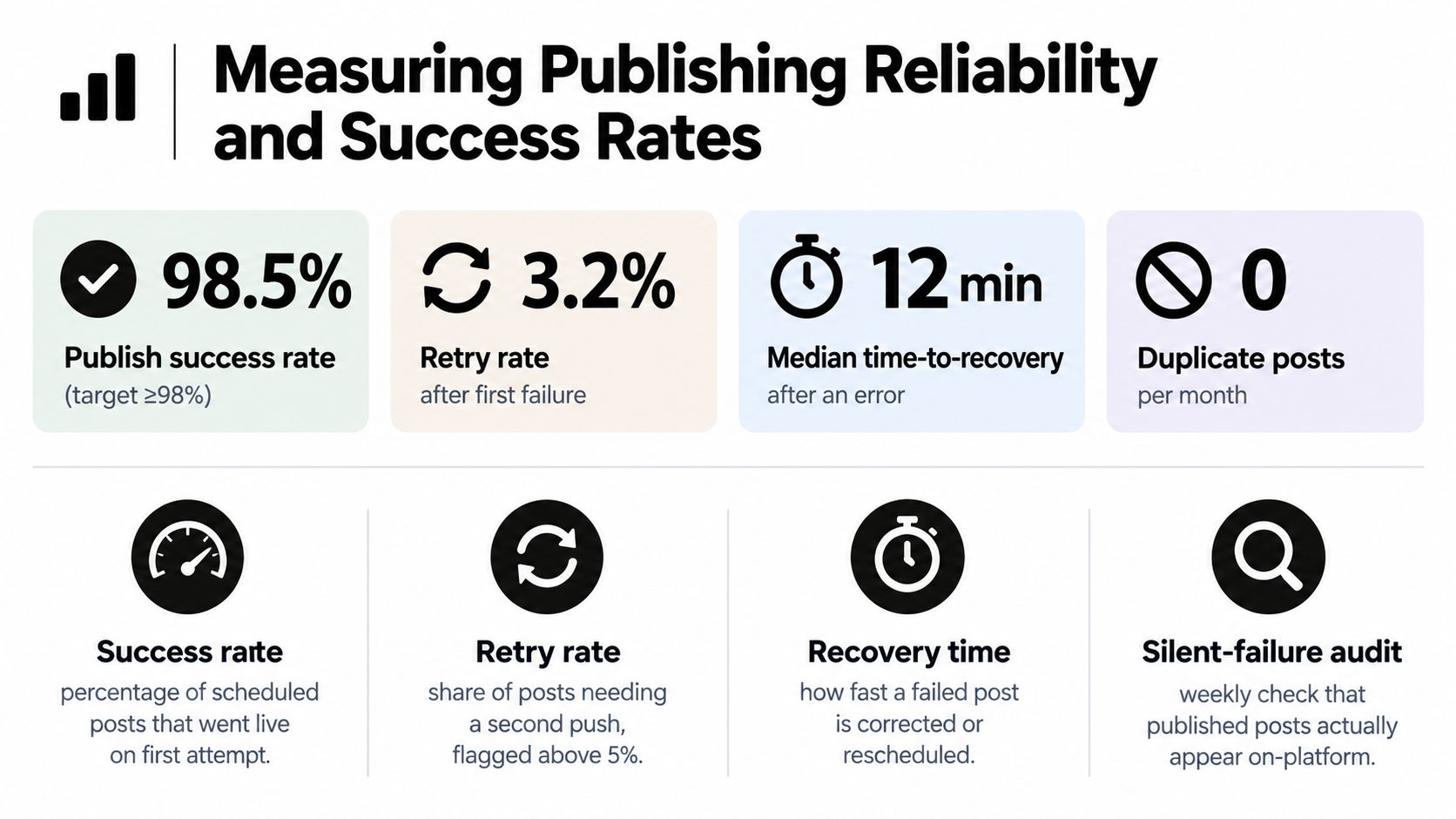
Treat publishing as a production service with service-level objectives, or SLOs. Track measures that describe whether the approved content reached the right account correctly:
- Publish success rate: The share of scheduled jobs reaching a confirmed live state.
- Time-to-published: The interval between the planned publishing point and verified publication.
- Duplicate rate: The share of jobs creating more than one public post.
- Integrity pass rate: Whether the live result contains the approved copy, media, destination, and link.
- Recovery time: How quickly a failed job is corrected, rescheduled, or deliberately cancelled.
A practical framework proposes weekly targets of 99.5% success within 90 seconds, under 0.5% duplicates, and a 99.9% integrity pass rate, as described in the guidance on fail-safe publishing SLOs. Treat these as operating targets, not universal guarantees. Adjust them to each platform, the risk of a missed post, and the team's ability to verify outcomes.
Separate delivery health from content performance
Use separate dashboards, or clearly separated views, for delivery and audience response. The first should answer, “Did the system publish the approved item correctly?” The second should answer, “Did the audience respond to it?”
This separation keeps a creative review from hiding an infrastructure problem. A lower success rate on one account points toward credentials, page roles, media processing, or platform restrictions. Stable delivery with changing engagement points toward content strategy.
Audit the result, not only the request
An API acknowledgment does not prove publication. Verify the live platform when possible, save the resulting URL, and compare the published payload with the approved version. A weekly audit can sample successful jobs for missing media, incorrect destinations, altered links, or posts present in the scheduler but absent from the network.
Measurement principle: A post succeeds when the intended audience can find the correct published result, not merely when the API returns an answer.
Use alerts for stuck jobs, repeated errors, missing confirmations, and unusual duplicate activity. The reporting view, built using reporting best practices, should help a manager decide whether to retry, replace the media, refresh authentication, pause a queue, or contact the platform.
Handling Errors and Platform Outages Without Double-Posting
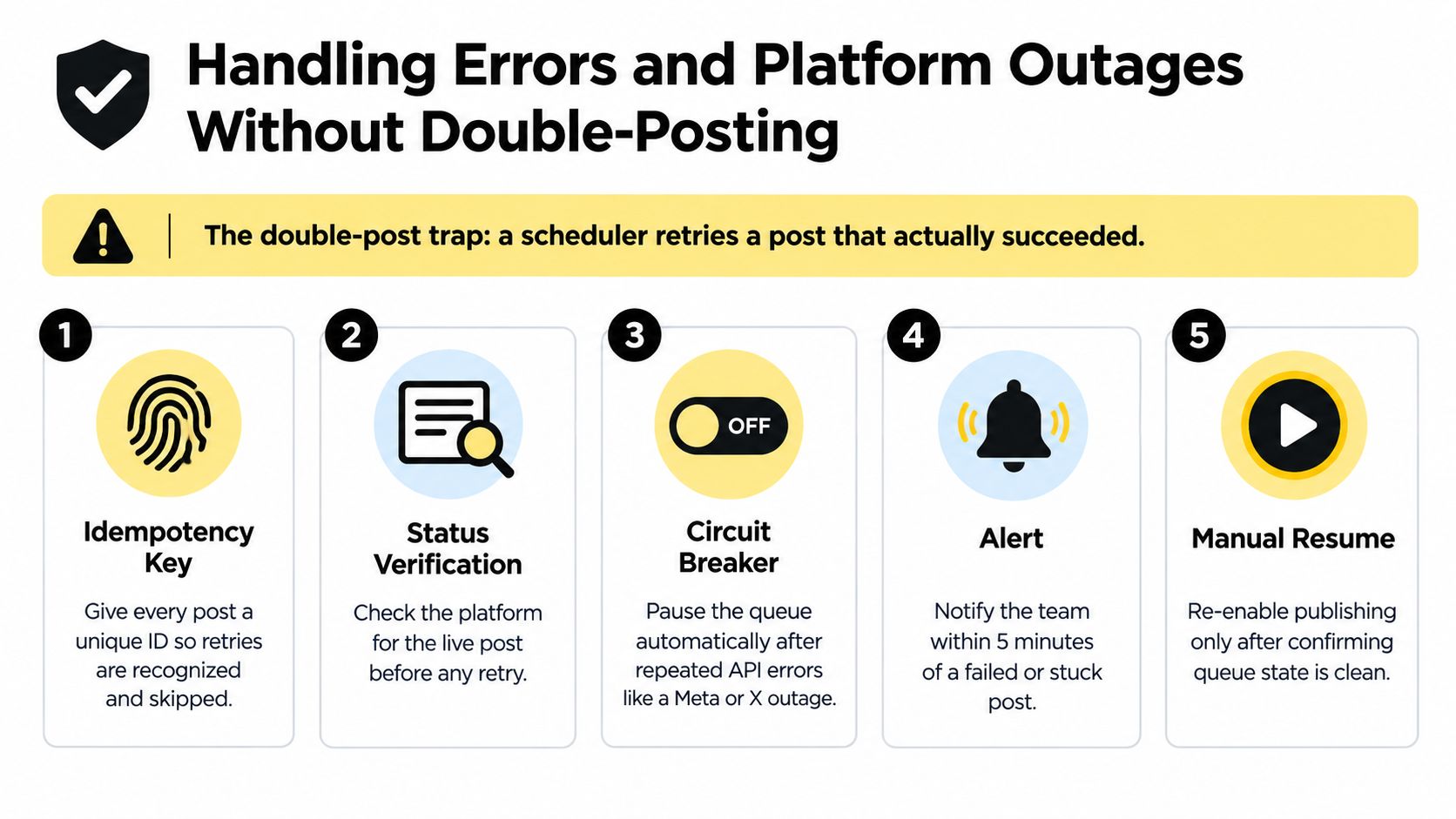
The most dangerous recovery mistake is treating uncertainty as failure. A request can time out after the platform has already created the post. Retrying immediately may produce two identical updates, while waiting without verification may leave the campaign incomplete.
When a post fails, record the exact state before taking action. Capture the platform, account, media type, error response, attempt history, and last known request identifier. Then classify the issue as a transient network problem, a media rejection, an authentication failure, a permission problem, or an uncertain outcome.
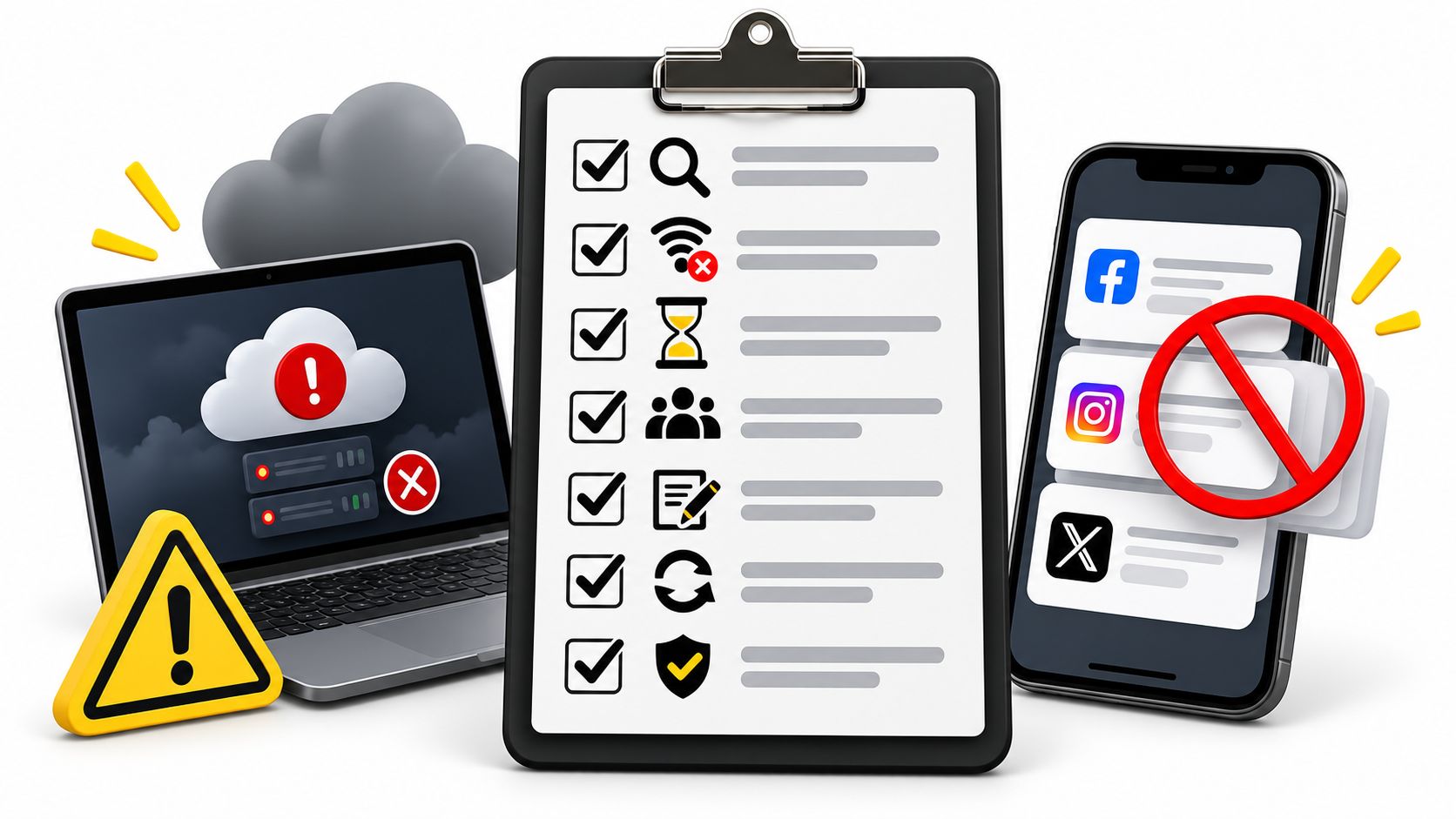
Follow a cautious triage sequence
- Check for a live post first. Search the target account and inspect the platform before retrying an uncertain request.
- Confirm the media state. Determine whether the file uploaded, whether processing finished, and whether the platform rejected its format.
- Inspect credentials and roles. Refresh an expired token or repair a missing page role when the error points to authorization.
- Apply controlled backoff. Use staged retries for recoverable faults, and stop when the response indicates a permanent failure.
- Pause during broad degradation. If multiple jobs fail on the same platform, stop adding pressure and preserve the queue state.
- Resume only after verification. Re-enable publishing when you know which jobs succeeded, which failed, and which require a fallback.
Idempotency is essential. Give each publishing job a unique identifier and retain it through retries so the system can recognize the same intent. If the platform doesn't provide a reliable idempotency mechanism, your own status store should prevent a second attempt until verification has ruled out a successful first attempt.
Design alerts for people, not just logs
A log entry buried in an integration dashboard won't protect a campaign. Queue-level alerts should identify the affected account, platform, format, scheduled time, and recommended next action. Human intervention is especially important for terminal failures, since the cited multi-platform guide reports that about 7% of failed publishes are terminal, while recoverable failures have a median time to success of around three minutes. Review the smart scheduling tips for entrepreneurs for broader guidance on preventing automated scheduling conflicts.
The same discipline applies when you automate Twitter posts. Keep the queue auditable, avoid manual re-entry during an incident, and distinguish a confirmed failure from an ambiguous response. A clean pause is safer than a frantic retry storm.
Sample Schedules for Creators and Agencies
A solo creator publishing short-form video can separate the week into a video queue, a text queue, and an evergreen queue. Video jobs should receive format checks before scheduling, while text posts provide continuity when editing or upload processing slips. Evergreen items can fill an approved gap, but they should remain clearly labelled so the creator can pause them during a launch or sensitive news cycle.
A small business can use a balanced weekly pattern: educational content early in the week, a community prompt around the audience's active window, a product-focused post when the team is available to answer questions, and a flexible evergreen item held as cover. Each platform gets its own copy and media version, rather than a single caption pushed everywhere.
An agency needs another layer. Each client should have separate approval states, account credentials, media libraries, and incident alerts. The agency can maintain shared operating rules while keeping publishing jobs isolated, so one client's token issue never pauses another client's queue. Teams evaluating software should compare social media management tools by recovery behavior, verification, permissions, and format support, not just calendar appearance.
For adaptable templates, use this social media planner example as a starting point, then add fallback assets, approval checkpoints, and post-publication checks. The schedule is only dependable when someone can explain what happens after the first error.
SleekPost helps creators, marketers, and small teams schedule and publish customized content across 10+ social platforms, with queues, recurring posts, platform-specific copy and media, and a shared media library. Visit SleekPost to build a publishing workflow that keeps routine content moving while giving your team clearer control over failures and recovery.